Ever wanted your tunes to sound less like a stock sample pack and more like an outback rave gone wild? Pick Yourself’s latest vid is a ripper—showing off an LFO trick that wrestles pure noise into percussive madness. We’re talking dynamic hats, snare-ish claps, and pads grittier than a dust storm at Rainbow Serpent. If you’re sick of cookie-cutter loops, this crafty technique is your ticket to proper character in your drums. Buckle up, because this is one ride where the only preset is chaos and every sound gets a chance to run wild. Ready for a taste? Let’s dive in—just don’t spill your beer on the laptop!
13. June 2026
TAS
Pick Yourself’s LFO Trick: Turning Noise Into Drum Gold (No Wombats Harmed)
LFOs Gone Wild: From Chaos to Kick-ons
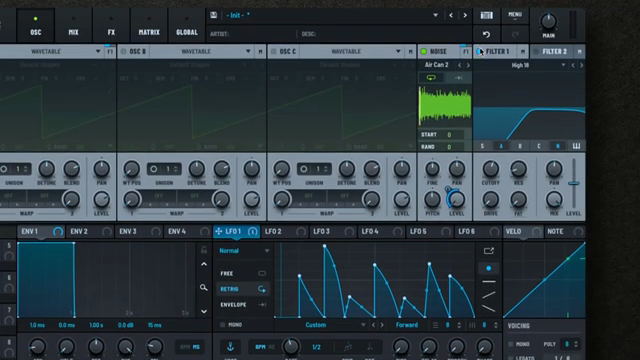
Pick Yourself kicks things off with a bang, making it clear that bland loops and stock presets are for mugs. Instead, the focus is on carving out your own sound using a nifty LFO technique that’s helped plenty of producers break free from the herd. The heart of the trick? Sequencing a noise oscillator with LFOs to spark up all sorts of percussive mayhem.
By setting up a half-bar loop and mapping LFOs to the level, you get a sharp, spiky pattern—each sixteenth note hitting like a possum on a trampoline. Even at this early stage, there’s the bones of a unique rhythm, but it’s not quite percussive yet. That’s where the real fun begins, as the video dives into tweaking those LFO shapes for maximum groove. If you want to see this chaos unfold in real time, it’s worth a squiz at the video—watching those LFO curves dance is half the fun.

"Once you learn how to create your own unique percussions and evolving textures, your tracks will finally start to sound like you."
© Screenshot/Quote: Pickyourselfofficial (YouTube)
Crafting Percussive Textures: Boring Loops, Be Gone!
"with the changes that we added into this LFO window down here, we create a lot of groove."
© Screenshot/Quote: Pickyourselfofficial (YouTube)
With the LFO now wrangled, Pick Yourself shows how to shave off the low end and tweak the noise oscillator to zero in on those classic hat-like frequencies. It’s a simple move, but it’ll have your tracks sounding less like a sausage sizzle and more like a custom BBQ feast. The beauty is in the details—tiny changes to the envelope and attack let you swing each hit for heaps of character.
Flicking the LFO window, you can manipulate every note’s behaviour, turning basic rhythms into groovy, evolving patterns. There’s even a free riser effect thrown in for good measure, just by opening up the noise oscillator. It’s the sort of creative mischief that can only really be appreciated in motion—so if you’re keen to hear the difference, crank the volume and let the hats rip in the original vid.
Hi-Hats, Claps & Everything In Between
Things get spicier as the technique shifts from hats to snare-ish and clap-like sounds. By bringing back a bit of low-end and adding a resonant EQ bump, you get sounds that flirt with both the sharpness of a hi-hat and the body of a clap. It’s not about perfect 909 emulation—it’s about making something all your own, warts and all.
Pick Yourself loads up a 909 clap sample for analysis, then rebuilds its key features—multiple transients and a ringing tail—inside Serum 2 using the same LFO-driven approach. The result? A weird, noisy, modulated clap that’s way more expressive than your average factory preset. Compression and saturation bring extra grit, making sure your percs can handle even the wildest outdoor party. It’s a reminder that with a bit of tweakery, you can straddle the line between hats, claps, and snares without ever sounding generic.
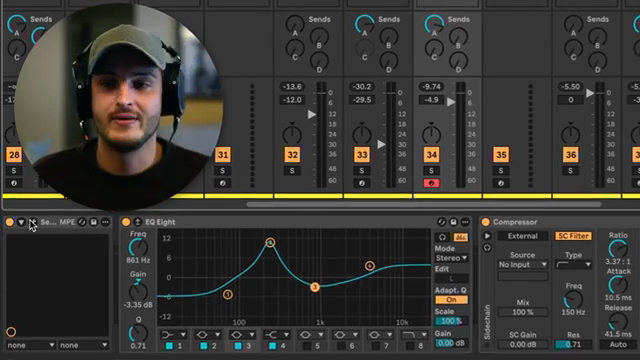
"we can change the character of the clap throughout the track, which I think is a very expressive and cool technique."
© Screenshot/Quote: Pickyourselfofficial (YouTube)
Audio Rate Mayhem: Pads With Bite
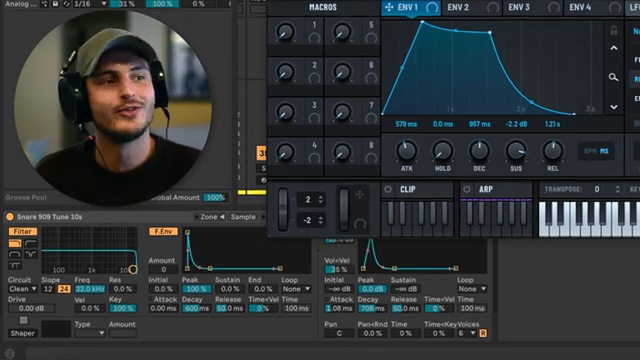
"It creates this nice, warm, distorted, really dusty, really nostalgic sounds."
© Screenshot/Quote: Pickyourselfofficial (YouTube)
Ready for a curveball? Pick Yourself throws noise into pads using audio rate modulation, creating atmospheres as tense as a dingo in a thunderstorm. By routing a noise oscillator to modulate a filter cutoff at audio rates, you get pads that are warm, dusty, and just a bit unstable—perfect for when you want your track’s background to feel like it’s breathing (or panicking).
The trick works with any oscillator, but noise gives it that special edge. The resulting sound isn’t just noise layered on top; it’s woven right into the pad’s DNA, making for a more organic, expressive result. Watching the filter mix in action is a treat—sometimes it’s clean, sometimes it’s crunchy as burnt snags at a bush BBQ. For the full whack of nostalgia and grit, the video’s audio examples are a must-hear.
Clean vs Distorted: The Art of Sonic Contrast
Bringing it home, Pick Yourself highlights the magic of contrast—balancing clean, ambient pads against gnarly, noise-soaked textures. By playing with the filter mix, you can dial in as much or as little dirt as you need, giving your music an expressive arc that’ll keep punters guessing all night.
This isn’t just about making things sound rough for the sake of it; it’s about telling a story with your sound palette. Sometimes, a track needs the clarity of a blue-sky morning; other times, you want the dust and chaos of a Melbourne laneway after a wild weekend. That push and pull between textures is where the real artistry lives. And if you want to cop the techniques in action—not just read about them—Pick Yourself’s video is the ticket. Just make sure your speakers can handle a bit of sonic dirt!
This article is also available in German. Read it here: https://synthmagazin.at/pick-yourselfs-lfo-trick-wie-aus-noise-drum-gold-wird-keine-wombats-zu-schaden-gekommen/
More articles about these products:
 Voltage Labs x Benjamin Damage: Berlin Studio Weapons Unleashed
 Rapid Flow’s Step Sequencer Survival Kit: omniGRID 1.1 from Blank Slate to Bass Face
 Underdog Electronic Music School: When One Pulse is Enough to Break Your Brain
 Starsky Carr’s Serum 2 Vintage Synth Throwdown: Jupiter, Prophet, and Pure Mayhem
 Markers That Splash: Underdog Electronic Music School’s Guide to Kickstarting Your Phrases
 Kairos as Living Sculpture: MusicRadar Tech Enters Laura Misch’s Sonic Sanctuary
 Voltage Labs: Berlin’s Sonic Mosaic – Studios, Shadows and the Pulse of Creation
 Architecting Performances: Novation Launch Control and Ableton Live Macro Workflows
 A Studio of Sonic Memory: synth4ever Journeys through Devin Belanger’s Ambient Sanctuary
 Nebula Machines: Bahadırhan Koçer and the Sonic Physics of Dub Techno
 Pick Yourself’s Hypnotic Bass Hack: Rumble Kicks Are Out, Sliding Grooves Are In
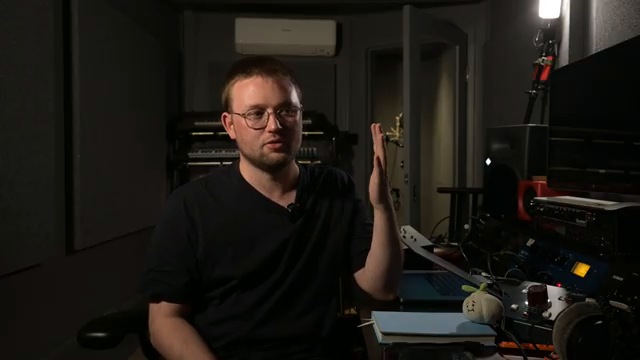 Mad Moments & Club Tactics: Tom VR Gets Real with MusicRadar Tech
Watch on YouTube:
Latest articles
Watch on YouTube:
Visit the channel:
https://www.youtube.com/pickyourselfofficial
https://www.youtube.com/pickyourselfofficial
Links from pickyourselfofficial:
Work with me: https://pickyourself.com/coaching/
FREE Guide: https://pickyourself.com/framework/
Sponsored links:
If you purchase via these links, we may earn a small commission – at no extra cost to you. The link opens an Amazon keyword search, and results may vary depending on availability.
Ableton Live
🔗 Check price on Amazon
🔗 Check price on Amazon
Serum 2
🔗 Check price on Amazon
🔗 Check price on Amazon