Ever feel like your beats are as flat as a schooner left out in the sun? TAETRO’s latest romp through Ableton Live is here to slap some life into your sets, mate! In this cheeky, hands-on guide, he wrangles Beat Repeat, filters, and a Synido controller into a performance FX rack that’s as wild and customisable as an outback ute. Whether you’re after stutters, filters, or transitions that’ll make your crowd spill their drinks, TAETRO’s got you covered. Grab your MIDI controller, crack a tinnie, and get ready for a no-nonsense push into live FX that’ll have your tracks flipping like a kangaroo on a Red Bull bender.
27. May 2026
TAS
TAETRO’s Ableton FX Racks: Add Some Aussie Mayhem to Your Beats
Performance FX: The Secret Sauce for Live Sets
If you reckon a good beat is all about the kicks and snares, think again. TAETRO kicks off pointing out that the usual suspects—drums and melodies—are just the foundation. What gives a live set its muscle is that extra layer of improvisation, driven by performance effects. These FX let you spice things up on the fly, turning predictable loops into head-turning moments that’ll get the crowd grinning.
Performance FX aren’t just for show-offs or gear snobs either. They’re the glue and mischief all-in-one, the sort of thing that can rescue a flat dancefloor or send your breakdowns into orbit. As TAETRO puts it, building your own FX rack in Ableton isn’t rocket science, but it can make your sessions feel like you’ve strapped a turbo to your tracks. And let’s be real—who doesn’t want that kind of firepower at their fingertips?

"Another layer on top of that is this improvisation layer that has to do with performance effects."
© Screenshot/Quote: Taetro (YouTube)
Stutters & Filters: Unleashing Ableton’s Beat Repeat
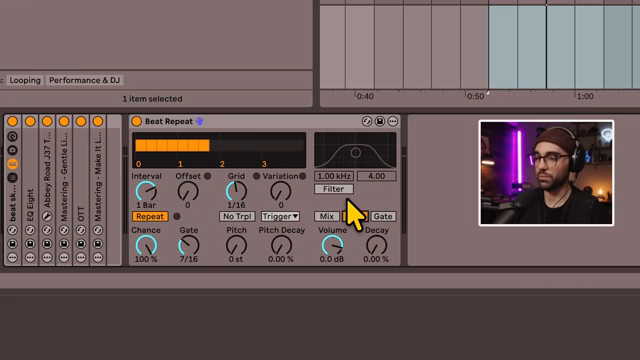
"So it completely takes over the sound."
© Screenshot/Quote: Taetro (YouTube)
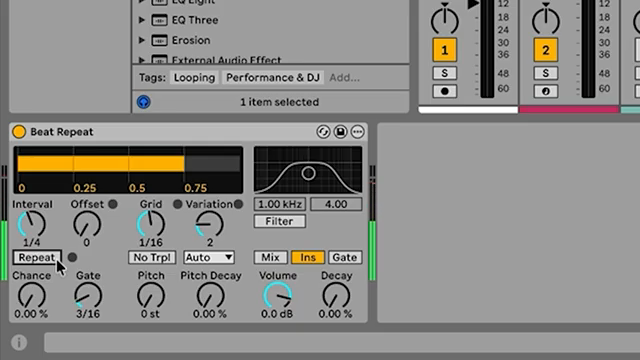
TAETRO dives straight into the deep end with Beat Repeat, Ableton’s answer to glitchy, head-spinning stutters. He doesn’t muck about—shows you how to slap Beat Repeat on your track, flip it into repeat mode, and tweak it from a mild hiccup to a full-blown stutter fit. The trick? Ditch the mix mode and go for insert, so your repeats take over and leave the original signal in the dust.
But wait, there’s more: dial in pitch and volume decay for extra wobble, and play with the grid size to go from slow shuffles to manic micro-edits. Chuck in some filters and you’re suddenly lobbing sound grenades with every button press. The best bit? You can stack multiple Beat Repeats with different settings, so there’s always a fresh stutter trick up your sleeve—like a magician at a bush doof.
Hands-On Mayhem: MIDI Mapping for Live Control
You haven’t lived until you’ve mapped every knob and button on your MIDI controller to a wild FX rack. TAETRO walks through grouping your effects, opening up macros, and mapping Beat Repeat on/off switches so you can trigger stutters at will. Naming your macros and keeping things tidy isn’t just for neat freaks—it’s for not losing your mind mid-set.
Then it’s all about getting physical. TAETRO shows how to map macros to the Synido TempoPAD C16 and explains the beauty of momentary versus toggle modes—momentary for quick stutter blasts, toggle for leaving an effect on until you say otherwise. The wireless MIDI controllers make setup breezy, and if you’re a keyboard fan, the Synido TempoKEY W25 gets a nod as well. This section is pure hands-on wizardry, and honestly, you’ll have to watch TAETRO’s fingers fly to truly appreciate the mayhem.
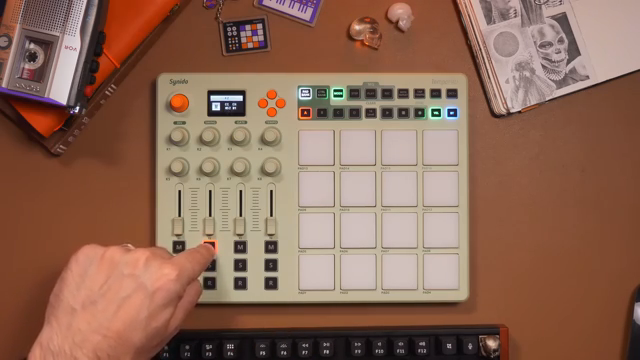
"When the button stays lit, when I release it, that's called toggle mode."
© Screenshot/Quote: Taetro (YouTube)
Layering FX: From Simple Tricks to Transition Magic
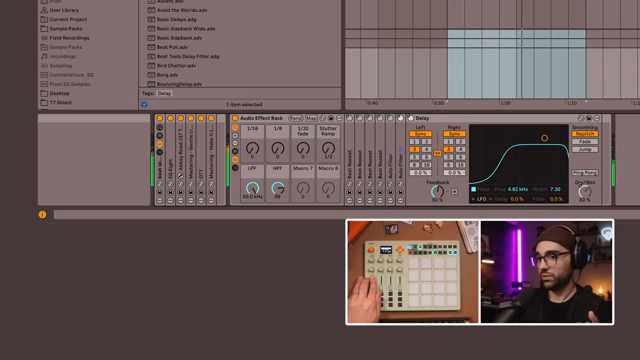
"we get this kind of delay sound, which while we're here, let's actually dial in this delay."
© Screenshot/Quote: Taetro (YouTube)
Now for the real chaos—layering effects for transitions that hit harder than an unexpected magpie swoop. TAETRO builds a ‘stutter ramp’ by mapping both the on/off and grid size of Beat Repeat to a single macro, letting you sweep stutter speed live. Then he piles on auto filters—low pass and high pass—each mapped neatly so they only kick in when you want them, not a second sooner.
But here’s where things get spicy: he chains up a delay to the high pass, so as you sweep the filter, a washy echo blooms behind your sound, perfect for dramatic build-ups or breakdowns. The creative possibilities are wild—combine, layer, map, and twist FX any way you like. It’s the sort of sound design that’ll have your mates asking how you pulled it off. And let’s be honest, you’ll want to see the video to catch all the sneaky Ableton mapping moves.
Save, Organise, and Take Your FX Rack Anywhere
No point building a Frankenstein FX rack if you lose it after a hard night, right? TAETRO makes sure you save your rack to Ableton’s user library, so it’s ready to drop into any project—on your drums, synths, or wherever you need some extra sizzle. He demos slapping the rack onto individual tracks and mapping controls by layer, which means you can run FX on drums while keeping your synths clean, or vice versa.
It’s all about staying organised: name your macros, colour code your controls, and keep those macros at zero before saving so you don’t start a new set with your stutter blaring. TAETRO even chucks the rack up on Gumroad for free, so you can poke around yourself. But the real gold is watching him wrangle everything live—seeing how quick, flexible, and fun this setup can be is something words can’t quite capture. Grab the rack, watch the demo, and let the FX chaos begin.
This article is also available in German. Read it here: https://synthmagazin.at/taetros-ableton-fx-racks-bring-australisches-chaos-in-deine-beats/
More articles about these products:
 Markers That Splash: Underdog Electronic Music School’s Guide to Kickstarting Your Phrases
 Kairos as Living Sculpture: MusicRadar Tech Enters Laura Misch’s Sonic Sanctuary
 Voltage Labs: Berlin’s Sonic Mosaic – Studios, Shadows and the Pulse of Creation
 Architecting Performances: Novation Launch Control and Ableton Live Macro Workflows
 Nebula Machines: Bahadırhan Koçer and the Sonic Physics of Dub Techno
 TAETRO’s Bluetooth MIDI Hack: Free App, Zero Headache
 Pick Yourself’s Hypnotic Bass Hack: Rumble Kicks Are Out, Sliding Grooves Are In
 Mad Moments & Club Tactics: Tom VR Gets Real with MusicRadar Tech
 Bonedo Synthesizers: How to Make Any Synth Scream Acid Like a 303
 LNA Does Audio Stuff: Making Beats on the Cheap with Ableton Note—Beach Edition
 Andrew Huang’s Remix Rodeo: Four Producers, One Song, Total Mayhem
 MusicRadar Tech Unleash Ableton Beat Repeat: From Lazy Slicer to Glitch Mayhem
Watch on YouTube:
Latest articles
Watch on YouTube:
Visit the channel:
https://www.youtube.com/Taetro
https://www.youtube.com/Taetro
Links from Taetro:
Instagram: https://instagram.com/taetro
Facebook: https://facebook.com/taetromusic
Bandcamp: https://taetro.bandcamp.com
Sponsored links:
If you purchase via these links, we may earn a small commission – at no extra cost to you. The link opens an Amazon keyword search, and results may vary depending on availability.
Ableton Live
🔗 Check price on Amazon
🔗 Check price on Amazon
Synido TempoKey W25
🔗 Check price on Amazon
🔗 Check price on Amazon
Synido TempoPAD C16
🔗 Check price on Amazon
🔗 Check price on Amazon