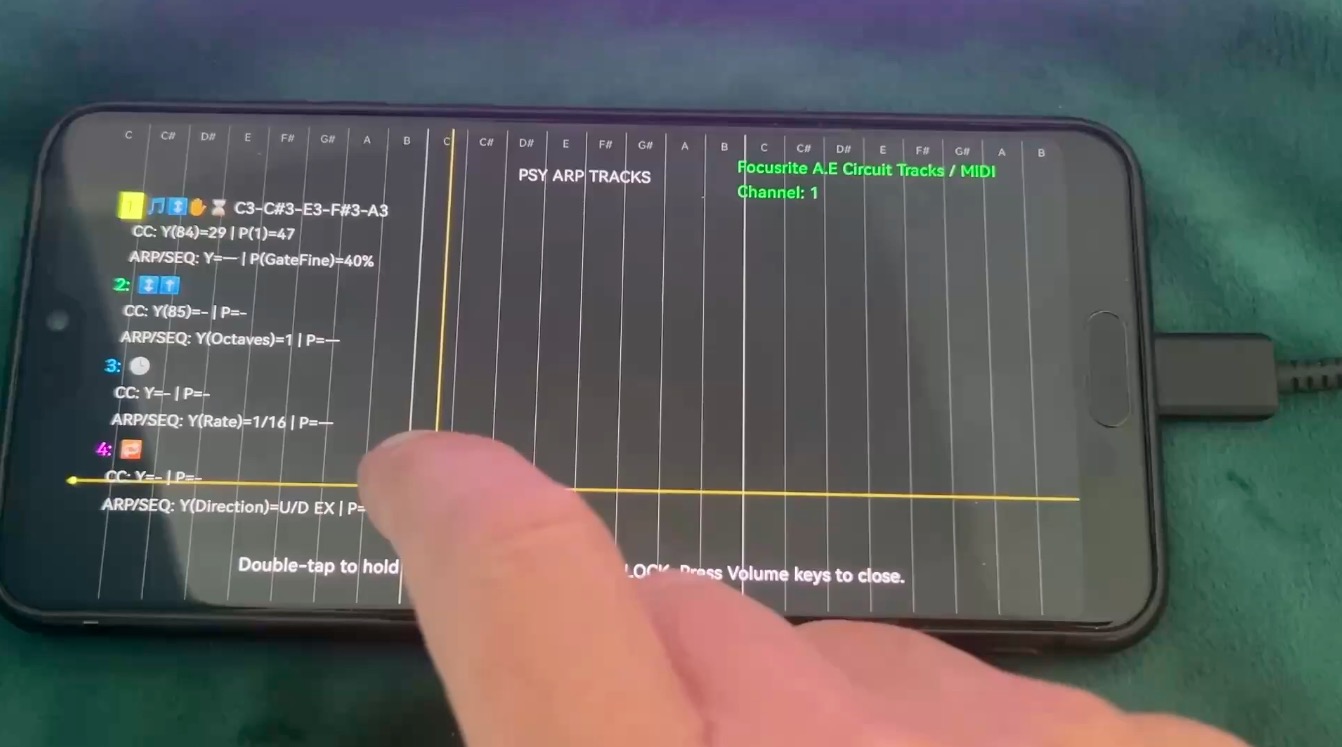
PlayArp is a new Android app that treats the smartphone not just as a control surface, but as an expressive MIDI performance instrument. Instead of simply triggering patterns, it lets you play them with touch, movement, pressure, XY gestures and real-time modulation.
Arpeggiators have been part of electronic music for decades. In their simplest form, they take a few held notes and turn them into repeating patterns. But in the right context, an arpeggiator can become much more than a utility — it can become the rhythmic and melodic engine of a track.
That is where PlayArp comes in.
The app approaches the arpeggiator as something playable. Rather than setting a pattern and letting it run untouched, PlayArp invites the performer to shape the sequence in real time. Speed, gate, note behaviour, modulation and touch interaction can all become part of the performance.
Not just starting a pattern — playing it
Many arpeggiators follow a familiar workflow: choose a direction, set a rate, hold a chord, press play. It works, but it can also feel a little static.
PlayArp tries to make that experience more physical. The smartphone screen becomes a performance area, where gestures can influence musical output directly. Finger position, movement, pressure and multi-touch behaviour can all be used to shape what is being sent via MIDI.
This makes the app especially interesting for musicians working with hardware synths, desktop modules, grooveboxes or software instruments. PlayArp does not generate sound by itself; instead, it sends MIDI to external sound sources. In that sense, it behaves more like a compact expressive controller than a traditional mobile synth app.
Touch as a musical gesture
The most interesting part of PlayArp is how it uses the touchscreen. The app is not simply a grid of buttons or virtual knobs. It turns touch into musical control.
Depending on the setup, XY position can be mapped to MIDI CCs, movement can influence modulation, and pressure can add another layer of expression. On supported devices, pressure data can be used to create more dynamic and responsive performances.
There is one important caveat: pressure support depends heavily on the Android device. Some touchscreens deliver useful pressure data, while others do not. PlayArp includes controls for working with this behaviour, but the quality of pressure response is ultimately device-dependent.
Even without pressure, the combination of touch, XY control and MIDI CC output makes the app useful as a live performance surface.
Arp, chord and poly touch ideas
PlayArp is built around several performance concepts rather than one fixed arpeggiator mode. Classic arpeggio behaviour is part of the app, but it also includes chord-oriented playing, poly-touch interaction and preset-based setups.
Musically, this makes sense. Electronic performance often depends less on playing many notes manually and more on shaping a few strong elements in real time. A bass sequence opens up, a gate becomes tighter, a lead line jumps across octaves, a modulation source adds movement, or a pattern suddenly becomes more chaotic.
PlayArp is designed for these moments.
The app includes performance-oriented ideas such as scales, chords, octave ranges, glide, velocity behaviour and MIDI CC mapping. Presets can be used as starting points for bass grooves, lead lines, ambient textures or more experimental sound design.
Rhythm and timing under the hood
Behind the interface, PlayArp follows a timing-based arpeggiator logic. Steps are triggered on a musical tick grid, while gate length determines how long notes stay active. Note-on and note-off behaviour are handled separately, which is important for clean timing and avoiding stuck notes during live changes.
Patterns can run in familiar directions such as up, down, up-down or random. Octave expansion can turn a small set of input notes into wider melodic movement. This makes it possible to move quickly from simple repeating figures to more animated sequences.
What matters most is not one single feature, but the way the features interact: pattern direction, gate, rate, touch, pressure, MIDI CCs and multi-finger control all work together as part of one performance system.
Who is PlayArp for?
PlayArp is aimed at musicians who already use MIDI or want to add a more tactile control surface to their setup.
It may be especially useful for hardware synth users, dawless performers, electronic music producers, sound designers, ambient musicians, techno artists and anyone looking for a more expressive way to control arpeggios and MIDI movement.
It is probably not the right app for someone looking for a traditional mobile piano or a self-contained synth. But for anyone interested in using a smartphone as a playable MIDI interface, PlayArp offers a fresh and surprisingly direct approach.
Final thoughts
PlayArp does not try to turn a phone into a full studio. Its strength is more focused: it treats the smartphone as its own kind of instrument — small, immediate, touch-sensitive and always within reach.
Used with external synths or software instruments, it becomes a compact performance tool for creating movement, variation and expression in real time.
For electronic musicians who like arpeggios, live tweaking and hands-on MIDI control, PlayArp is worth a look.
Play the arp. Show your sound.
Download for free:
https://play.google.com/store/apps/details?id=com.mariorosin.playarp
Playarp on Instagram:
https://www.instagram.com/playthearp