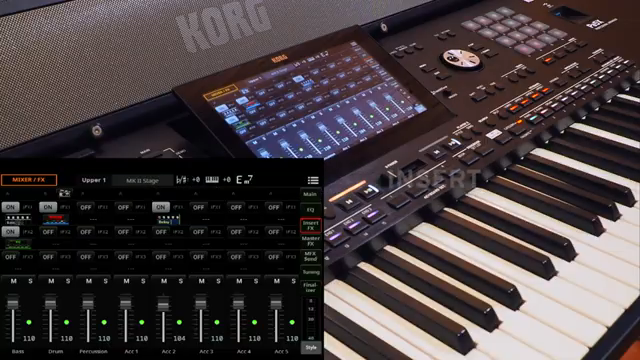
Korg’s Pa5X isn’t just another arranger keyboard—it’s a digital powerhouse loaded with a formidable effects engine. In this official walkthrough, Korg’s team unpacks the Pa5X’s effect section, revealing a structure that’s both deep and flexible, with up to 3 master and 10 insert slots per track. The video zeroes in on the practicalities: how master and insert effects interact, how to manage FX groups, and the workflow behind copying, pasting, and recalling effect chains. For anyone interested in how digital effects architectures translate into real-world sound design and performance, this is a revealing look at the Pa5X’s sonic toolkit.
A Digital Powerhouse of Effects
The Pa5X is introduced as a digital instrument with a serious focus on effects processing. Right from the start, Korg positions the Pa5X not just as an arranger, but as a workstation with substantial sound-shaping capabilities. The video’s early moments highlight the instrument’s effect section as a major architectural feature, inviting us to look past presets and into the underlying structure.
Korg’s walkthrough quickly establishes the Pa5X’s “effect power” as a core selling point. The interface leads users into the mixer page, where the depth of the effect system becomes apparent. This isn’t just about adding a bit of reverb—Korg is aiming for a platform where complex sound manipulation is built-in, not bolted on. The video sets the stage for a detailed exploration of how these effects are distributed and controlled.
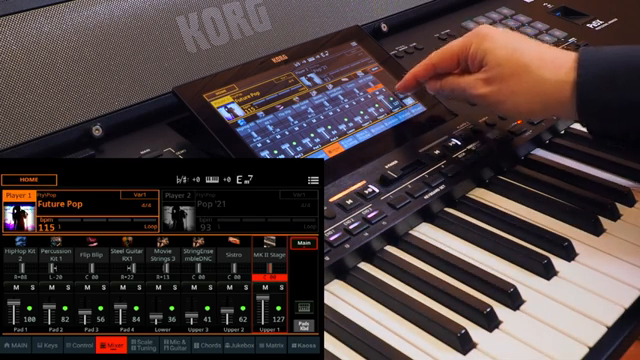
"The effect power of the PA5X is huge."
© Screenshot/Quote: Korgofficial (YouTube)
Three Masters, Ten Inserts: The FX Structure Unpacked
The Pa5X’s effect architecture is both broad and granular. For each keyboard set, users have access to up to three master and three insert effect slots, while styles and MIDI songs can leverage up to three master and a remarkable ten insert slots per track. This level of granularity allows for intricate layering and processing chains, making the Pa5X stand out among digital workstations.
A notable architectural twist is the double sequencer, which effectively duplicates this entire effect engine—meaning the full suite of master and insert effects is available independently for each sequencer. This opens up possibilities for seamless transitions and complex arrangements, all with dedicated effects processing. Korg’s approach here is unapologetically ambitious, targeting users who demand detailed control over every stage of their signal path.
Master vs. Insert: Signal Flow Demystified
"If you set an insert effect for a particular track the sound of this track is passing through the effect by 100%."
© Screenshot/Quote: Korgofficial (YouTube)
The video moves on to clarify the difference between master and insert effects—a distinction that’s crucial for anyone building complex patches. Insert effects are applied directly to a track, processing the signal at 100%, which is ideal for transformative effects like amp simulation or compression. Master effects, on the other hand, are added in parallel via send levels, much like an analog mixer, allowing for subtle blending and shared processing across tracks.
Korg further divides master effects into two groups: Group A (for style, pad, and MIDI song tracks) and Group B (for keyboard set tracks). This separation enables targeted routing and more organized effect management. The video also notes that for MIDI songs, users can switch the master effect group if needed, adding flexibility to how effects are distributed in multi-track arrangements.
Copy, Paste, and Tweak: Streamlining FX Workflows
Workflow is a recurring theme, and Korg demonstrates how effect settings can be copied and pasted between tracks. After dialing in an amp simulation as an insert effect on a guitar sound, the video shows how users can access all effect parameters, copy the configuration, and paste it elsewhere—speeding up the process of building consistent FX chains across multiple tracks.
The demonstration continues with the addition of a stereo compressor and a master reverb, illustrating how effects can be chained and layered. The ability to activate or deactivate effects with a single button or via the mixer interface is highlighted, making it easy to audition changes in real time. This workflow-centric approach is designed to keep musicians in the creative zone, rather than bogged down in menu-diving.
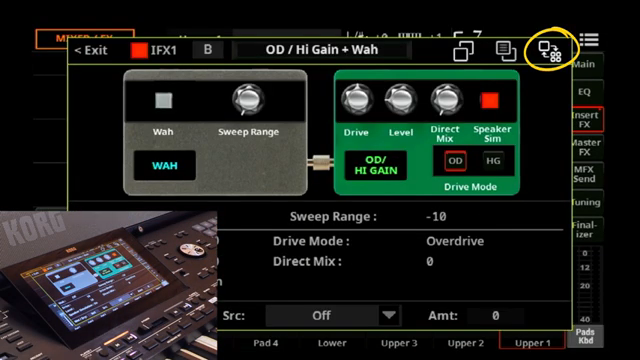
"To copy all these specific effect parameters press the copy icon and use the paste icon if you like to paste these settings in the same effect in a different track."
© Screenshot/Quote: Korgofficial (YouTube)
‘Use IFX’ and ‘Use MFX’: Consistency in Sound Selection
The final section of the video zeroes in on the importance of the ‘Use IFX’ and ‘Use MFX’ options. When enabled, these checkboxes ensure that the predefined insert and master effect chains from the sound edit area are loaded automatically with each new sound selection. This is essential for maintaining sonic consistency—especially when switching between complex patches or moving from studio to stage.
However, the video also points out the flexibility of disabling these options. With ‘Use IFX’ and ‘Use MFX’ off, the current effect chains remain unchanged, allowing users to audition different sounds without altering their carefully crafted FX setups. This duality—between automatic recall and manual control—gives performers and programmers the ability to tailor the Pa5X’s behaviour to their workflow, whether they’re chasing consistency or creative chaos.
This article is also available in German. Read it here: https://synthmagazin.at/korg-pa5x-tiefenanalyse-der-master-und-insert-effektarchitektur/
More articles about these products:
Watch on YouTube:
Latest articles
Watch on YouTube:
Visit the channel:
https://www.youtube.com/KorgOfficial
https://www.youtube.com/KorgOfficial
Links from KorgOfficial:
website: https://www.korg.com
facebook: https://www.facebook.com/KORGusa
twitter: https://twitter.com/KorgUSA
instagram: https://instagram.com/korgofficial
soundcloud: https://soundcloud.com/korg
Sponsored links:
If you purchase via these links, we may earn a small commission – at no extra cost to you. The link opens an Amazon keyword search, and results may vary depending on availability.
Korg Pa5X
🔗 Check price on Amazon
🔗 Check price on Amazon