Akai Professional’s AIR Tape Echo plugin brings the lush, unpredictable world of analog tape echo into the digital domain, designed specifically for MPC users and DAW producers alike. In this official walkthrough, Akai demonstrates how Tape Echo delivers not just classic delay, but a full suite of tape-inspired controls—preamp coloration, multi-head echo modes, spring reverb, and tape age artifacts—wrapped in a workflow that’s both performance-ready and deeply tweakable. The video methodically explores each section of the interface, showing how the plugin can add warmth, movement, and character to drums, vocals, and full mixes. For those obsessed with sonic detail and hands-on control, this is a revealing look at how Akai’s digital architecture aims to capture the spirit (and quirks) of vintage tape, without leaving the MPC ecosystem.
22. May 2026
LYRA
Akai Professional AIR Tape Echo: Digital Tape Magic for Modern MPC Workflows
Tape Echo: Analog Spirit, Digital Workflow
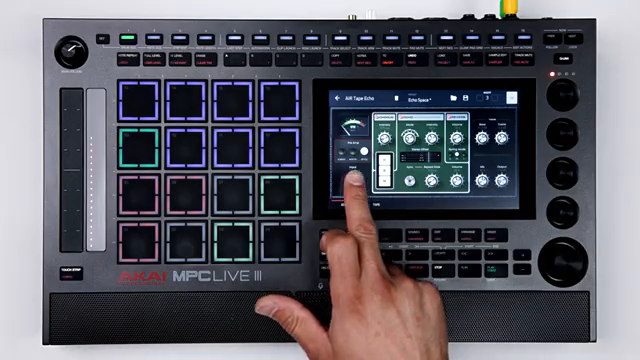
Akai Professional introduces AIR Tape Echo as a performance-ready tape echo effect designed to inject authentic tape character, movement, and spatial depth into both MPC and DAW environments. The plugin is positioned not just as a delay, but as a creative system that responds musically to real-time tweaking, making it suitable for both studio production and live performance. The walkthrough immediately sets the tone: this is about more than just retro flavor—it’s about giving users expressive control over the nuances of tape-based effects within a modern, integrated workflow.
"Air Tape Echo is a performance-ready tape echo effect that treats delay as an expressive, musical system delivering authentic tape character, movement, and space for modern MPC and DAW workflows."
© Screenshot/Quote: Akai Pro (YouTube)
Feature Deep Dive: Preamps, Playheads, and Tone Shaping
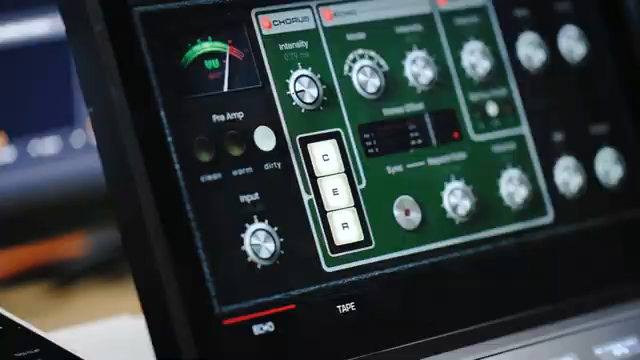
"You have clean, warm, and dirty."
© Screenshot/Quote: Akai Pro (YouTube)
The walkthrough begins with the preamp section, where users can dial in three distinct tonal characters—clean, warm, and dirty—each shaping the input signal before it hits the delay line. This section is more than cosmetic: pushing the input can yield drastic changes, letting users sculpt the harmonic content and drive of their signal before any echo is applied.
Moving to the chorus, echo, and reverb sections, the plugin offers hands-on toggling for each effect, with simple intensity and volume controls. The echo section is particularly flexible, featuring six selectable modes that determine which of the three virtual tape heads are active. Users can shift between these modes to create varied rhythmic patterns and spatial effects. Stereo offset, sync options, and repeat rate controls allow for detailed manipulation of delay timing and stereo image, while the dedicated echo volume and intensity dials provide further nuance. The spring reverb is straightforward—three sizes, one volume control—but can be used independently for those who want just a touch of vintage ambience.
Bass and treble controls offer precise tone shaping, affecting only the echo repeats. This allows users to tailor the frequency content of their delays without muddying the dry signal or other effects. The mix and output dials round out the feature set, enabling users to blend the processed and dry signals to taste, whether on a bus or an individual track. The interface is designed for quick, intuitive adjustments, supporting both subtle enhancement and more radical sound design moves.
Simulating Tape: Grit, Drift, and Sonic Character
AIR Tape Echo doesn’t stop at delay and reverb—it goes deep into the quirks of analog tape. The plugin provides dedicated controls for motor drift, dropouts, and noise, simulating the unpredictable artifacts that give tape its character. Motor drift introduces timing variations, while dropout simulates degraded tape for those classic warbles and stutters. The noise control adds adjustable tape hiss, letting users dial in as much or as little lo-fi texture as they want. These parameters can be pushed for subtle coloration or exaggerated for creative effect, making it possible to transform sterile digital signals into something with real vintage grit and movement.
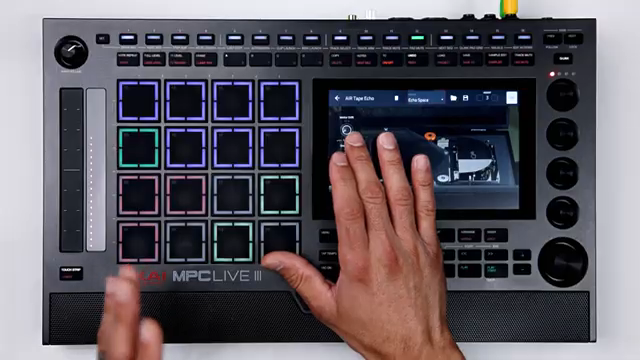
"This will adjust the amount of simulated motor drift of the tape echo mechanism."
© Screenshot/Quote: Akai Pro (YouTube)
Performance in Practice: From Drums to Full Mixes
"Try it out on some of your tracks, whether it's vocals, drums, bass or samples, and see what you come up with."
© Screenshot/Quote: Akai Pro (YouTube)
The walkthrough closes by demonstrating how AIR Tape Echo can be applied to a variety of sources—drums, vocals, bass, and samples—showcasing its versatility in both subtle mixing contexts and more experimental sound design. Performance-oriented controls like the playhead tap function allow for real-time disruption of the echo, creating dynamic effects that respond to the user’s touch. The plugin’s architecture encourages hands-on exploration, whether you’re chasing classic tape warmth or pushing into more avant-garde territory.
Throughout, Akai emphasizes that Tape Echo is available for both MPC Standalone and Desktop, reinforcing its role as a bridge between hardware-centric and DAW-based workflows. The result is a tool that feels equally at home in a DAWless rig or a modern hybrid studio, offering deep sonic customization without sacrificing immediacy or playability.
Watch on YouTube:
Latest articles
Watch on YouTube:
https://www.youtube.com/Akai_Pro
Links from Akai_Pro:
Sponsored links:
If you purchase via these links, we may earn a small commission – at no extra cost to you. The link opens an Amazon keyword search, and results may vary depending on availability.
🔗 Check price on Amazon