KDx, Yamaha Synths Official’s latest software-based editor, aims to revolutionize how musicians interact with a broad range of Yamaha synthesizers. Presented by Kier Darby at Superbooth 2026, this web-based environment brings hands-on, visual editing to the AN-X, FM-X, and AWM2 engines, as well as expanded integration with devices like Seqtrak and Reface DX. The video walks through KDx’s real-time parameter control, live set management, and deep sound design workflows, all without generating sound itself. For anyone invested in Yamaha’s synth ecosystem, KDx promises a streamlined, visually rich approach to complex editing tasks—though, as always, the proof will be in the workflow.
22. May 2026
LYRA
Yamaha Synths Official Unveils KDx: A New Era of Visual Editing for Yamaha Synthesizers
KDx, Yamaha MODX, Yamaha Montage, Yamaha Montage M, Yamaha Motif XF, Yamaha Reface CS, Yamaha Reface DX, Yamaha SEQTRAK
KDx: Software Control for the Yamaha Universe
KDx is introduced as a software-based solution designed to enhance the control and editing of Yamaha synthesizers. The project was inspired by the PG-ANX and PG-FMX hardware controllers, but quickly evolved into a far more ambitious tool. Kier Darby, the developer, describes how the initial idea was to replicate the tactile, one-knob-per-function experience in software, leveraging the flexibility of a digital interface.
Unlike a virtual instrument, KDx does not generate sound itself. Instead, it acts as a programmer, sending system exclusive MIDI messages to connected Yamaha hardware. The current version supports a broad swath of Yamaha synths, including Montage M, Montage, MODX, MODX+, Reface series, Seqtrak, and even the Motif XF (with more planned). This wide compatibility positions KDx as a central hub for Yamaha users seeking a unified, visually driven editing workflow.

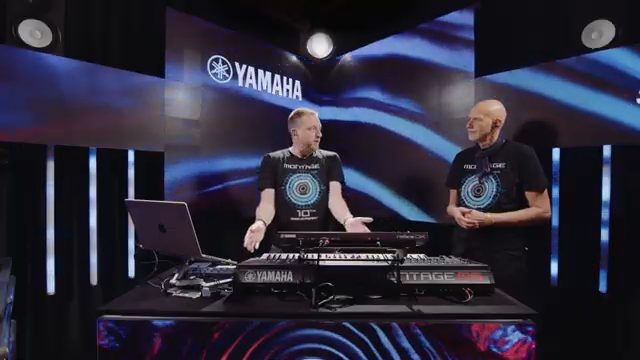
"This is a web app, this is not a virtual instrument."
© Screenshot/Quote: Yamahasynthsofficial (YouTube)
Visual Editing Workflows: AN-X, FM-X, and AWM2 Engines
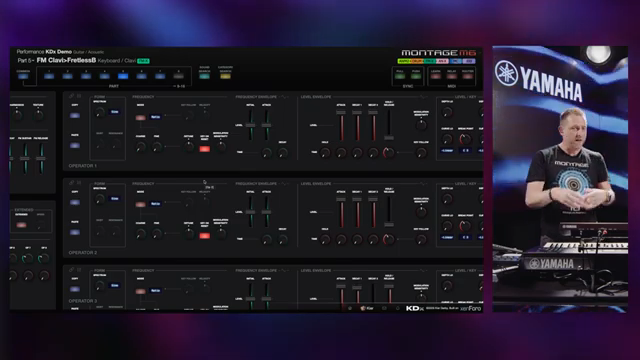
"I'm a great believer in being able to visualize the shape of your envelope from the state of your controls."
© Screenshot/Quote: Yamahasynthsofficial (YouTube)
The core of KDx’s appeal lies in its visual editing workflows for Yamaha’s flagship sound engines: AN-X, FM-X, and AWM2. For the AN-X engine, the interface mirrors the PG controller layout, offering dedicated columns for common controls, three oscillators, dual filters, amplifiers, effects, and EQs. Performance-level controls allow users to mix and manage different parts with clarity. The software’s part selector highlights active parts, and the digital format enables users to view and adjust all parameter values simultaneously—something not possible on the hardware unless motorized knobs are involved.
Switching between parts in KDx triggers real-time updates, with the software requesting fresh data from the synth and reflecting changes immediately. This is particularly useful when working with multiple AN-X parts or layering different engines. The FM-X engine editor also draws inspiration from the PG hardware controllers, but introduces sliders for envelope editing, allowing users to visualize and shape envelopes directly—an ergonomic improvement over rotary encoders. The graphical feedback makes it easy to distinguish between different envelope types at a glance.
AWM2 editing is where KDx’s visual paradigm truly shines. The AWM2 engine, often misunderstood as simple sample playback, is revealed to be a powerhouse with up to 128 elements—each with its own sample, LFO, pitch, filter, amplitude, and EQ. KDx’s interface exposes this complexity in a manageable way, letting users navigate and tweak each element’s parameters visually. This level of access far surpasses what’s available on most hardware front panels, making deep sound design more approachable.
Real-Time Control and Live Set Management
KDx emphasizes real-time parameter control, allowing users to tweak sounds and immediately see (and hear) the results on their connected hardware. The video demonstrates filter adjustments and envelope edits, with the software providing instant visual feedback and synchronizing changes to the synth without noticeable latency. This immediacy supports a more intuitive, creative workflow, especially when sculpting sounds on the fly.
Live Set management is another highlight. Traditionally, rearranging Live Sets on Yamaha workstations could be cumbersome, involving multiple copy and exchange steps. KDx streamlines this process with a drag-and-drop interface: users can move slots within and between pages, with changes reflected instantly on the hardware. Multi-selection and batch moves further simplify set organization, making it easier to prep performances or studio sessions without menu-diving.
Seqtrak Integration and Hidden Editing Depths
One of the most intriguing parts of the demo is KDx’s integration with Yamaha Seqtrak. While the Seqtrak hardware and its official apps offer limited editing, KDx unlocks deeper access via system exclusive MIDI. By referencing parameters by name rather than address, the software exposes advanced AWM2 and FM editing features that are otherwise hidden. This effectively transforms Seqtrak into a more powerful sound design platform than its front panel suggests.
KDx also enables seamless patch transfer between Seqtrak and Reface DX, since the DX engine inside Seqtrak is essentially a Reface DX under the hood. This interoperability expands creative possibilities, letting users share and manipulate sounds across devices with minimal friction. For those who crave more than preset browsing, KDx turns Seqtrak into a surprisingly deep synth editor.
"It's only when you start talking to it with system exclusive MIDI that the secrets are revealed."
© Screenshot/Quote: Yamahasynthsofficial (YouTube)
A New Layer of Creative Freedom
KDx ultimately enhances creative workflows by making complex sound design tools more accessible and visually intuitive within Yamaha’s synthesizer ecosystem. By bridging software flexibility with hardware power, it invites users to explore deeper editing and performance possibilities—without the usual menu-diving or workflow bottlenecks.
This article is also available in German. Read it here: https://synthmagazin.at/yamaha-synths-official-praesentiert-kdx-eine-neue-aera-des-visuellen-editierens-fuer-yamaha-synthesizer/
More articles about these products:
 AudioPilz vs Yamaha AN1x: Blue Box Mayhem in the Bad Gear Bunker
 TAETRO’s Bluetooth MIDI Hack: Free App, Zero Headache
 Inside Yamaha Synths: A Decade of Montage Innovation
 Scott’s Synth Stuff Gets Dirty: Cooking Up a Wurlitzer Patch on the 3rd Wave
 Sam Gutman’s Synth Sell-Off: Regret, Nostalgia, and Gear FOMO
 Yamaha Synths Official reimagines the groovebox: Seqtrak OS v2.0’s workflow architecture explored
 Yamaha Synths Official: John Melas Tools Take Montage M Workflow to the Next Level
 Yamaha Synths Official: Seqtrak as a Tone Generator with YC88 – Expanding Live Keyboard Architectures
 Sam Gutman vs. Yamaha Montage: The Workstation Roast We Needed
 sunwarper Unleashes the SEQTRAK 2.0: Groovebox Gets Gritty, Sampler Still Sulks
 NAMM 2026’s Wildest Rigs: Sunwarper’s Top Gear Picks That’ll Make Your Studio Roar
 TAETRO Unleashes SEQTRAK 2.0: Groovebox Resurrection or Just Hype?
Watch on YouTube:
Latest articles
Watch on YouTube:
Visit the channel:
https://www.youtube.com/YamahaSynthsOfficial
https://www.youtube.com/YamahaSynthsOfficial
Links from YamahaSynthsOfficial:
instagram: https://instagram.com/yamahasynths_official
facebook: https://www.facebook.com/yamahasynths
twitter: https://twitter.com/YamahaSynths
website: https://yamahasynth.com
Sponsored links:
If you purchase via these links, we may earn a small commission – at no extra cost to you. The link opens an Amazon keyword search, and results may vary depending on availability.
Yamaha MODX
🔗 Check price on Amazon
🔗 Check price on Amazon
Yamaha Montage
🔗 Check price on Amazon
🔗 Check price on Amazon
Yamaha Montage M
🔗 Check price on Amazon
🔗 Check price on Amazon
Yamaha Motif XF
🔗 Check price on Amazon
🔗 Check price on Amazon
Yamaha Reface CS
🔗 Check price on Amazon
🔗 Check price on Amazon
Yamaha Reface DX
🔗 Check price on Amazon
🔗 Check price on Amazon
Yamaha SEQTRAK
🔗 Check price on Amazon
🔗 Check price on Amazon