Intellijel’s official channel brings us a deep-dive into the potent pairing of Metropolix and Multigrain, two modules that promise to turn even the most stubborn rack into a rhythmic playground. This video isn’t just a surface-level walkthrough—it’s a hands-on patch build that explores how Metropolix’s sequencing prowess can wrangle Multigrain’s eight-voice granular engine into intricate, loopable textures. Expect practical patching, clever workflow tips, and a few deadpan moments as the host demonstrates how to sculpt, morph, and modulate your way to modular inspiration. For anyone obsessed with granular sound design and real-time sequencing, this is a pairing worth a closer look.
11. November 2025
MILES
Intellijel’s Metropolix & Multigrain: Rhythmic Patch Alchemy in Eurorack
Elektron Digitakt, Intellijel Metropolix, Intellijel MIDI 1U, Intellijel MultiGrain, Intellijel Quadrax, Intellijel Sealegs, Intellijel Stereo I/O 1U
Patch Foundations: Metropolix Meets Multigrain
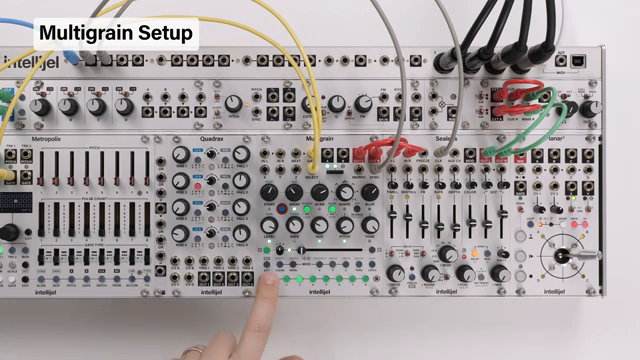
The video opens with a clear mission: harness all eight of Multigrain’s available sounds and sequence them with the Intellijel Metropolix. The patch begins by routing Multigrain’s stereo outs through Sealegs and then to the main outputs via Stereo I/O, establishing a clean audio path. To provide a rhythmic backbone and clock source, an Elektron Digitakt is patched in, its audio routed through the case and its MIDI sync sent to MIDI 1U. This ensures everything ticks along in time, with Metropolix receiving clock and run signals for tight sequencing.
The heart of the patch is the interplay between Metropolix’s sequencing and Multigrain’s sound selection. Output A from Metropolix is patched to Multigrain’s select input, allowing the sliders to address each of the eight sounds directly. Track 1’s gate output triggers Multigrain, while the Metropolix clock output is multed to keep Sealegs and Multigrain in sync. This setup lays the groundwork for complex rhythmic textures, with the flexibility to expand the patch further if desired.

"I'm also going to show you an easy way to edit all the sounds at the same time to make this whole process smoother."
© Screenshot/Quote: Intellijel (YouTube)
Sequencing and Sample Manipulation: The Core Workflow
"To fine tune a sound, select it, press ALT and then adjust the pitch knob."
© Screenshot/Quote: Intellijel (YouTube)
With the patch in place, the focus shifts to loading and tuning samples within Multigrain. Eight samples from a factory project are loaded, covering both melodic and rhythmic territory. The video demonstrates how to fine-tune melodic elements for better harmonic cohesion—using the ALT function and pitch knob for precise adjustments, and quickly switching between sounds to keep everything in tune.
Metropolix’s sliders are then used to sequence through the sounds in order, with the loopy function providing a handy way to preview and audition each stage. By manipulating track division and playback, the host shows how to create evolving patterns and looped textures, making full use of the granular engine’s flexibility. The workflow is designed for hands-on experimentation, encouraging users to build and refine patterns in real time.
Edit All, Quantize, and Scene Morphing: Dynamic Sound Shaping
A key feature highlighted is the ability to edit all eight sounds simultaneously using the latch and scene buttons. This makes it easy to tidy up chaotic textures—reducing grain size, switching to exponential shapes for percussive impact, and unlinking rate from size for more nuanced control. The quantizer is set up per sound, ensuring all samples stay harmonically related when pitch is manipulated globally.
The video then explores scene morphing, using the morph fader to transition between two distinct sonic states. By editing parameters on scene B and morphing between A and B, the patcher uncovers a range of timbral possibilities. The morph input can be modulated externally for even more movement, and subtle tweaks to tone and grain parameters help carve out space in the mix. Syncing grains to the clock is demonstrated, showing how rhythmic precision or chaos can be dialled in as needed.

"And now all of our sounds are quantized to octaves and fifths."
© Screenshot/Quote: Intellijel (YouTube)
Experimentation and Modulation: Pushing the Patch Further

"So why don't we take a looping envelope from Quadrax to modulate some of the parameters on multigrain."
© Screenshot/Quote: Intellijel (YouTube)
Sample swapping is presented as a powerful way to refresh the pattern—simply select a sound, use ALT to access folders, and audition new samples on the fly. The workflow supports both global and individual sound editing, with the ability to fine-tune, adjust size, or add blur for textural interest. Metropolix’s play order and stage offset controls are mapped to knobs, allowing for instant pattern rearrangement without disturbing slider positions.
The host demonstrates how pulse count and gate type switches can break up the rhythm, and how setting a consistent pulse length helps maintain structure. Modulation is brought in via Quadrax, with looping envelopes assigned to Multigrain parameters for evolving soundscapes. The latch and scene button combinations make it easy to assign modulation across multiple sounds, opening up even more creative territory.
Practical Tips: Sample Choice and Capturing Inspiration
The session wraps up with some sage advice: be adventurous with your sample choices, use control-all functions to streamline editing, and don’t forget to save presets or record your output when you stumble upon something inspiring. The video underscores the sheer range of possibilities unlocked by pairing Metropolix and Multigrain, encouraging viewers to experiment and capture those fleeting moments of modular magic.
This article is also available in German. Read it here: https://synthmagazin.at/intellijel-metropolix-multigrain-rhythmische-patch-alchemie-im-eurorack/
Watch on YouTube:
Latest articles
Watch on YouTube:
Visit the channel:
https://www.youtube.com/intellijel
https://www.youtube.com/intellijel
Links from intellijel:
website: https://intellijel.com
forum: https://forum.intellijel.com
instagram: https://instagram.com/intellijel
facebook: https://www.facebook.com/intellijel
Sponsored links:
If you purchase via these links, we may earn a small commission – at no extra cost to you. The link opens an Amazon keyword search, and results may vary depending on availability.
Elektron Digitakt
🔗 Check price on Amazon
🔗 Check price on Amazon
Intellijel Metropolix
🔗 Check price on Amazon
🔗 Check price on Amazon
Intellijel MIDI 1U
🔗 Check price on Amazon
🔗 Check price on Amazon
Intellijel MultiGrain
🔗 Check price on Amazon
🔗 Check price on Amazon
Intellijel Quadrax
🔗 Check price on Amazon
🔗 Check price on Amazon
Intellijel Sealegs
🔗 Check price on Amazon
🔗 Check price on Amazon
Intellijel Stereo I/O 1U
🔗 Check price on Amazon
🔗 Check price on Amazon