Native Instruments just dropped the Maschine 3.5 update, and Bolo Da Producer is here to give us the real talk—no sugar-coating, just street-level honesty. If you’re tired of corporate hype and want to know if this update actually makes your workflow smoother or just adds another layer of polish to the same old box, Bolo’s got you. From bug fixes and a fresh sampler UI to pinning sounds and keyboard compatibility, he covers what matters for beatmakers who want to keep the groove moving. And yeah, he’s got thoughts about what Native needs to cook up next. If you want the lowdown with a side of laughs, this is your stop.
6. May 2026
RILEY
Bolo Da Producer Breaks Down Maschine 3.5: Updates, Glitches, and Hopes for the Future
Native Instruments Kontrol Keyboard, Native Instruments Maschine Plus, Native Instruments Maschine Software
Bug Fixes and a Fresh Coat of Paint
Bolo Da Producer kicks things off with a nod to Native Instruments for not letting Maschine users gather dust. The 3.5 update isn’t about wild new features, but it does show the company’s still got its ear to the street. The update brings a handful of bug fixes and a redesigned sampler UI in MixerView, giving the software a little facelift without flipping the whole script.
Don’t expect your Maschine to suddenly turn into a spaceship, but the new sampler look is a welcome change for anyone tired of staring at the same old screen. Bolo keeps it real—these aren’t jaw-dropping changes, but they’re a step in the right direction. Sometimes, a little stability and a cleaner workflow are all you need to keep the beats rolling.

"Even though these updates are not nothing too fancy, but it goes to show that Native Instruments is thinking about their users and that's why they're giving us these updates."
© Screenshot/Quote: Bolodaproducer (YouTube)
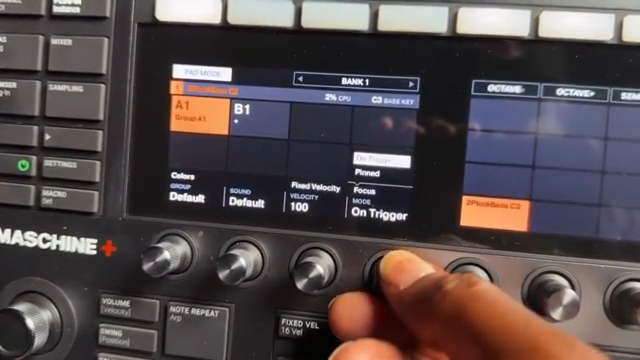
Pinning Sounds: Stay Focused, Stay Fresh
"So you can just work on that sound and get it the way you need to be."
© Screenshot/Quote: Bolodaproducer (YouTube)
One of the slickest tricks in this update is the ability to pin a sound for editing, and Bolo breaks down why that’s a game-changer. Instead of bouncing around every time you tap a new pad, you can lock in on one sound and tweak it to perfection, even if your fingers are wandering elsewhere. It’s like putting your favorite taco on a plate so nobody else grabs it—focus, people!
If you’re the type who gets lost in a sea of samples, this feature is your new best friend. Bolo admits it sounds a little complicated at first, but once you get the hang of it, it’s a smooth way to dial in your sound design without losing your groove. It’s not flashy, but it’s the kind of workflow hack that makes you wonder how you ever lived without it.
Control Keyboards: Finally Playing Nice
Now for the real meat—compatibility with Native Instruments’ control keyboards. Bolo doesn’t mince words: these boards looked great but were a hot mess when they dropped. The 3.5 update finally brings them into the fold, letting you browse sounds, effects, and samples right from the keyboard, whether you’re running Maschine software or the Plus hardware. No more reaching for your mouse like it’s the last slice of pizza at a party.
The update even syncs the screens between your Maschine Plus and the control board, so what you see is what you get—no more guessing games. Bolo’s hype is real here, especially for those who want to keep their hands on the hardware and out of the computer. This is the kind of fix that makes the whole setup feel like a real instrument, not just a collection of blinking lights.
"This whole update surrounds about the compatibility of the control keyboards with the program and with the standalone unit."
© Screenshot/Quote: Bolodaproducer (YouTube)
Standalone Glitches, Software Smoothness
"But just me personally, it just feels a little bit shaky, a little bit, if I could say that."
© Screenshot/Quote: Bolodaproducer (YouTube)
But let’s not pretend it’s all sunshine and 808s. Bolo keeps it honest about some glitches when running the control board with Maschine Plus in standalone mode. Things can get a little laggy, and sometimes it feels like your beats are wading through molasses. He points out it could be the update, the board, or just the sounds eating up CPU—either way, it’s not as smooth as it should be.
On the flip side, when you hook everything up to the Maschine software, it’s a different story. Bolo reports zero issues, with everything running tight and responsive. So if you’re a studio head who keeps it plugged in, you’re golden. But if you’re hoping to go full-on portable, you might want to keep an eye out for future fixes—or just bring some extra patience to the session.
Looking Ahead: Time for New Hardware?
Bolo wraps things up with some real talk about the future of Maschine. The update is cool, but he’s clear: Native Instruments needs to drop some new hardware if they want to keep the hype alive. He’s calling for a next-gen Maschine Plus and a new MK series—something with enough muscle to handle these control boards without breaking a sweat.
Competition is heating up, and Bolo knows that fresh gear is what keeps the scene moving. He’s got ideas for smarter connectivity and more powerful features, and he’s rooting for Native to pull through. If they get it right, he says, the whole beatmaking world wins. But until then, this update is a decent appetizer—just don’t expect it to fill you up like a late-night slice after a gig.
This article is also available in German. Read it here: https://synthmagazin.at/bolo-da-producer-ueber-das-maschine-3-5-update-frische-features-kleine-bugs-und-grosse-hoffnungen/
More articles about these products:


Watch on YouTube:
Latest articles
Watch on YouTube:
Visit the channel:
https://www.youtube.com/BoloDaProducer
https://www.youtube.com/BoloDaProducer
Links from BoloDaProducer:
Instagram: https://instagram.com/bolodaproducer
Patreon: https://patreon.com/bolodaproducer
Sponsored links:
If you purchase via these links, we may earn a small commission – at no extra cost to you. The link opens an Amazon keyword search, and results may vary depending on availability.
Native Instruments Kontrol Keyboard
🔗 Check price on Amazon
🔗 Check price on Amazon
Native Instruments Maschine Plus
🔗 Check price on Amazon
🔗 Check price on Amazon
Native Instruments Maschine Software
🔗 Check price on Amazon
🔗 Check price on Amazon