Akai Professional’s FORCE 3.5 beta update lands with a thump, bringing a suite of workflow-driven upgrades to their flagship standalone production system. In this official walkthrough, Akai’s own channel teams up with Gabe Miller to showcase everything from plugin integration and stem separation to tempo automation and expanded sequencing. The focus is firmly on how these new features reshape the creative process—no computer required. If you’re curious about how FORCE 3.5 reimagines arrangement, sound design, and performance, this video is a must-watch for digital and hybrid workflow enthusiasts.

21. May 2025
LYRA
Akai Professional Unleashes FORCE 3.5: A Deep Dive into Standalone Power
FORCE 3.5: A Standalone Evolution
Akai Professional’s FORCE 3.5 update arrives as a significant leap for their standalone music production system, introducing a suite of features that directly target creative workflow bottlenecks. The video wastes no time highlighting the open beta status and the intent behind these changes: to empower users to make more music, more efficiently, without needing to tether to a computer. The update borrows heavily from the MPC3 platform, bringing proven tools and interface concepts into the FORCE ecosystem.
Among the headline improvements are the new main mode, enhanced navigation, and a streamlined approach to track and clip management. The demonstration underscores how these changes are not just cosmetic—they’re designed to minimize friction when building up ideas, arranging, and experimenting. The result is a system that feels more responsive and better suited for both studio and live contexts, with a clear emphasis on speed and hands-on control.
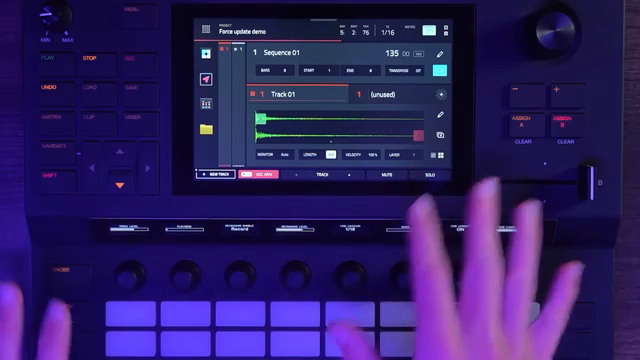
"This was introduced with MPC3 and is now brought over to the Force and is meant to be a one-stop shop for a bunch of information."
© Screenshot/Quote: Akai Pro (YouTube)
Plugin Power: AIR and Native Instruments Inside
One of the most impactful additions in FORCE 3.5 is the seamless integration of plugin instruments and effects from AIR and Native Instruments, all running natively within the standalone environment. Users can now swap out presets, edit plugin parameters, and even access new sound engines like Sub Factory and Low Fly Dirt directly from the hardware interface. The update also brings compatibility with a range of Native Instruments MPC Edition plugins, expanding the sonic palette without the need for external software.
The workflow for managing plugins is notably streamlined: swapping presets, editing effects, and even reordering plugin chains can all be handled from the main mode or dedicated channel strip views. This not only accelerates sound design but also makes it easier to experiment with layering and effects routing on the fly. The demonstration makes it clear that Akai is targeting producers who demand both depth and immediacy from their instruments.
Sequencing Unleashed: Automation, Follow Actions, and Arrangement Tools
"Now you can have many sequences, which can all be different iterations of performances that can even be changed together in song mode if you want to do that."
© Screenshot/Quote: Akai Pro (YouTube)
FORCE 3.5 takes sequencing to a new level with the introduction of tempo automation, follow actions, and an expanded arrangement system. Users can now create multiple sequences within a single project, each with its own automation and performance nuances—an upgrade from the previous single-arranger limitation. This flexibility allows for alternate versions, creative variations, and the ability to chain sequences together for complex song structures.
Follow actions, borrowed from the MPC lineage, enable clips or rows to trigger each other based on customizable conditions and time intervals. The ability to assign different tempos to individual rows further enhances live performance potential, letting users craft evolving sets with dynamic BPM shifts. These tools collectively transform the FORCE into a much more versatile sequencer, equally at home in DAWless rigs or on stage.
Stem Separation: Sampling and Remixing Reimagined
A major highlight of the update is the addition of stem separation, allowing users to isolate vocals, drums, and instrumental elements from full tracks directly within the FORCE. This opens up new possibilities for sampling, mashups, and live remixing, all without leaving the standalone workflow. The process is designed to be straightforward, making it accessible even for those new to stem-based production.
In tandem with stem separation, the export workflow has been overhauled. Users can now export individual drum pads as stems with just a few taps, selecting formats and even adding audio tails for cleaner transitions. This is particularly useful for producers who want to move between hardware and DAW environments, or for those building complex arrangements that require granular control over each element.
Keygroup Synthesis, LFOs, and Streamlined Export: Sonic Depth Meets Efficiency
The FORCE 3.5 update doesn’t stop at workflow enhancements—it also delivers substantial improvements to sound design and modulation. Keygroup programs now support up to eight sample layers, dual filters (including creative types like vocal filters), and a full modulation matrix with four LFOs. These additions give users deeper control over timbre, movement, and texture, all from within the standalone interface.
The update also introduces new harmonizer and unison options, expanded envelope controls, and a reorganized utilities section for quick access to portamento, pitch bend, and voice settings. Exporting tracks and stems is now faster and more flexible, making it easier to move projects between hardware and software environments. Altogether, these features position FORCE 3.5 as a serious contender for both sound designers and producers who value speed, depth, and standalone power.
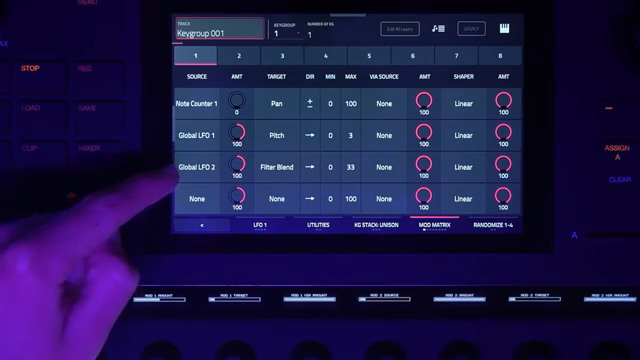
"We also now have four LFOs, so two global LFOs here, and a full mod matrix, which is lovely to see here."
© Screenshot/Quote: Akai Pro (YouTube)
This article is also available in German. Read it here: https://synthmagazin.at/akai-professional-entfesselt-force-3-5-ein-architektur-update-fuer-standalone-produktionen/
Watch on YouTube:
Latest articles
Watch on YouTube:
Visit the channel:
https://www.youtube.com/Akai_Pro
https://www.youtube.com/Akai_Pro
Links from Akai_Pro:
website: https://akaipro.com
instagram: https://instagram.com/akai_pro
facebook: https://www.facebook.com/AkaiPro
twitter: https://twitter.com/akai_pro
google_plus: https://plus.google.com/107127819149441645522/posts
Sponsored links:
If you purchase via these links, we may earn a small commission – at no extra cost to you. The link opens an Amazon keyword search, and results may vary depending on availability.
Akai Force
🔗 Check price on Amazon
🔗 Check price on Amazon