Compression: the secret street weapon for anyone who wants their mix to punch, duck, or just behave. Taylor Fiore, California’s own multi-tool music machine, breaks down compressors with the kind of clarity and sarcasm that’ll make your next bassline bounce. Forget the endless theory – this is hands-on, Ableton-in-the-trenches stuff, with real talk about threshold, ratio, sidechain, and those magic moments when a track just needs to get squashed. If you’ve ever felt lost in a menu, this one’s for you.
13. October 2026
SPARKY
Taylor Fiore Gets Squishy: Compression Demystified for the Real World
Compression: The Great Leveller
Taylor Fiore doesn’t waste time sugar-coating: compression is just automated volume control, plain and simple. The main mission? Smash down those wild peaks and pull up the whispers, so your track doesn’t sound like a rehearsal in a warehouse. That’s the rave bunker charm—consistency without killing all the fun.
"Compression is an automated volume control."
© Screenshot/Quote: Taylorfiore (YouTube)
Thresholds, Ratios, and Envelope Antics
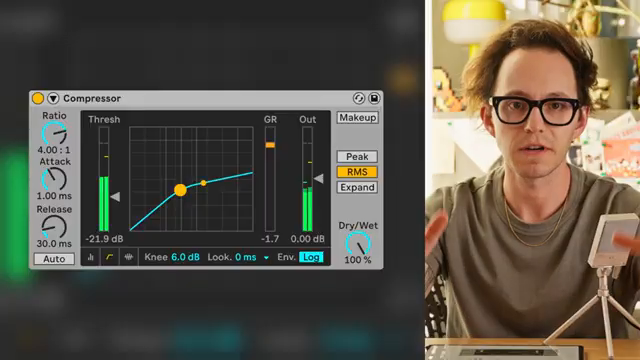
"The threshold is the target level or volume for compression to begin."
© Screenshot/Quote: Taylorfiore (YouTube)
Taylor dives straight into the guts: threshold sets the point where compression kicks in, and ratio decides how much gets squashed. He’s not here for two-to-one ratios unless you’re trying to pet a kitten—four-to-one is his daily driver, with higher ratios reserved for when you want to brick-wall things into submission. The dude even brings out the math, but don’t worry, it’s not GCSE-level trauma—just enough so you don’t embarrass yourself at the pub.
Attack and release settings get the no-nonsense treatment. Fast attack? Perfect for taming rowdy vocals. Slower attack? Let those drum transients punch through before the compressor does its thing. Taylor reminds us: there’s no one-size-fits-all, but the wrong combo will turn your groove into wallpaper paste. And yes, he covers the knee—soft or hard, it’s all about how gently or rudely the compressor steps in. No drama, just results.
Beyond Vanilla: Sidechains, Multibands, and Other Tricks
When Taylor gets into types of compression, it’s clear he’s seen every trick in the book. Limiting? That’s just compression with the dial cranked until nothing gets out alive. Parallel compression? Mix your dry and wet for extra punch—Taylor’s go-to for beefing up sounds without losing their humanity. He’s a fan, and you should be too if you want your mix to hit like a toaster-fight.
Then there’s the classic sidechain move: if you’ve ever danced to four-on-the-floor, you’ve felt the kick ducking the bass—Taylor uses it everywhere, not just for dance music but to make sure his voice slices through the mix like a rusty blade. Multiband compression gets a shout too, for when you want to wrangle just the lows, mids, or highs instead of nuking the whole spectrum. Bus compression? Just slap it on your group tracks and call it a day. It’s all in the video, and Taylor keeps it practical—no modular labyrinths required.
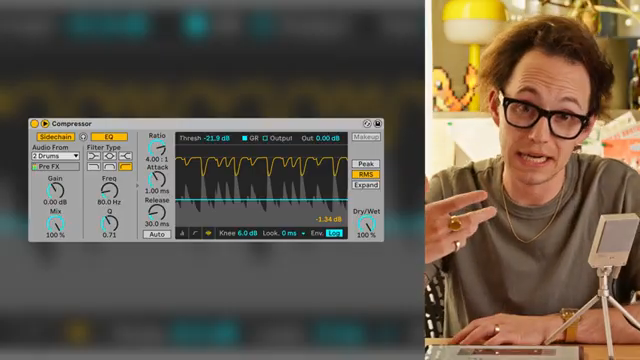
"I like parallel compression because it makes the sound feel more natural while also giving it a little more oomph."
© Screenshot/Quote: Taylorfiore (YouTube)
Makeup Gain: Loudness Lies
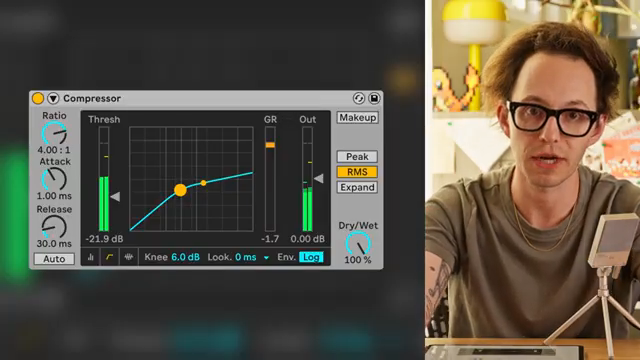
"This is where a compressor starts to sound squished."
© Screenshot/Quote: Taylorfiore (YouTube)
Taylor hammers home the importance of makeup gain: after compression, you need to bring the level back up so your mix isn’t left sounding like a sad demo. But don’t get tricked—louder isn’t always better, just sneakier. Use makeup gain to balance things, not to fool yourself into thinking you’ve made magic. That’s the streetwise tip that separates pros from bedroom producers.
Watch and Learn: The Real Action Is in the Demo
Honestly, you can read about compression all day, but if you want to actually hear the difference between a squashed snare and a punchy kick, you need to watch Taylor’s video. The hands-on demos, Ableton hacks, and real-world sound examples are what bring the lesson home. Don’t just twiddle knobs—see (and hear) how the pros do it. Trust me, your next track will thank you.
This article is also available in German. Read it here: https://synthmagazin.at/taylor-fiore-machts-platt-kompression-entmystifiziert-fuer-die-echte-welt/
Watch on YouTube:
Latest articles
Watch on YouTube:
Visit the channel:
https://www.youtube.com/TaylorFiore
https://www.youtube.com/TaylorFiore
Links from TaylorFiore:
Website: https://whostaylor.com/
Lessons: https://whostaylor.com/lessons
Instagram: https://www.instagram.com/whostaylor/
Threads: https://www.threads.net/@whostaylor
Sponsored links:
If you purchase via these links, we may earn a small commission – at no extra cost to you. The link opens an Amazon keyword search, and results may vary depending on availability.
Ableton Compressor
🔗 Check price on Amazon
🔗 Check price on Amazon