Synido Tech steps into the spotlight with the TempoPAD C16, a Bluetooth MIDI controller that aims to bridge the gap between mobile beat-making and studio production. In this official overview, the brand’s signature focus on compact, affordable, and flexible gear is on full display. The C16 is packed with velocity-sensitive pads, assignable controls, and a bank system that multiplies its creative potential. The video walks through not just the hardware, but also the workflow philosophy—highlighting hands-on mapping, performance features, and seamless integration with mobile apps like Koala. For digital-centric producers and DAWless explorers alike, this controller promises a new level of portability and customization.

28. June 2025
LYRA
Synido Tech’s TempoPAD C16: Wireless MIDI Control Reimagined for Mobile and Studio Creators
A Wireless Workhorse for Modern Setups
The Synido TempoPAD C16 is introduced as a Bluetooth MIDI controller designed to operate wirelessly, catering to both mobile and studio workflows. This dual focus is immediately apparent: the device is shown untethered, enabling spontaneous performances without the clutter of cables. Synido Tech’s approach here is clear—prioritizing portability and flexibility for creators who move between environments.
The video sets the stage for a walkthrough of the C16’s features, highlighting its suitability for a range of music-making scenarios. The promise is a controller that doesn’t compromise on hands-on control, even when used in a compact, wireless setup. This positions the C16 as a versatile tool for producers, performers, and anyone seeking a streamlined, modern MIDI workflow.
Pads, Banks, and Assignable Controls: The C16’s Core Arsenal
At the heart of the TempoPAD C16 are its 16 velocity-sensitive pads, which the presenter describes as responsive and satisfying for finger drumming. While not quite matching the feather-light touch of flagship controllers like Ableton Push 3, the pads still deliver a solid, expressive playing experience. This is crucial for beatmakers who rely on nuanced dynamics and tactile feedback.
Beyond the pads, the C16 features eight endless encoders, four faders, and twelve assignable buttons—each of which can operate in momentary or toggle modes. The real architectural trick, however, is the bank system: four pad banks and four control banks multiply the available controls, effectively turning eight knobs into 32 and four faders into 16. This banked approach enables deep customization and expands the controller’s utility far beyond its physical footprint, making it a powerful hub for complex setups.
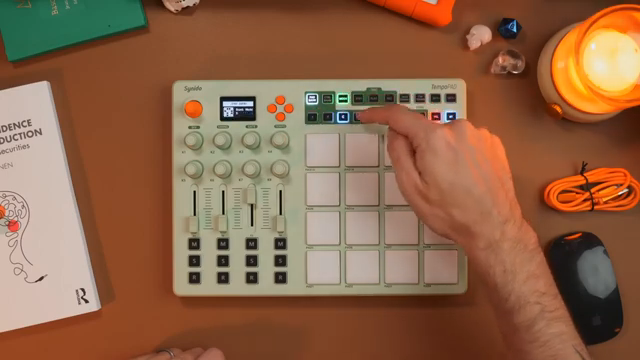
"So for the pads, we've got four banks of 16 pads, meaning that all four banks can contain 16 unique pads that we can program in different ways."
© Screenshot/Quote: Synidotech (YouTube)
Custom Mapping and Navigating Performance Workflows
"This is a controller you will have to do custom mapping with, which is not too difficult."
© Screenshot/Quote: Synidotech (YouTube)
The C16’s workflow is built around user-driven MIDI mapping, with the video making it clear that automatic DAW integration is not provided out of the box. Instead, users are encouraged to assign controls manually, a process that is described as straightforward and well-documented in the user guide. This hands-on approach allows for precise tailoring of the controller to individual setups, whether in Ableton Live, drum machines, or other DAWs.
Navigation is aided by dedicated buttons and an illuminated Bluetooth indicator, with additional options for adjusting velocity curves and fixed velocity modes. These features support a range of performance styles, from expressive finger drumming to consistent, quantized triggering. The emphasis here is on flexibility and adaptability, empowering users to mold the C16 to their preferred workflow.
Sequencing, Note Repeat, and MIDI Connectivity: Expanding the Creative Palette
The inclusion of a step sequencer adds another layer to the C16’s capabilities. While described as basic—limited to 16 steps with no advanced features like probability or pattern chaining—it nonetheless provides a straightforward way to program beats directly from the controller. Live recording into the sequencer is supported, and the workflow is demonstrated with kick, snare, and hi-hat patterns. Although power users may wish for deeper sequencing tools, the simplicity here keeps things accessible and fast.
Note repeat functionality is also present, with controls for time division, swing, gate, and tempo (including tap tempo and external sync). This is a staple for finger drumming and rapid-fire fills, and its implementation on the C16 is both immediate and flexible. On the connectivity front, the controller offers MIDI in, out, and thru ports, as well as USB-C for charging and wired MIDI use. The internal battery supports wireless sessions, though the non-replaceable design is noted as a trade-off. Overall, these features round out the C16’s appeal for both DAW-based and hardware-centric rigs.
"It's just a very basic step sequencer, which you can also record live into here."
© Screenshot/Quote: Synidotech (YouTube)
Mobile Integration: Koala and Beat-Making on the Move
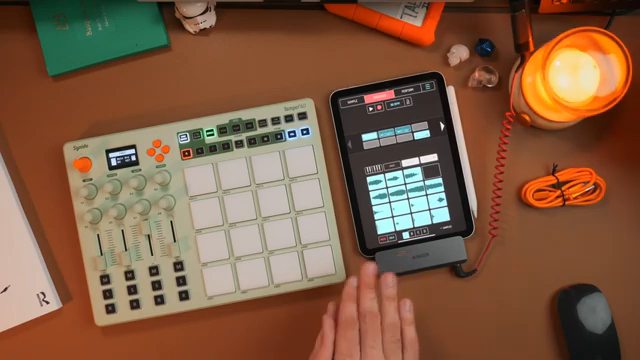
"A Bluetooth MIDI controller that you don't need to plug into the mobile device is the way to go."
© Screenshot/Quote: Synidotech (YouTube)
The video culminates with a demonstration of the C16’s compatibility with mobile apps, specifically Koala Sampler on iOS. The controller is recognized instantly, enabling wireless beat-making without the need for additional adapters or cables—a significant advantage given the port limitations of modern mobile devices. Mapping controls in Koala is shown to be quick and intuitive, allowing users to assign play, stop, and other functions directly from the C16.
This seamless integration underscores Synido Tech’s commitment to supporting mobile creators. The tactile feel of the pads is highlighted as a major improvement over touchscreen-only workflows, making the C16 a compelling option for producers who want hands-on control in a portable format. The overall message is clear: the TempoPAD C16 is designed to empower creativity wherever inspiration strikes.
This article is also available in German. Read it here: https://synthmagazin.at/synido-techs-tempopad-c16-drahtlose-midi-kontrolle-neu-gedacht-fuer-mobile-und-studio/
Watch on YouTube:
Latest articles
Watch on YouTube:
Visit the channel:
https://www.youtube.com/synidotech
https://www.youtube.com/synidotech
Links from synidotech:
website: https://www.synido.com
instagram: https://www.instagram.com/synidotech
facebook: https://www.facebook.com/109726971738618
linktree: https://linktr.ee/synidotech
Sponsored links:
If you purchase via these links, we may earn a small commission – at no extra cost to you. The link opens an Amazon keyword search, and results may vary depending on availability.
Synido TempoPAD C16
🔗 Check price on Amazon
🔗 Check price on Amazon