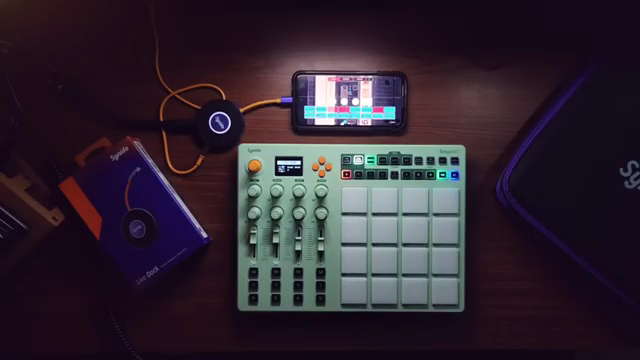
Synido Tech steps into the portable MIDI controller arena with the TempoPAD C16, aiming squarely at creators who crave a minimal, wireless workflow—especially those deep into the Koala Sampler ecosystem. In this official guide, Synido showcases how the C16’s Bluetooth connectivity, programmable controls, and compact design can transform a tablet or phone into a tactile beat-making powerhouse. The video walks through hands-on MIDI mapping, sample manipulation, and sequencing, all without the cable clutter. For anyone curious about how digital control surfaces can streamline mobile music production, this is a revealing look at how hardware and software can dance together in a truly portable rig.
29. August 2025
LYRA
Synido Tech’s TempoPAD C16: Minimalism Meets Wireless MIDI for Koala Sampler
Minimalism in Motion: The TempoPAD C16’s Core Philosophy
The video opens with a clear statement of intent: the creator values minimalistic setups, favoring standalone gear and streamlined workflows over hybrid, cable-laden rigs. This ethos sets the stage for the Synido TempoPAD C16, a wireless MIDI controller designed to maximize creative output with minimal hardware. The C16 is positioned as the centerpiece of a portable Koala Sampler setup, aiming to provide tactile control without sacrificing mobility or simplicity.
Synido Tech’s approach is evident in the details—Bluetooth connectivity, a built-in lithium battery, and a compact form factor that fits neatly into a travel case. The inclusion of the Synido Live Dock audio interface further reinforces the minimal, all-in-one philosophy, allowing users to sample directly into Koala with just a few pieces of gear. The focus here is on reducing friction: less setup time, fewer cables, and more immediate access to music-making, whether at a desk or on the go.
Feature Deep Dive: Connectivity, Control, and Customization
The TempoPAD C16’s hardware feature set is tailored for versatility. Bluetooth MIDI support means users can connect wirelessly to Android devices (with the help of the free MIDI BLE Connect app), sidestepping the need for adapters or extra cables. Physical connections are also available, with MIDI in, out, and thru ports on the back for those who want to integrate the C16 into more traditional setups.
Programmability is front and center: the controller offers multiple banks for pads, knobs, sliders, and buttons, each of which can be mapped up to four times via the CTRL BANK system. This architecture allows for a significant degree of customization, enabling users to assign controls for sample editing, sequencing, or performance effects as needed. The lithium battery ensures extended sessions without hunting for spare AAAs, and the overall build is clearly aimed at creators who need both flexibility and reliability in a portable package.
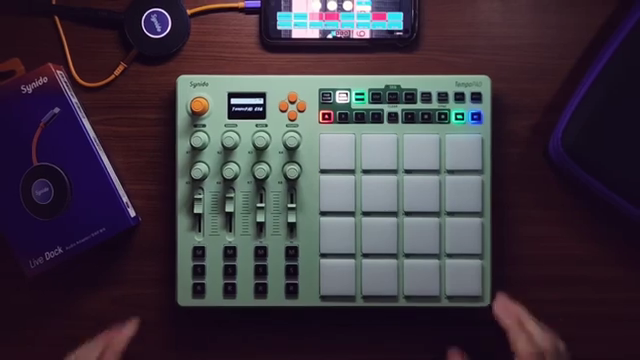
"This is a wireless Bluetooth MIDI pad controller with a lot of different features, as you can see, a lot of different controls that you can program."
© Screenshot/Quote: Synidotech (YouTube)
MIDI Mapping Mastery: Integrating with Koala Sampler
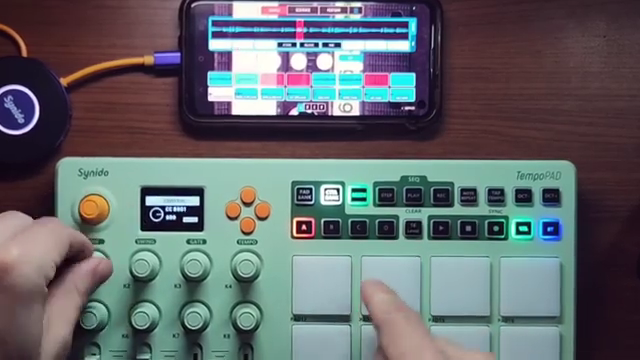
"We focus on this section right here, my volume. And I like the fact that, you know, you just move to the next pad, and then this is now controlling that pad."
© Screenshot/Quote: Synidotech (YouTube)
Integration with the Koala Sampler is where the C16’s design really shines. MIDI mapping is straightforward—users can assign each pad, knob, and slider to specific functions within Koala, from sample start and end points to pitch, pan, and even transport controls. The CTRL BANK system allows for logical grouping: one bank for sample manipulation, another for sequencing, and a third for performance effects, mirroring Koala’s own workflow sections.
This flexibility enables highly personalized setups. For example, users can dedicate knobs to EQ or sample reversal, assign faders to mixer tracks, and repurpose buttons for tap tempo, undo, or sequence clearing. The video demonstrates how quickly these mappings can be set up and adjusted, making it easy to adapt the controller to different creative needs. The result is a workflow that feels both tactile and immediate, bridging the gap between touchscreen software and hands-on hardware control.
Beyond the Basics: Step Sequencer and Note Repeat in Hardware
The C16 isn’t just a generic MIDI pad controller—it also includes its own hardware step sequencer and a flexible note repeat function. The step sequencer can be accessed directly from the device, allowing users to input and edit patterns without touching the screen. While the video only scratches the surface of this feature, it’s clear that the sequencer is designed for quick idea capture and basic pattern programming.
The note repeat function is particularly nuanced: not only can users set time divisions, swing, and gate, but they can also selectively enable or disable note repeat on a per-pad basis. This level of granularity is rare in compact controllers and gives beatmakers the ability to create intricate hi-hat rolls or rhythmic variations with ease. These hardware features extend the C16’s utility beyond simple triggering, making it a more complete creative tool for rhythm and sequencing.
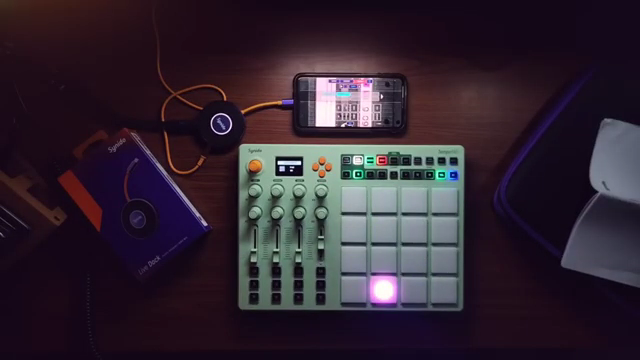
"The tempo pad C16 also has a pretty cool note repeat function. So if you press note repeat, we got note repeat for all the pads."
© Screenshot/Quote: Synidotech (YouTube)
A Portable Powerhouse: The C16 as the Heart of a Minimal Setup
In summary, the TempoPAD C16 is presented as the beating heart of a minimal, portable music production setup. Paired with the Synido Live Dock and a mobile device running Koala Sampler, it offers a cable-free, battery-powered environment that’s ready for beatmaking anywhere. The inclusion of a travel case and the compact footprint further reinforce its suitability for creators on the move.
What stands out is the way Synido Tech has architected the C16 to bridge hardware and software: deep MIDI programmability, wireless operation, and onboard sequencing tools all contribute to a workflow that’s both streamlined and powerful. While the video focuses on integration with Koala, the potential for broader hardware and DAW use is hinted at but not explored. For now, the C16 looks like a strong contender for anyone seeking a minimal, tactile, and portable control solution.
This article is also available in German. Read it here: https://synthmagazin.at/synido-tech-tempopad-c16-minimalismus-trifft-kabelloses-midi-fuer-den-koala-sampler/
Watch on YouTube:
Latest articles
Watch on YouTube:
Visit the channel:
https://www.youtube.com/synidotech
https://www.youtube.com/synidotech
Links from synidotech:
website: https://www.synido.com
instagram: https://www.instagram.com/synidotech
facebook: https://www.facebook.com/109726971738618
linktree: https://linktr.ee/synidotech
Sponsored links:
If you purchase via these links, we may earn a small commission – at no extra cost to you. The link opens an Amazon keyword search, and results may vary depending on availability.
Synido Live Dock
🔗 Check price on Amazon
🔗 Check price on Amazon
Synido TempoPAD C16
🔗 Check price on Amazon
🔗 Check price on Amazon