The Synido Tech TempoKey K25 enters a crowded field of compact MIDI controllers, but this official tutorial video makes a strong case for its place in the modern mobile studio. Synido Tech, known for their focus on affordable, high-quality gear for producers and creators, showcases the K25’s thoughtful design and workflow-centric features—especially in the context of iOS music production with Cubasis 3. From robust connectivity options to hands-on mapping and performance tools, the video walks through not just what the K25 can do, but how it wants to be played. For anyone seeking a portable, DAW-friendly keyboard that doesn’t rely on a dedicated app or convoluted setup, this deep dive is worth a close look.
31. March 2024
LYRA
Synido Tech’s TempoKey K25: A Digital Controller Built for Modern iOS Workflows
Unboxing the K25: A Controller for the DAW Generation
The Synido TempoKey K25 is introduced as a 25-key MIDI controller designed to serve as a versatile bridge between musicians and their digital audio workstations, with a particular focus on Cubasis 3 for iOS. The video’s presenter sets expectations early: while the market is saturated with similar controllers, the K25 earns attention for its build quality and thoughtful packaging. The device comes in a padded, roomy carry case, complete with a shoulder strap, making it a genuinely portable option for mobile musicians.
Inside the box, users find not only the keyboard but also a microfiber cloth for its glossy finish, a USB-A to USB-C cable, a 3.5mm MIDI adapter, and a USB-C adapter for modern iOS devices. The construction is described as dense and robust, with connectors that feel sturdy and reliable. The video emphasizes that the K25 is strictly a MIDI controller—it produces no sound on its own but is meant to interface with DAWs or other MIDI-enabled devices. The setup process is straightforward: plug into a powered hub or use the included adapters for iOS, and the device is ready to communicate with Cubasis 3 or other software without fuss.
Hands-On Features: Octaves, Transpose, and Touch Sensitivity
The K25’s front panel offers immediate access to essential performance controls. Octave up and down buttons allow users to shift the keyboard’s range by up to four octaves in either direction, with a display window providing real-time feedback on the current setting. This display also surfaces other contextual information as users navigate the controller’s functions, reducing menu-diving and keeping the workflow fluid.
Transpose buttons make it easy to adjust pitch on the fly, while the keys themselves strike a balance between mini and full-size, offering a tactile experience that stands out in this price bracket. The video highlights the K25’s touch sensitivity algorithms: users can select between linear, logarithmic, and exponential response curves, tailoring the feel to their playing style. A fixed velocity mode is also available for consistent output. These adjustments are made directly from the hardware via the main knob, reinforcing the K25’s commitment to hands-on, menu-light operation.
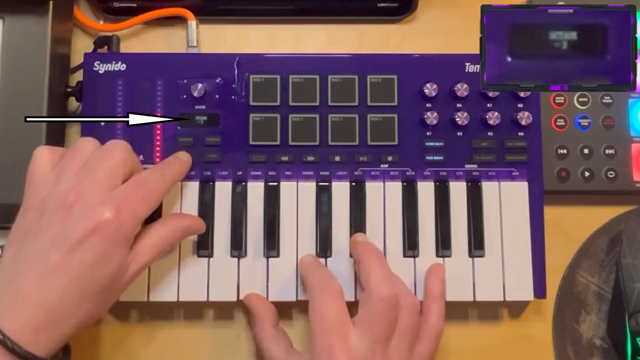
"This display window shows relevant information as we access many of the controller's functions and is incredibly helpful."
© Screenshot/Quote: Synidotech (YouTube)
Mapping Controls: Streamlined Integration with Cubasis 3
"Now I can operate the transport functions of my recording software from the keyboard."
© Screenshot/Quote: Synidotech (YouTube)
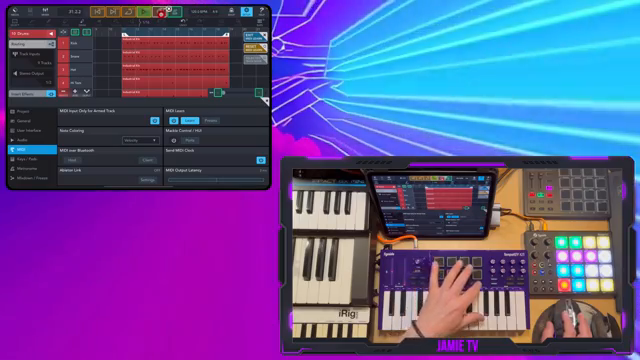
A major strength of the K25, as demonstrated, is its seamless integration with Cubasis 3’s MIDI learn system. Mapping transport controls—play, stop, loop, and metronome—takes only a few button presses, allowing users to operate DAW functions directly from the keyboard. This hands-on approach is especially valuable for mobile setups where screen real estate is at a premium.
The video also covers mapping the K25’s pads to Cubasis’s chord pads, enabling one-finger chord triggering and creative performance workflows. With two pad banks and two knob banks, users have access to 16 assignable pads and 16 assignable knobs. Assigning knobs to synth parameters is equally direct: touch a parameter, twist a knob, and the mapping is complete. This level of integration supports efficient sound design and performance without constant device switching or deep menu navigation.
Performance Tools: Arpeggiator, Note Repeat, and Assignable Controls
Beyond basic MIDI control, the K25 offers a suite of performance features that add depth to musical creations. The arpeggiator is accessed via dedicated buttons, with time division, swing, and direction settings available directly from the keyboard. Users can select latch mode and adjust the number of octaves covered, all without leaving the hardware interface.
Note repeat functionality is also present, allowing repeated triggering of notes based on the arpeggiator’s current settings. Tap tempo provides further flexibility for live performance or spontaneous composition. The assignable knobs and pads, with their dual banks, expand the controller’s utility in the studio, making it possible to control multiple synth parameters, effects, or DAW functions from a single, compact device.
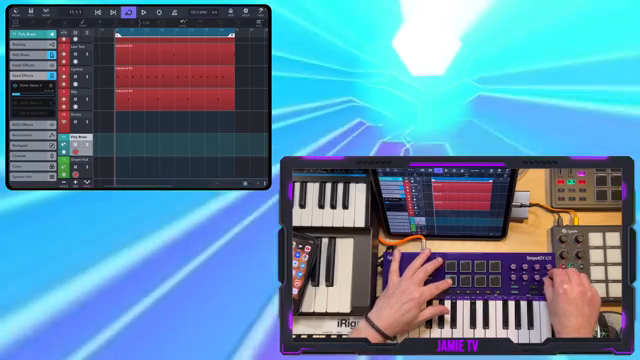
"I can control the transport bar, play chords, lead, and use the knobs to control synth parameters, volumes, and effects sends."
© Screenshot/Quote: Synidotech (YouTube)
Designed for iOS: Standalone Control Without the App Hassle

"Any change that you want to make for this controller you can do on the controller itself."
© Screenshot/Quote: Synidotech (YouTube)
A key message in the video is the K25’s suitability for iOS musicians. Unlike some previous Synido products, the K25 does not require a dedicated configuration app. All essential settings and mappings can be performed directly on the hardware, streamlining the workflow and eliminating the need to constantly switch between devices or software editors. This is a notable advantage for mobile producers who value immediacy and portability.
While the absence of an app means users cannot save multiple configuration profiles, the presenter argues that the K25’s on-device editing covers nearly all practical needs for most users. The video concludes with a strong endorsement: for its price bracket, the K25 stands out as a robust, flexible controller for iOS and mobile setups. Synido Tech may not have legacy status, but their approach to workflow and user experience is clearly tuned to the realities of modern music-making.
This article is also available in German. Read it here: https://synthmagazin.at/synido-techs-tempokey-k25-ein-digital-controller-fuer-moderne-ios-workflows/
Watch on YouTube:
Latest articles
Watch on YouTube:
Visit the channel:
https://www.youtube.com/synidotech
https://www.youtube.com/synidotech
Links from synidotech:
website: https://www.synido.com
instagram: https://www.instagram.com/synidotech
facebook: https://www.facebook.com/109726971738618
linktree: https://linktr.ee/synidotech
Sponsored links:
If you purchase via these links, we may earn a small commission – at no extra cost to you. The link opens an Amazon keyword search, and results may vary depending on availability.
Synido TempoKey K25
🔗 Check price on Amazon
🔗 Check price on Amazon