In this deep-dive, we explore how Synido Tech’s TempoPAD P16 MIDI controller pairs with the Koala Sampler app to create a surprisingly robust mobile beatmaking rig. The video, produced by TAETRO and featured on Synido Tech’s channel, walks through the Koala app’s sampling, editing, and sequencing features, while demonstrating how the P16 unlocks hands-on control for both beginners and seasoned producers. We break down the app’s architecture, workflow, and performance tools, and examine how this affordable setup stacks up against traditional hardware samplers. If you’re curious about mobile production or looking for a compact, flexible alternative to classic grooveboxes, this article is for you.
24. August 2024
LYRA
Synido Tech and Koala: Mobile Sampling Powerhouse Meets Pad Control
Koala App: Affordable Power for All Levels
The video opens with a clear mission: introduce the Koala Sampler app as a foundational tool for mobile music production. Priced at just $5, with expansions bringing the total to around $16, Koala is positioned as an accessible entry point for anyone with a smartphone or tablet. The presenter emphasizes that, while the app is beginner-friendly, it’s not limited to novices—advanced features are baked in, making it a viable option for more experienced beatmakers as well.
This dual focus on affordability and versatility is central to the video’s pitch. The Koala app is framed as a modern alternative to classic hardware like the SP-404, offering much of the same sampling and sequencing power in a portable, app-based package. The message is clear: if you’re starting out or looking for a compact, cost-effective solution, Koala deserves a serious look.

"If you've already got a mobile device or a tablet this app is a fantastic way to start your beat making journey."
© Screenshot/Quote: Synidotech (YouTube)
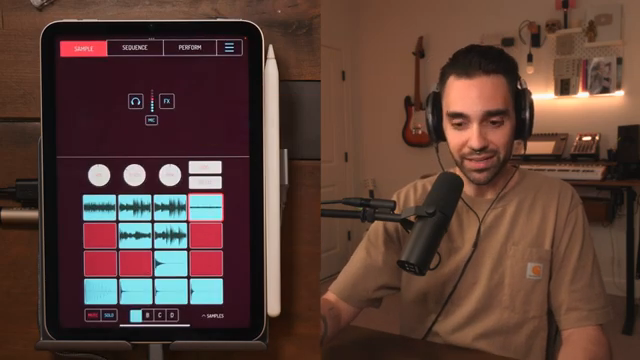
Sampling, Mic Recording, and Editing: Koala’s Intuitive Core
"We can use the iPad's microphone or your device's microphone to record into the app."
© Screenshot/Quote: Synidotech (YouTube)
The heart of Koala’s workflow lies in its sampling capabilities. Users can import sounds, record directly from their device’s microphone, or resample internally. The interface is designed for immediacy: loading drum hits, melodic chops, and loops is as simple as tapping and dragging. The video demonstrates how to record a sound via the mic, apply real-time effects like reverb or fuzz, and monitor input levels—all without leaving the main sample page.
Sample editing is equally streamlined. Each pad can be set to one-shot, loop, or hold modes, with additional options like reverse, ping-pong looping, and custom loop points. Attack, release, and tone controls allow for quick sculpting of each sound, while choke groups and time stretching help manage overlapping samples and tempo-matching. The presenter shows how to trim, normalize, auto-chop, and even EQ individual samples, highlighting Koala’s surgical precision despite its mobile roots.
Routing is another strength: samples can be assigned to one of four buses or the master, enabling differentiated processing later in the mixer. Volume, pitch, and pan adjustments are available per pad, and the app supports up to four pages of 16 pads each—enough for full arrangements. The editing tools are approachable but deep, striking a balance that should appeal to both casual beatmakers and those who want to dig in and fine-tune their sounds.
TempoPAD P16: MIDI Control, Mapped for Mobile
Synido Tech’s TempoPAD P16 is introduced as a MIDI controller purpose-built for mobile workflows. The video details its dual USB ports—one for device connection, one for external power—solving the perennial issue of mobile devices under-powering controllers. This hardware consideration is crucial for anyone planning to use a controller alongside their phone or tablet for extended sessions.
Integration with Koala is straightforward. The app’s MIDI mapping menu allows users to assign pads, transport controls, and even performance effects to the P16’s buttons and knobs. The presenter demonstrates mapping play/stop to a toggle (rather than momentary) and using the controller’s banks and pages to access all available samples and functions. The P16’s chromatic mode enables the playing of melodic samples across octaves, and the controller’s physical octave buttons further streamline this process. The result is a tactile, hands-on experience that brings hardware immediacy to the app-centric workflow.
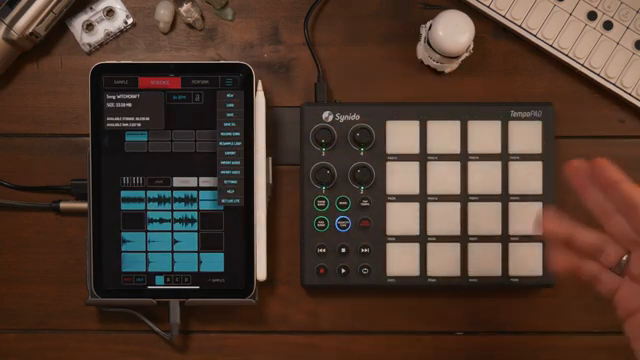
"The tempo pad is a great companion for the koala app."
© Screenshot/Quote: Synidotech (YouTube)
Creative Workflows: Sequencing, Performance FX, and Export
The tutorial shifts to Koala’s sequencing and performance features, showing how patterns are built, edited, and performed. The sequence page offers a grid for creating and arranging loops, with options for live recording, step input, and detailed MIDI editing. Quantization, probability (chance), and velocity tools are all present, allowing for both tight grooves and organic variation. Patterns can be chained and transitioned with customizable snapping, and the piano roll supports chromatic sample playback for melodic sequencing.
Performance effects are split into two banks—Vanilla and Strawberry—covering everything from filters and tape stops to more experimental treatments. Effects can be triggered momentarily or latched with a hold function, and the P16’s knobs can be mapped for real-time manipulation. The video also covers recording full performances, resampling internally, and exporting projects in multiple formats, including Ableton Live Drum Rack and session files. This flexibility makes Koala a legitimate option for both standalone production and integration into larger DAW or hardware setups.
The mixer section is a highlight, with four buses and a master channel supporting per-bus effects like drive, delay, sidechain, and more. The presenter demonstrates routing drums, percussion, and melodic elements to different buses for tailored processing, including classic sidechain ducking. The mixer’s architecture is surprisingly deep for a mobile app, offering much of the routing and FX flexibility found in desktop DAWs or dedicated grooveboxes.
Koala vs. Hardware: A Mobile Production Contender

"It's essentially like having an SP 404 built into your phone or your tablet."
© Screenshot/Quote: Synidotech (YouTube)
The video wraps up by positioning Koala as a compelling alternative to traditional hardware samplers, especially for those already invested in mobile devices. While the presenter is careful not to claim it can fully replace an SP-404 or similar hardware, the value proposition is hard to ignore: for under $20 (including expansions), users get a feature-rich sampler, sequencer, and performance tool that fits in a pocket.
For mobile producers, beatmakers on a budget, or anyone seeking a portable sketchpad with serious depth, the Koala app—especially when paired with Synido Tech’s TempoPAD P16—offers a workflow that’s both approachable and powerful. The video makes a strong case for this hybrid setup as a modern, flexible alternative to classic beatmaking rigs.
This article is also available in German. Read it here: https://synthmagazin.at/synido-tech-und-koala-mobile-sampling-power-trifft-pad-control/
Watch on YouTube:
Latest articles
Watch on YouTube:
Visit the channel:
https://www.youtube.com/synidotech
https://www.youtube.com/synidotech
Links from synidotech:
website: https://www.synido.com
instagram: https://www.instagram.com/synidotech
facebook: https://www.facebook.com/109726971738618
linktree: https://linktr.ee/synidotech
Sponsored links:
If you purchase via these links, we may earn a small commission – at no extra cost to you. The link opens an Amazon keyword search, and results may vary depending on availability.
Koala Sampler App
🔗 Check price on Amazon
🔗 Check price on Amazon
Synido TempoPAD P16
🔗 Check price on Amazon
🔗 Check price on Amazon