RolandChannel’s latest tutorial dives deep into the AIRA Compact P-6 Creative Sampler, a pint-sized device that fuses classic sampling with contemporary digital wizardry. This video, led by Dustin Good, explores the P-6’s granular engine, advanced sequencer, and a host of editing and performance features—all in a form factor that fits in your palm. The focus is on hands-on workflow, practical integration with mobile devices, and the creative potential unlocked by the P-6’s interface and effects. For anyone curious about how Roland’s digital architecture translates to real-world jamming, this is a detailed, workflow-centric walkthrough.
13. September 2024
LYRA
RolandChannel’s P-6 Creative Sampler: Pocket-Sized Power, Modern Sampling Workflow
A Pocket-Sized Sampler with Big Ambitions
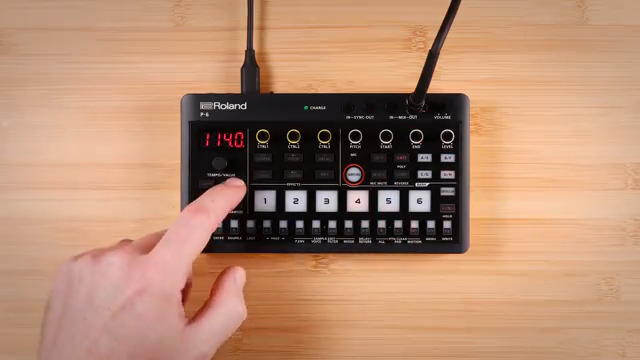
Roland positions the P-6 Creative Sampler as a compact yet highly capable instrument, designed to bridge the gap between classic sampling workflows and modern digital sound design. The device features eight banks of six pads, offering a substantial palette for sample storage and triggering within a remarkably small footprint. The interface is streamlined but flexible, with a rotary encoder for parameter navigation and a set of multipurpose buttons that morph between step sequencing, chromatic play, and pattern selection.
The P-6’s design ethos is clear: deliver hands-on control and immediate access to creative tools, whether you’re a sampling novice or a seasoned beatmaker. Roland’s approach, as seen in this video, is to make the fundamentals of sampling—recording, editing, and performance—accessible without sacrificing depth. The result is a device that aims to be as comfortable in a mobile jam session as it is in a more structured studio environment.
Granular, Sequencing, and Effects: The P-6 Feature Set
One of the P-6’s headline features is its granular sampler, which allows users to manipulate sound textures in detail. The granular engine can use any loaded sample as its source, enabling the creation of new stereo and polyphonic tones by adjusting parameters like head position and grain size. The video demonstrates how the granular section is integrated into the overall workflow, with dedicated controls and deep menu options for shaping grains, adjusting envelopes, and even introducing grain reverse probability for more experimental results.
Sequencing on the P-6 is handled by a 16-step multipurpose button array, which can function as a step sequencer, chromatic keyboard, or pattern selector. The sequencer supports real-time and step recording, motion recording of knob movements, microtiming, probability per step, sub-steps for ratchets, and polyphonic note entry. This advanced sequencing architecture is paired with a robust sample editing section, where users can adjust pitch, endpoints, looping modes, filter types, and amp envelopes on a per-pad basis. Each sample also features multi-mode filtering, individual effects routing, and the ability to switch between mono and polyphonic playback.
Effects are a central part of the P-6 experience. Each pattern has its own delay and reverb, with global options for seamless transitions during live performance. The MFX section offers a suite of performance-oriented effects, including DJ FX looper, pitch shifter, scatter, cassette simulation, and more. Samples can be routed through different buses to group them or exclude them from certain effects, providing nuanced control over the final output. This architecture is clearly designed to support both intricate sound design and spontaneous performance.
"The MFX section here offers a ton of great effects geared for performance and resampling."
© Screenshot/Quote: Rolandglobal (YouTube)
Sample Editing and Mobile Integration in Practice
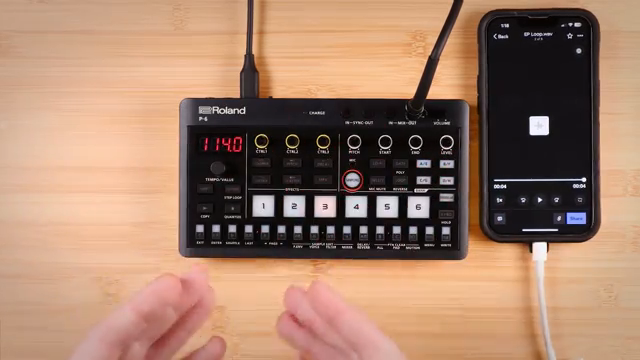
"One of the most exciting things about USB-C class compliant audio on the P6 is that the audio flows in both directions."
© Screenshot/Quote: Rolandglobal (YouTube)
The tutorial showcases practical sample editing, from chopping and step sampling to resampling and pad management. Users can chop samples into up to 64 slices, assign them across the keyboard, and use step sampling to quickly lay down new sounds in sequence. The workflow is optimized for speed: recording, editing, and assigning samples can be accomplished with minimal menu-diving, thanks to shift functions and dedicated controls.
Integration with external devices is a strong suit for the P-6. The sampler accepts input from a variety of sources, including the built-in microphone, stereo mix-in, USB-C audio, and even direct drag-and-drop from a computer. The video highlights how audio flows bidirectionally over USB-C, making the P-6 an ideal companion for mobile setups, streaming, or DAW recording. Roland’s free P-6 sample tool further streamlines the process, enabling users to prep and load samples from a desktop environment with ease.
Creative Workflows: Step Sampling and Granular Synthesis
Performance tools on the P-6 are designed to encourage experimentation and fast iteration. Step sampling allows users to record multiple samples in sequence and instantly map them across a pad, ready for chopping or polyphonic play. The granular engine, meanwhile, transforms any sample into a playground for textural manipulation, with deep control over grain parameters and envelope shaping.
These features are not just technical add-ons—they’re tightly integrated into the sequencer and pad architecture, allowing users to weave complex patterns, resample performances, and layer effects in real time. The result is a workflow that supports both structured composition and on-the-fly jamming, with enough depth to satisfy sound designers and enough immediacy for live performers.
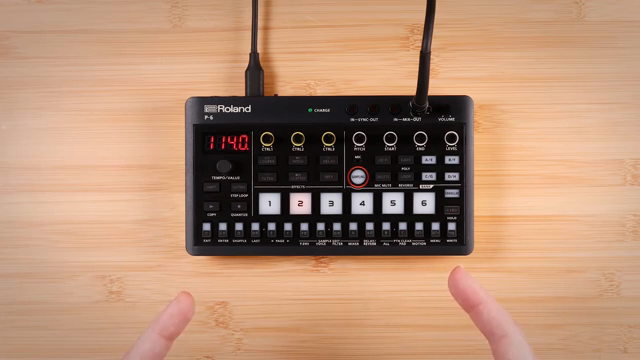
"The granular section on the P6 takes sound design to a whole nother level."
© Screenshot/Quote: Rolandglobal (YouTube)
Saving Projects: Seamless Recall for Any Setup
Project and settings management on the P-6 is straightforward. Users can save all work, individual pad settings, patterns, or effects configurations with a simple shift-and-write command. This ensures that creative sessions—whether spontaneous jams or carefully crafted arrangements—can be recalled without hassle. The video notes that a factory reset will erase internal samples and patterns, so backing up is recommended for those who want to safeguard their work.
This article is also available in German. Read it here: https://synthmagazin.at/rolandchannel-und-der-p-6-creative-sampler-taschenformat-mit-grossem-workflow/
Watch on YouTube:
Latest articles
Watch on YouTube:
Visit the channel:
https://www.youtube.com/rolandglobal
https://www.youtube.com/rolandglobal
Links from rolandglobal:
website: https://www.roland.com
roland_cloud: https://www.roland.com/global/promos/about_roland_cloud
instagram: https://instagram.com/rolandglobal
Sponsored links:
If you purchase via these links, we may earn a small commission – at no extra cost to you. The link opens an Amazon keyword search, and results may vary depending on availability.
Roland AIRA Compact P-6 Creative Sampler
🔗 Check price on Amazon
🔗 Check price on Amazon