Qu-Bit, ever the digital mavericks of Eurorack, return with a deep dive into the Stardust Cosmic Tape Looper’s lesser-known secondary features. In this no-nonsense walkthrough, the team eschews marketing fluff for a methodical exploration of shift functions, Narwhal-based configuration, and workflow enhancements. If you’re curious about how Stardust’s punch-in modes, loop import/export, and clock sync can reshape your modular rig, or how Narwhal unlocks further creative potential, this video is a must-watch. Expect a patch-oriented, detail-rich look at what Stardust really brings to the bench—beyond the obvious tape tricks.
19. December 2024
MILES
Qu-Bit Stardust: Unveiling the Cosmic Tape Looper’s Hidden Depths
Secondary Features: Beyond the Front Panel
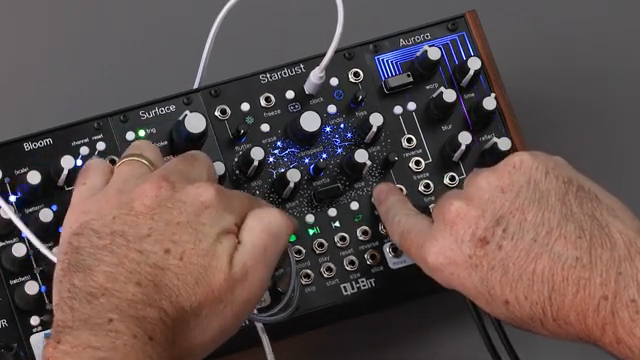
Qu-Bit’s Stardust is introduced here not just as a tape looper, but as a module brimming with secondary functions and hidden depths. The video wastes no time, moving quickly from the basics to the more arcane features accessible via the Shift button or through the Narwhal web app. These aren’t just afterthoughts—they’re integral to how Stardust can be tailored to fit a variety of patching philosophies.
The approach is refreshingly direct, with the creator demonstrating how secondary controls and software configuration can fundamentally alter the looper’s behaviour. Whether you’re after subtle workflow tweaks or radical changes in operation, Stardust’s design encourages exploration. It’s a clear nod to Qu-Bit’s ethos: digital innovation with a modular mindset, where the real magic often lies just beneath the surface.

"In this video, we're going to be exploring the features you won't necessarily find right off the bat."
© Screenshot/Quote: Qubitelectronix (YouTube)
Recording Modes and Loop Management: Hands-On Flexibility
"These modes change whether or not Stardust will take over starting or stopping a recording."
© Screenshot/Quote: Qubitelectronix (YouTube)
Diving into the heart of Stardust’s secondary features, the video highlights three distinct punch-in record modes, each accessed via Shift and the record button. The default mode offers manual control, while immediate hold and queued hold introduce automatic start and stop behaviours, giving users nuanced control over loop creation and overdubbing. These modes are visually indicated by blue, green, and gold LEDs, making it easy to keep track of your workflow mid-patch.
Loop import and export via USB are also covered in detail. Importing a WAV file is as simple as holding Shift and pressing play, provided your file is properly formatted. Exporting your current loop is equally straightforward, using Shift and the freeze button. The process is quick, but with the caveat that exporting will overwrite any existing loop file—so a bit of file management is in order if you’re juggling multiple ideas. It’s a workflow that should appeal to anyone who likes to move between DAW and hardware, or simply wants to preserve those happy accidents.
Integration and Customisation: Clock Sync, Firmware, and More
Stardust’s secondary functions extend well beyond recording tricks. Clock mode, toggled with Shift and the reverse button, allows the module to sync with external clocks, transforming skip, slice, freeze, and even record/reset behaviours to operate in time with your modular system. This is especially handy for those who want tight rhythmic integration or generative sequencing.
Firmware updates are handled directly from the module—no need to power cycle the rack—by holding Shift and pressing the loop mode button. Other thoughtful touches include the ability to dim the LEDs (Shift + Mix knob), adjust varispeed by octaves or set its range (with quantised, unquantised, fifths/octaves, or octaves-only modes), and tweak the inertial slope for tape lag behaviour. These features collectively make Stardust adaptable to a wide range of setups, from dimly lit stages to precision studio environments.

"You'll know you're in clock mode when the reverse LED is green."
© Screenshot/Quote: Qubitelectronix (YouTube)
Narwhal: The Web App Power-Up

"The first setting in Narwhal is mix mode, which changes the curve on mix."
© Screenshot/Quote: Qubitelectronix (YouTube)
Narwhal, Qu-Bit’s web-based configuration app, is showcased as the key to unlocking Stardust’s full potential. Users can adjust settings like mix mode, which changes the crossfade curve between dry and wet signals—offering transition, constant power, or linear options for different mixing preferences. This level of control is rare in Eurorack and speaks to Qu-Bit’s digital-first approach.
Other Narwhal-enabled tweaks include selecting the Nova output mode (gate, ramp, or splice-based signals), effect CV lock (assigning CV modulation to specific effects), reverb type (normal, bright, or dark), and button response behaviour for erase/undo. The process is straightforward: set your preferences in Narwhal, export the options file, and load it via USB—no rack reboot required. It’s a workflow that bridges the gap between hands-on hardware and modern software convenience.
Configurable Creativity: Stardust’s Expansive Palette
The video closes by underscoring how Stardust’s configurable settings—both on-module and via Narwhal—are central to maximising its creative potential. Rather than locking users into a single workflow, Qu-Bit encourages experimentation, letting you tailor the looper to suit everything from live performance to intricate studio patching. The result is a module that feels at home in any rack, ready to adapt as your ideas evolve.
This article is also available in German. Read it here: https://synthmagazin.at/qu-bit-stardust-verborgene-tiefen-des-cosmic-tape-loopers-enthuellt/
Watch on YouTube:
Latest articles
Watch on YouTube:
Visit the channel:
https://www.youtube.com/QuBitElectronix
https://www.youtube.com/QuBitElectronix
Links from QuBitElectronix:
Sponsored links:
If you purchase via these links, we may earn a small commission – at no extra cost to you. The link opens an Amazon keyword search, and results may vary depending on availability.
Qu-Bit Stardust
🔗 Check price on Amazon
🔗 Check price on Amazon