If you’re sick of spending hours on overcooked rumble kicks that still sound like wet cardboard, Pick Yourself has a fix. In this punchy tutorial, he slices through the faff and shows how to build a proper techno rumble kick—fast, dirty, and tight. No labyrinthine chains, no endless tweaking, just a streamlined Ableton setup that gets your low end bouncing in minutes. Expect gritty processing, clever channel tricks, and the kind of advice only a coach who’s heard 400 unfinished tracks can give. If you want your kicks to slap, not flop, this is essential viewing.
7. May 2026
SPARKY
Pick Yourself’s Rumble Kick Hack: Techno Low End in Warp Speed
Ableton Amp, Ableton Hybrid Reverb, Ableton Live, DS Drum Synth (Ableton), Shaperbox
Rumble Kicks Without the Headache
Pick Yourself kicks things off by calling out the classic producer mistake: turning rumble kicks into a science project and getting nowhere. He’s seen too many producers waste hours on convoluted chains, only to end up with a flabby low end that doesn’t stack up to their references. Instead, he’s all about a streamlined approach that actually gets tracks finished instead of stuck in the endless tweak zone.
The video’s premise is simple—ditch the complexity, get results. Pick Yourself’s method is born from coaching over 400 producers, so he’s not just winging it. He promises a technique that nails the rumble kick every time, and he’s ready to show exactly how it’s done. No more procrastination, just progress.

"Most producers overcomplicate their rumble kicks and wonder why they're low and never sounds as good as their references."
© Screenshot/Quote: Pickyourselfofficial (YouTube)
One Channel, One Mission: Tight Low End
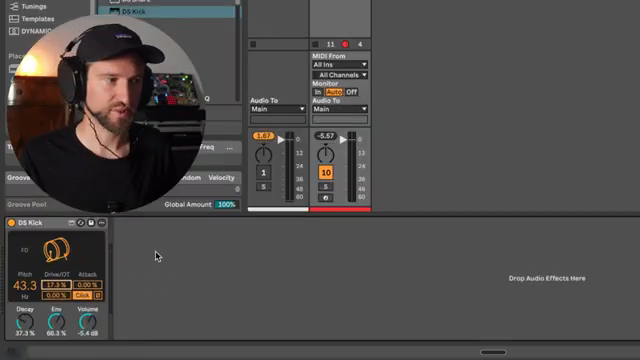
"You can directly do everything on one channel to be completely honest with you usually I separate out the kick and the rumble so I have individual control over everything but if I want to work really really fast and just get my idea out of my head into the DAW as quickly as possible I just throw it in like this."
© Screenshot/Quote: Pickyourselfofficial (YouTube)
Forget splitting your kick and rumble across a dozen tracks—Pick Yourself shows how to get it done on a single channel for maximum speed. He usually separates the kick and rumble for control, but when it’s time to move fast, he groups and duplicates, keeping everything tight and simple. The key is to process only the rumble copy, so you don’t muddy up your main kick.
He walks through setting up the kick with Ableton’s DS drum synth, but makes it clear you can use any drum synth or sample. The focus is on getting a solid starting point, then using grouping and colour-coding to keep things clear. This is workflow for people who want to get ideas out of their head and into the DAW before inspiration dies.
Distort, Delay, Destroy: Shaping the Rumble
Now for the fun bit: mangling the rumble. Pick Yourself dives into pitch shifting, dropping the rumble down for proper sub action and stripping away any clicky attack. He tweaks decay and envelope settings to get that signature tail, then slaps on a delay to focus the energy in the low end. Within seconds, you’ve got a moving sub that’s more than just a static thud.
He doesn’t stop there—distortion and reverb are next. Using Ableton’s Amp for grit and Hybrid Reverb for texture, he layers up a dark, smeared rumble that oozes techno attitude. There’s talk of feeding the amp into the reverb or vice versa, but the message is clear: don’t overthink it, just experiment until it sounds filthy. If you want to hear how nasty this gets, you’ll need to watch the video—words don’t do the dirt justice.
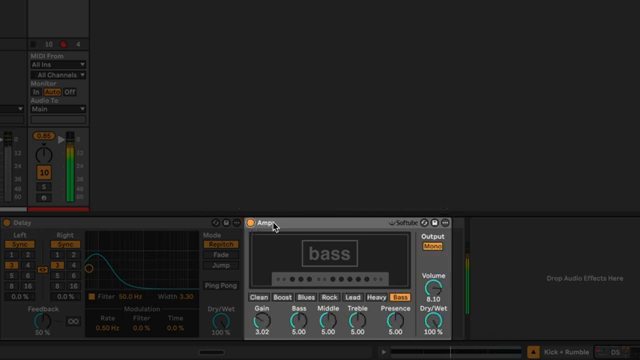
"The idea is not to get beautiful distortion on this the idea is to really create that smear that grit that texture."
© Screenshot/Quote: Pickyourselfofficial (YouTube)
Keep It Clean: Dynamics and Separation
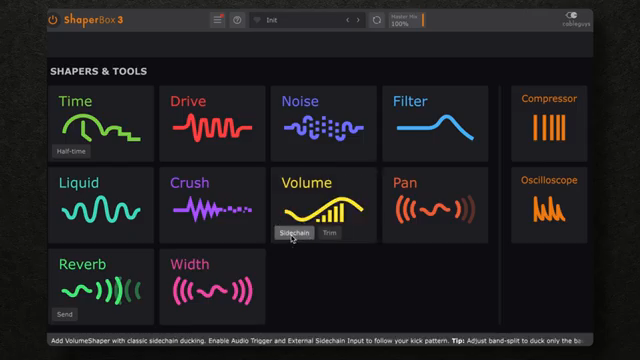
"It ducks this rumble chain in the moment where the kick hits the kick is happening here the rumble is happening here and we can then kind of fine tune this and see like if any of the other curves work best."
© Screenshot/Quote: Pickyourselfofficial (YouTube)
With the rumble sounding fierce, Pick Yourself stresses the importance of keeping it out of the kick’s way. He uses sidechain volume shaping (ShaperBox or Ableton’s own) to duck the rumble when the kick hits, making sure the two don’t fight for space. Fine-tuning the curve is quick and dirty—no perfectionism, just what works.
He also throws in filtering tricks, boosting resonance in the low end and using LFOs to add subtle movement. The goal is always the same: keep the kick punching through while the rumble supports from below. Compression, EQ, and even some glue on the group are options, but he’s clear that sometimes separation is better than gluing everything into a mush. It’s about making the low end bounce, not blur.
See It, Hear It, Feel It: Why the Video Matters
Pick Yourself wraps up by showing the rumble kick in context with percussion and the rest of the track. He reminds us that while the method is simple, the real magic is in the sound—something you need to hear, not just read about. If you want to catch the nuances, the punch, and the dirt, you’ll have to watch the video yourself. Trust me, your speakers will thank you.
This article is also available in German. Read it here: https://synthmagazin.at/pick-yourselfs-rumble-kick-hack-techno-tiefbass-im-turbomodus/
More articles about these products:
 Stereo for the Streets: Underdog Electronic Music School Drops the Panning & Haas Reality Check
 Architecting Performances: Novation Launch Control and Ableton Live Macro Workflows
 Nebula Machines: Bahadırhan Koçer and the Sonic Physics of Dub Techno
 Pick Yourself’s Hypnotic Bass Hack: Rumble Kicks Are Out, Sliding Grooves Are In
 Mad Moments & Club Tactics: Tom VR Gets Real with MusicRadar Tech
 Bonedo Synthesizers: How to Make Any Synth Scream Acid Like a 303
 LNA Does Audio Stuff: Making Beats on the Cheap with Ableton Note—Beach Edition
 Andrew Huang’s Remix Rodeo: Four Producers, One Song, Total Mayhem
 MusicRadar Tech Unleash Ableton Beat Repeat: From Lazy Slicer to Glitch Mayhem
 Pick Yourself Makes Echo Bang: Delay as Synth Weapon
 Underdog Electronic Music School: Don’t Let Your Beats Collect Dust
 Polyend Play+ in the Hot Seat: Nu-Trix The Synth Guy Gets Real
Watch on YouTube:
Latest articles
Watch on YouTube:
Visit the channel:
https://www.youtube.com/pickyourselfofficial
https://www.youtube.com/pickyourselfofficial
Links from pickyourselfofficial:
Work with me: https://pickyourself.com/coaching/
FREE Guide: https://pickyourself.com/framework/
Sponsored links:
If you purchase via these links, we may earn a small commission – at no extra cost to you. The link opens an Amazon keyword search, and results may vary depending on availability.
Ableton Amp
🔗 Check price on Amazon
🔗 Check price on Amazon
Ableton Hybrid Reverb
🔗 Check price on Amazon
🔗 Check price on Amazon
Ableton Live
🔗 Check price on Amazon
🔗 Check price on Amazon
DS Drum Synth (Ableton)
🔗 Check price on Amazon
🔗 Check price on Amazon
Shaperbox
🔗 Check price on Amazon
🔗 Check price on Amazon