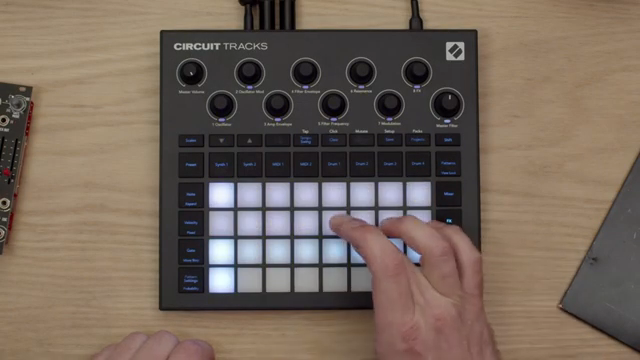
Novation’s Circuit Tracks is pitched as more than just a groovebox—it’s a hands-on sound design and automation playground for producers who want to push beyond static patterns. In this official NovationTV video, Dylan walks through a series of practical techniques for browsing, tweaking, and automating sounds, all within the Circuit Tracks’ tightly integrated workflow. From macro knob sound shaping to extended phrase automation, the focus is on how to get evolving, expressive results without menu diving or DAW dependency. For anyone curious about how Circuit Tracks handles real-time manipulation and performance-friendly arrangement, this is a revealing, workflow-centric demonstration.
21. June 2025
LYRA
Novation Circuit Tracks: Automation Tricks for Dynamic Groovebox Workflows
Circuit Tracks: A Platform for Expressive Automation
The video opens with Dylan setting the stage for a hands-on session with Novation’s Circuit Tracks, immediately positioning the device as a central tool for creative music production. The initial focus is on the groovebox’s ability to facilitate both beat-making and deeper sound manipulation, with drums already in play as a foundation.
Rather than simply sequencing static loops, the workflow here is about evolving patterns and textures through real-time tweaks and automation. Circuit Tracks is presented as a device that encourages experimentation, allowing users to quickly move from idea to execution without breaking the creative flow.
Preset Browsing and Macro Sound Shaping
Dylan demonstrates the preset browsing system, which leverages the Circuit Tracks’ grid to present a wide palette of sounds. Each preset can be previewed instantly, streamlining the process of finding the right timbre for a track. The grid-based interface is clearly designed for speed and playability, minimizing friction when auditioning sounds.
Once a suitable preset is found, the macro knobs become the primary interface for sound shaping. These macros are context-sensitive, mapped differently for each preset but always matching the hardware’s labeling. The video highlights how quickly a sound can be transformed from a short pluck to a swelling chord, reinforcing the instrument’s focus on tactile, performance-oriented control.
"Each sound has the macro knobs mapped in different ways."
© Screenshot/Quote: Novationtv (YouTube)
Building Chords, Basslines, and Refining with Effects
"I'm going to add some delay to that synth part and I'll add some reverb as well."
© Screenshot/Quote: Novationtv (YouTube)
The workflow moves into constructing an eight-bar chord phrase using pattern chaining and extended note mode. Dylan demonstrates how to link multiple patterns for longer phrases, then selects octaves and records a chord part, adjusting as needed to fit the musical context. This approach allows for more complex arrangements without leaving the hardware environment.
Sound refinement is handled directly on the device, with effects such as delay and reverb added via the effects mode. The video shows how tweaking filter cutoff, amplitude envelope, and filter envelope modulation can dramatically alter the character of the part, all in real time.
The process is then repeated for the bass, with a focus on extending patterns to two bars and using the same preset for sonic cohesion. Sidechain techniques are introduced to help the bass and chords sit together in the mix, demonstrating how Circuit Tracks supports both sound design and basic mix engineering within its workflow.
Automation: Extending Phrases and Real-Time Manipulation
Automation is presented as a key strength of Circuit Tracks, enabling users to create evolving musical phrases from simple patterns. Dylan shows how duplicating a short bass pattern across multiple patterns allows for automation of synth parameters over a longer phrase, adding movement and variation without changing the underlying notes.
The demonstration continues with automation of mixer effects, specifically delay and reverb sends, to add dynamic splashes of brightness as the filter opens. This real-time manipulation is recorded directly into the sequence, making it possible to build intricate, expressive arrangements with minimal effort.
Throughout, the emphasis is on hands-on control and immediate feedback. The video makes it clear that Circuit Tracks is designed for producers who want to inject life into their sequences through performance gestures and parameter automation, rather than static programming.
"By manipulating the filter I can really make that phrase talk."
© Screenshot/Quote: Novationtv (YouTube)
From Simple Patterns to Dynamic Arrangements
"By repeating a simple musical pattern but then creating a longer phrase of automation over the top you can make quite a moving part with a very simple musical sequence."
© Screenshot/Quote: Novationtv (YouTube)
The session wraps up by underscoring how Circuit Tracks’ automation and pattern chaining capabilities allow for the creation of complex, evolving arrangements from the simplest musical building blocks. Even with a basic sequence, the addition of layered automation transforms the result into something much more engaging.
Novation’s presentation style here is direct and practical, focusing on actionable techniques rather than abstract theory. The takeaway is clear: with Circuit Tracks, dynamic soundscapes and performance-ready tracks are within reach, even for those starting with just a handful of notes.
This article is also available in German. Read it here: https://synthmagazin.at/novation-circuit-tracks-automations-tricks-fuer-dynamische-groovebox-workflows/
Watch on YouTube:
Latest articles
Watch on YouTube:
Visit the channel:
https://www.youtube.com/NovationTV
https://www.youtube.com/NovationTV
Links from NovationTV:
website: https://novationmusic.com
instagram: https://instagram.com/wearenovation
twitter: https://twitter.com/WeAreNovation
facebook: https://facebook.com/NovationMusic
Sponsored links:
If you purchase via these links, we may earn a small commission – at no extra cost to you. The link opens an Amazon keyword search, and results may vary depending on availability.
Novation Circuit Tracks
🔗 Check price on Amazon
🔗 Check price on Amazon