Intellijel’s Multigrain module steps into the Eurorack sampling arena with a distinctly patch-friendly approach to granular sound design. In this official video manual, Intellijel walks through the nuts and bolts of loading, recording, and editing samples, all within the context of firmware version 1.1.0.0. True to Intellijel’s practical style, the video is a guided tour of real-world patching, showing how Multigrain integrates with other modules and encourages hands-on manipulation. For anyone curious about granular workflows or looking to wrangle samples in a modular environment, this is a deep dive worth your voltage.
26. April 2025
MILES
Intellijel Multigrain: Granular Sampling in Patchwork Detail
Intellijel 62HP 4U Palette Case, Intellijel MultiGrain, Intellijel Plonk, Intellijel Stereo I/O 1U, Intellijel Tête, Intellijel Tetrapad, Intellijel XY I/O 1U
Meet Multigrain: Granular Sampling, Modular Style
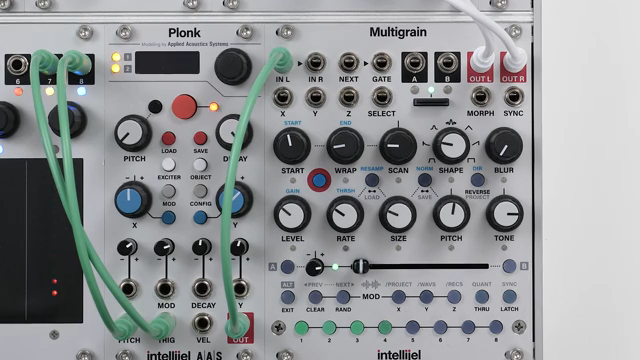
The Intellijel Multigrain is introduced as a versatile granular sampling module, tailored for creative sound design within modular systems. Its core function is to let users load and manipulate samples, feeding them into a granular engine for further sonic exploration. The video sets the stage by outlining the four main topics: sample loading and navigation, basic sampling, sampling settings, and advanced sampling.
Multigrain’s design philosophy is clearly aimed at hands-on patchers who want immediate access to sample-based textures. With eight sound buttons, each capable of holding a different sample, the module invites experimentation and quick swapping of sounds. The approach is less about menu-diving and more about tactile interaction, fitting neatly into the ethos of Eurorack workflows.
Sampling Unpacked: Loading, Recording, and Editing
The video dives into the practicalities of sample loading, demonstrating how users can access three main folders—/project, /waves, and /rex—on the microSD card. Each folder serves a distinct purpose: project-specific samples, a global pool for reusable sounds, and a chronological archive of user-recorded material. Navigation is straightforward, with latching and scrolling functions allowing for quick auditioning and assignment of samples to sound buttons.
Basic sampling is shown as a non-disruptive process. Users can record new audio directly into Multigrain without interrupting playback or triggering, thanks to a clever monitoring system. The module’s always-listening buffer is a highlight, capturing up to 32 seconds of audio in the background—ideal for those happy accidents that occur mid-patch. Assigning, saving, or discarding samples is handled with a few button presses, keeping the workflow fluid.
Advanced editing options come into play with the sampling settings page. Here, users can tweak gain, set threshold-triggered recording, and choose between input or resampling modes. Normalisation is available to level out recordings, and all settings persist across sampling modes. The video emphasises that these features are designed to keep users in the creative flow, rather than bogged down by technical interruptions.
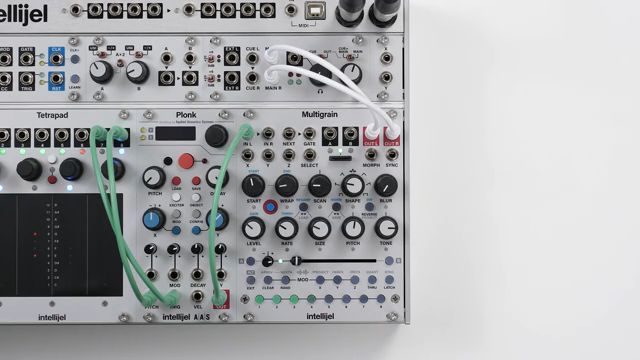
"This sampling process is non-disruptive meaning that the audio from the module isn't interrupted while we're sampling or assigning samples to a sound."
© Screenshot/Quote: Intellijel (YouTube)
Sample Navigation and Real-Time Editing: The Button Ballet
Navigating sample folders and assigning sounds is a tactile affair on Multigrain. The video demonstrates how users can move between folders, preview samples, and latch sounds for continuous auditioning. Assigning samples to the eight sound buttons is immediate, and the copy-paste function allows for quick duplication of settings or samples between slots.
Real-time editing is another strength. Users can randomise sound settings, clear individual samples or settings, and even overwrite sounds on the fly. The interface is designed for fast, in-the-moment decisions, supporting both structured sample management and spontaneous patching. This approach keeps the module responsive to the needs of live performance or evolving studio sessions.
Advanced Sampling: Trimming, Splitting, and Precision Editing
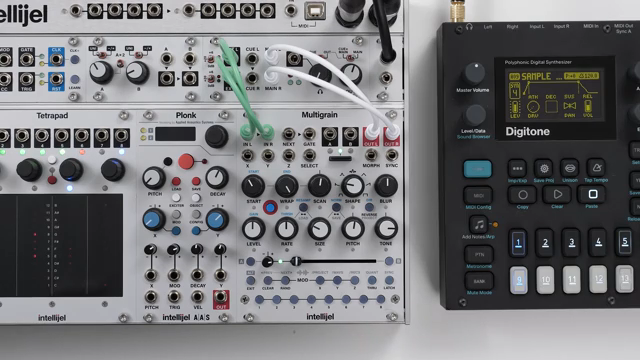
"Advanced sampling adds an editing stage to the basic sampling process. This pauses the granular engine so that we can preview, trim, save and assign multiple samples from a longer recording."
© Screenshot/Quote: Intellijel (YouTube)
Advanced sampling techniques are showcased as the video moves into trimming and editing longer recordings. Multigrain pauses its granular engine during this stage, allowing users to preview, trim, and assign multiple samples from a single recording. The interface provides start and end controls, nudge functions for fine adjustment, and scene buttons for quick previewing of different sample segments.
This editing workflow is particularly useful for extracting usable grains from complex or lengthy recordings. The ability to overwrite existing sounds, access previous takes from the always-listening buffer, and save trimmed samples to specific locations gives users granular control—pun intended—over their sonic material. The video makes clear that these tools are intended to empower detailed sound sculpting without breaking the modular patching mindset.
Seamless Integration: Sampling Without Disruption
A recurring theme in the video is the non-disruptive nature of Multigrain’s sampling process. Whether recording, editing, or assigning samples, the module maintains audio output and keeps the creative flow uninterrupted. This is especially valuable in a modular context, where stopping the patch to manage samples can kill the vibe.
The workflow is shown integrating smoothly with other Intellijel modules, such as Plonk and Stereo I/O 1U, as well as external gear like the Digitone. The video highlights how Multigrain’s sampling and editing tools complement a broader Eurorack setup, making it a flexible hub for granular experimentation.
Ultimately, the video positions Multigrain as a module that encourages exploration and risk-taking. By keeping sampling and editing accessible and immediate, it invites users to treat samples as living material—ready to be shaped, layered, and reimagined in the heat of a patching session.
This article is also available in German. Read it here: https://synthmagazin.at/intellijel-multigrain-granulares-sampling-im-patch-alltag/
Watch on YouTube:
Latest articles
Watch on YouTube:
Visit the channel:
https://www.youtube.com/intellijel
https://www.youtube.com/intellijel
Links from intellijel:
website: https://intellijel.com
forum: https://forum.intellijel.com
instagram: https://instagram.com/intellijel
facebook: https://www.facebook.com/intellijel
Sponsored links:
If you purchase via these links, we may earn a small commission – at no extra cost to you. The link opens an Amazon keyword search, and results may vary depending on availability.
Intellijel 62HP 4U Palette Case
🔗 Check price on Amazon
🔗 Check price on Amazon
Intellijel MultiGrain
🔗 Check price on Amazon
🔗 Check price on Amazon
Intellijel Plonk
🔗 Check price on Amazon
🔗 Check price on Amazon
Intellijel Stereo I/O 1U
🔗 Check price on Amazon
🔗 Check price on Amazon
Intellijel Tête
🔗 Check price on Amazon
🔗 Check price on Amazon
Intellijel Tetrapad
🔗 Check price on Amazon
🔗 Check price on Amazon
Intellijel XY I/O 1U
🔗 Check price on Amazon
🔗 Check price on Amazon