Intellijel, the Canadian modular stalwart, dives deep into the granular world with their Multigrain module, and this video is all about synchronising those grains to external clocks. The focus is on the Sync Input and how it transforms the module’s behaviour, letting you lock grain rates to your wider Eurorack system. Expect a clear, patch-oriented walkthrough, with practical demonstrations of how linking controls like Size and Rate can yield everything from tight rhythmic pulses to overlapping textures. If you’re after granular precision or creative chaos in your rack, this is a must-watch for understanding Multigrain’s sync tricks.
16. May 2025
MILES
Intellijel Multigrain: Clocking Chaos and Grain Discipline
Intellijel 62HP 4U Palette Case, Intellijel MIDI 1U, Intellijel MultiGrain, Intellijel Stereo I/O 1U, Intellijel Tangrams, Intellijel Tête, Intellijel Tetrapad, Intellijel XY I/O 1U
Granular Foundations: Multigrain in the Modular Ecosystem
Intellijel opens the proceedings by positioning Multigrain as a flexible tool for granular synthesis within the modular realm. The module is designed to manipulate sound in ways that go well beyond simple sample playback, inviting users to explore the microstructure of audio. Right from the outset, the focus is on how Multigrain integrates into a larger Eurorack setup, with an emphasis on hands-on control and patching possibilities.
The video’s introduction sets the stage for a practical exploration, making it clear that Multigrain is not just about abstract DSP but about real-world interaction. It’s a module that wants to be clocked, modulated, and reset—an invitation for modular users to get their hands dirty with grains, clocks, and triggers. This context is classic Intellijel: practical, musical, and always thinking about how modules play together.
Sync Input: Bringing Grains to Heel
The heart of the video is the Sync Input, which allows Multigrain’s grain generation to be clocked from an external source. Once patched, every sound in a preset can have its grain rate follow the incoming clock, making synchronised granular textures possible. The process is straightforward: enable Sync via the ALT menu, patch in your clock, and the grains march in step with your system.
This synchronisation is per preset, so you can have different rhythmic behaviours across your saved sounds. The demonstration makes it clear that the Sync Input primarily affects the Rate control, turning it into a divider or multiplier of the clock. This means you can dial in anything from slow, spaced-out grains to frenetic bursts, all locked to your master clock—a boon for anyone who wants granular textures that actually groove.

"Multi-grains rate control can be synchronized to an external clock source via the Sync Input."
© Screenshot/Quote: Intellijel (YouTube)
Linked Controls: Size, Rate, and the Morphing Grain Machine
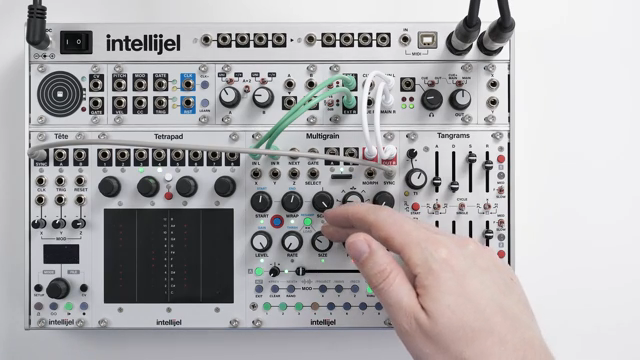
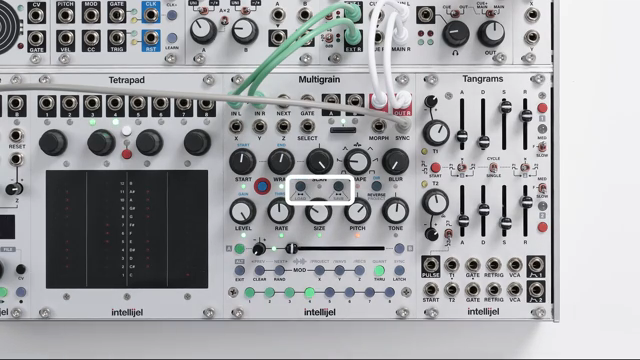
"As I slowly turn the Size control, listen to how the rate changes with increments, rather than continuously."
© Screenshot/Quote: Intellijel (YouTube)
Things get more interesting when you start linking controls. With Size and Rate linked, the size of each grain now determines the rate at which grains are generated. When Sync is active, this relationship snaps to clock divisions, creating stepped, rhythmic changes as you tweak the Size knob. The Rate control becomes a multiplier, letting you quickly move from one clock division to another, and overlapping grains become part of the sonic palette as you push the rate higher.
If you link Pitch as well, it starts to influence both Size and Rate, shrinking grains and increasing their rate as you raise the pitch. The video demonstrates how these interactions behave both with and without Sync, but the real magic is in how everything locks to the clock when Sync is enabled. It’s a patcher’s playground: overlapping grains, rhythmic divisions, and the ability to sculpt granular textures that are both precise and lively.
Creative Rhythms: Manual Triggering and Phase Play
The video moves on to practical use cases, showing how Multigrain can be synced to external gear like Digitone via MIDI. Even when grains are synchronised, they aren’t phase-locked to the clock, which means you can get creative with manual triggering. By using the sound buttons or sending triggers to the Gate or Next inputs, you can reset the phase and start point of the grains, aligning them with your beat or deliberately offsetting them for polyrhythmic effects.
This approach turns Multigrain into a rhythmic tool, not just a texture generator. Regularly re-triggering the sound lets you play with Rate, Size, Wrap, and Scan to build complex, repeatable patterns. The option to reset grains even when unsynced opens up further possibilities for unpredictable loops and evolving textures. It’s a reminder that in modular, sometimes the most musical results come from a bit of manual intervention.
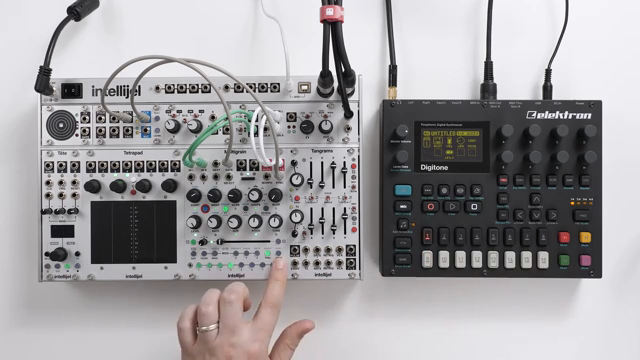
"When using multi-grain in this way, we can think of the sound buttons or the Gate inputs as a reset function, similar to what you might find on a Eurorack sequencer."
© Screenshot/Quote: Intellijel (YouTube)
Wrapping Up: Sync Strategies and Future Firmware
The session closes with a concise summary of synchronisation techniques, reinforcing the flexibility of Multigrain’s grain management. The presenter notes that any changes in future firmware will be covered in upcoming videos, and points viewers to the written manual for deeper dives. It’s a typically thorough Intellijel wrap-up—practical, forward-looking, and focused on giving patchers the tools to get the most out of their granular adventures.
This article is also available in German. Read it here: https://synthmagazin.at/intellijel-multigrain-getaktetes-chaos-und-disziplinierte-grains/
Watch on YouTube:
Latest articles
Watch on YouTube:
Visit the channel:
https://www.youtube.com/intellijel
https://www.youtube.com/intellijel
Links from intellijel:
website: https://intellijel.com
forum: https://forum.intellijel.com
instagram: https://instagram.com/intellijel
facebook: https://www.facebook.com/intellijel
Sponsored links:
If you purchase via these links, we may earn a small commission – at no extra cost to you. The link opens an Amazon keyword search, and results may vary depending on availability.
Intellijel 62HP 4U Palette Case
🔗 Check price on Amazon
🔗 Check price on Amazon
Intellijel MIDI 1U
🔗 Check price on Amazon
🔗 Check price on Amazon
Intellijel MultiGrain
🔗 Check price on Amazon
🔗 Check price on Amazon
Intellijel Stereo I/O 1U
🔗 Check price on Amazon
🔗 Check price on Amazon
Intellijel Tangrams
🔗 Check price on Amazon
🔗 Check price on Amazon
Intellijel Tête
🔗 Check price on Amazon
🔗 Check price on Amazon
Intellijel Tetrapad
🔗 Check price on Amazon
🔗 Check price on Amazon
Intellijel XY I/O 1U
🔗 Check price on Amazon
🔗 Check price on Amazon