Ever lost hours of your life bouncing stems in Logic Pro, soloing tracks while your coffee goes cold and your will to live drains away? Chris Sangster, the man behind sangstersounds, has found a tool that promises to end this madness: EasyBounce. In his latest video, Chris walks us through this automation beast, showing how it turns Logic’s most tedious task into a set-and-forget affair. Whether you’re a studio rat or a gigging producer, if you’re sick of clicking your way through stem exports, this is a must-watch. We dig in, so you can decide if this is the workflow hack you never knew you needed.
21. June 2026
SPARKY
Chris Sangster vs. Logic’s Stem-Bounce Nightmare: EasyBounce to the Rescue
Stem Bouncing: The Worst Chore Gets a Robot Butler
Let’s not sugarcoat it: bouncing stems in Logic Pro is about as much fun as watching paint dry in a windowless bunker. Chris Sangster wastes no time calling out this old-school pain point—especially when buses are part of the mix. The standard method? Solo, bounce, repeat, and pray you don’t nod off before your tracks are named right or, worse, misaligned.
Enter EasyBounce: Chris’s new best mate and the kind of utility that makes you wonder why DAWs are still stuck in the Dark Ages. Instead of babysitting Logic through endless cycles, you set parameters, press bounce, and go get a life—or at least a coffee. If you’ve ever wished you could step away from the screen while your stems export, this is your ticket out of bounce jail.
"you know how time-consuming and tedious this process can be, especially if there are buses involved."
© Screenshot/Quote: Sangstersounds (YouTube)
Easy Mode vs. Pro Mode: Choose Your Weapon
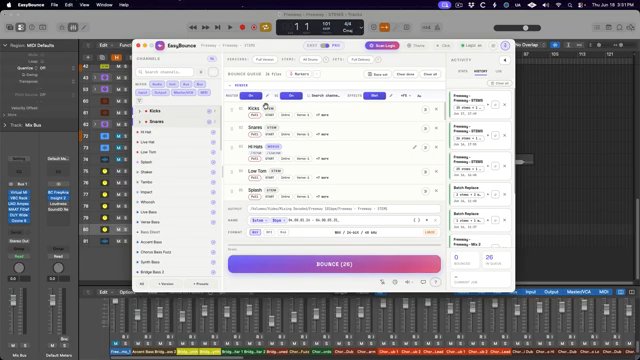
"an insane amount of customization control over how to bounce out the stems is available in pro mode."
© Screenshot/Quote: Sangstersounds (YouTube)
EasyBounce offers two flavours for your workflow cravings: Easy Mode and Pro Mode. Chris admits he’s a fan of Easy Mode, which strips things down to the essentials—just a few hotkeys and you’re off to the races. Define tracks, group them, mute for versions, and keep your setup minimal. No faff, no endless menus, just results.
But for those who want to go full mad scientist, Pro Mode unlocks a trove of customisation. You can drag and drop tracks, tweak themes (yes, there’s a Logic-colour scheme for the diehards), and dig into activity history for old bounces. Chris tips his hat to features like selective master bus bypass and granular plugin control, though he’s quick to say that for most real-world sessions, Easy Mode gets the job done fast—and that’s what matters.
Naming, Wet/Dry, and Marker Magic: The Features That Matter
It’s not just about automation—it’s about control. EasyBounce lets you go nuts with naming conventions, adding BPM, timecode, and whatever else your client’s OCD requires. Chris demonstrates how you can insert custom tags, wrangle dashes and spaces, and even automate renaming for repeat sessions. File type? Pick your poison straight from EasyBounce or pop the Logic bounce window if you’re feeling nostalgic.
Wet/dry stem options are another killer feature: want your stems with or without effects? Flick a switch. Marker-based exports let you bounce only specific song sections—think drum stems for just the chorus—making life easier for remixers and film scorers. Chris is clearly chuffed with the level of detail, though he flags a few minor quirks, like text placement in naming cards, but nothing that derails the workflow.
Step Away From the Desk: Automation That Actually Frees You
Here’s where EasyBounce truly earns its stripes: once you hit bounce, you can walk away and let your machine sweat it out. Chris points out you’ll need to keep your hands off the Mac while it works—so it’s perfect for lunch breaks, late nights, or those moments when you’d rather ring your mum than stare at a progress bar. It isn’t lightning-fast, but the real win is not having to sit through each bounce cycle. For 25 stems and a version, Chris clocks it at 44 minutes—but that’s 44 minutes where you can actually live your life.
"So that's not quick by any means, but I didn't have to sit in front of my computer that whole time."
© Screenshot/Quote: Sangstersounds (YouTube)
A Bottleneck Busted: Why This Plugin Slaps
Let’s be real: Logic’s built-in stem workflow is ancient, and EasyBounce finally brings it into the present. Chris is all-in on this utility, praising its focus on real-world producer problems and its refusal to bloat your plugin folder with nonsense. If stem exports are ruining your vibe, EasyBounce could be the street weapon your studio’s been missing. For all the gritty workflow details—and to see Chris’s setup in action—you’ll want to catch the video itself.
This article is also available in German. Read it here: https://synthmagazin.at/chris-sangster-gegen-logics-stem-bounce-albtraum-easybounce-als-rettung/
More articles about these products:
 SangsterSounds Digs Deep: Logic Pro’s Track Inspector Unleashed
 Verysickbeats Digs Into NWA’s Electro Funk Oddball—And Drops 808 Gems
 Verysickbeats Breaks Down That Organized Noize Drum Sauce
 Verysickbeats Flips the Script: Vocal Stem Sorcery with Lalals
 Chris Sangster’s Region Inspector Rave: Logic Pro’s Best-Kept Workflow Weapon
 Verysickbeats: Sculpting the Boondocks—Soulful Templates for Cinematic Beats
 Verysickbeats Schools Us: Why Auto-Tune Can’t Hang With a Vocoder
 Verysickbeats Breaks Down Just Blaze’s Sample Game: Groove Lessons from a Beatmaking OG
 Chris Sangster Turns Club Chaos Into Streaming Gold – A No-Nonsense Live Mix Breakdown
 sunwarper’s Flip: No More Crate Digging—Make Your Own Heat
 Lodewijk Vos (LØ): Navigating the DAW Nebula – A Composer’s Sonic Cartography
 Chris Sangster’s MIDI Survival Guide: Logic Pro Troubleshooting That Actually Works
Watch on YouTube:
Latest articles
Watch on YouTube:
Visit the channel:
https://www.youtube.com/sangstersounds
https://www.youtube.com/sangstersounds
Links from sangstersounds:
FREE DOWNLOADS!: https://linktr.ee/sangstersounds
Website: https://sangstersounds.com
Instagram: https://instagram.com/sangstersounds
Sponsored links:
If you purchase via these links, we may earn a small commission – at no extra cost to you. The link opens an Amazon keyword search, and results may vary depending on availability.
EasyBounce
🔗 Check price on Amazon
🔗 Check price on Amazon
Logic Pro
🔗 Check price on Amazon
🔗 Check price on Amazon