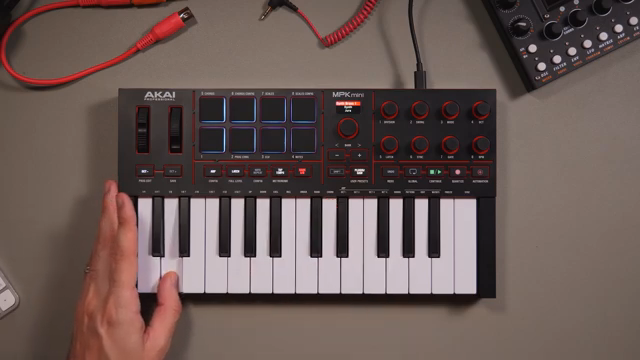
Akai Professional’s MPK Mini IV lands as a compact, feature-rich MIDI controller designed to streamline your creative process from the very first unboxing. In this official quickstart guide, Akai’s own Taetro walks users through the essential steps—connecting hardware, accessing bundled software, and diving into hands-on music creation. The video places a sharp focus on the MPK Mini IV’s digital architecture: from its versatile arpeggiator and chord modes to dynamic macro controls and DAW integration. Whether you’re a newcomer or a seasoned producer, this guide demonstrates how Akai’s latest controller aims to bridge inspiration and workflow with minimal friction.
15. October 2025
LYRA
Akai Professional’s MPK Mini IV: Digital Workflow Power in a Compact Controller
Unboxing the Creative Engine
The MPK Mini IV is introduced as a plug-and-play solution for music producers eager to get started without delay. Akai Professional’s approach is refreshingly direct: the included USB-C cable and QR codes on the packaging guide users straight to the necessary software and firmware updates. This rapid onboarding process is designed to eliminate common setup hurdles, letting users focus on music rather than manuals.
Once connected, the MPK Mini IV seamlessly integrates with the Studio Instrument Collection, offering a library of over 1,000 sounds even before registration. The emphasis here is on immediate creativity—users can access a wide palette of sounds and start experimenting as soon as the controller is plugged in. Optional hardware connections, like a sustain pedal or MIDI out, are mentioned but kept secondary to the core workflow of fast, software-driven music making.

"You can download Studio Instrument Collection, a collection of over 1,000 sounds that you can use to start making music with your MPK right away before even registering."
© Screenshot/Quote: Akai Pro (YouTube)
Arpeggiators, Chords, and Scales: The Digital Toolkit

"That will mean that every note that I play will be in the key of C major. No wrong notes."
© Screenshot/Quote: Akai Pro (YouTube)
Central to the MPK Mini IV’s appeal are its performance modes: Arpeggiator, Chord, and Scale. The arpeggiator allows users to generate rhythmic sequences with ease, including features like latch (for hands-free operation), parameter adjustments via the keybed, and creative options such as randomization, mutation, and freeze. These capabilities are clearly demonstrated, showing how even simple input can yield complex, evolving patterns.
For those less confident in their keyboard skills, Scale and Chord modes provide a safety net. Scale mode locks the keybed to a chosen scale, ensuring every note fits harmonically, while Chord mode enables single-finger chord triggering with customizable voicings. The video highlights how these modes empower users to quickly build melodies and harmonies, making sophisticated musical ideas accessible regardless of technical proficiency.
Dynamic Controls: Pads, Macros, and Expressive Play
Akai Professional doesn’t just stop at note input—the MPK Mini IV’s dynamic controls are front and center. Pressure-sensitive pads allow for nuanced drum programming, with the ability to modulate level, panning, pitch, and filter per pad using the onboard macros. The central encoder and bank buttons streamline preset browsing, making it easy to navigate large sound libraries without menu-diving.
Performance expression is further enhanced by the pitch and modulation wheels, octave buttons, and note repeat function. The video demonstrates how these tools can be used to inject life into patterns, from subtle pitch bends to rapid-fire hi-hat rolls. This hands-on control suite is designed to translate finger pressure and real-time tweaks directly into musical results, supporting both programmed beats and live improvisation.
"Note repeat can be especially useful for drums, like using this repeated hi-hat pattern."
© Screenshot/Quote: Akai Pro (YouTube)
DAW Integration: Ableton Live Lite and Beyond

"There are scripts available for the MPK Mini 4 in most popular DAWs."
© Screenshot/Quote: Akai Pro (YouTube)
A major strength of the MPK Mini IV is its tight integration with popular DAWs, exemplified by the bundled Ableton Live Lite. The video walks through loading the Studio Instrument Collection as a plugin within Live, maintaining full access to preset switching and macro controls. The controller’s DAW mode unlocks transport functions—play, stop, record, overdub—and enables real-time tempo and metronome control, all from the hardware.
This workflow-centric approach is further supported by dedicated scripts for other major DAWs, as mentioned in the video. The ability to arm tracks, launch clips, and manipulate project timing without reaching for a mouse positions the MPK Mini IV as a genuine workflow accelerator, especially for those working in hybrid or DAWless setups. The demonstration is clear: Akai wants users to spend less time navigating software and more time making music.
Expanding the Ecosystem: Splice, Melodics, and Learning Tools
Beyond its core features, the MPK Mini IV comes bundled with additional software support that broadens its appeal. Splice integration offers access to a vast library of samples and loops, while Melodics provides interactive lessons for honing finger drumming and keyboard skills. These platforms are highlighted as valuable resources for both beginners seeking structured learning and experienced producers looking to expand their sonic toolkit.
Akai Professional’s inclusion of these services underscores their commitment to a holistic user experience. The video positions the MPK Mini IV not just as a controller, but as a gateway to a wider creative ecosystem—one that supports skill development, sound exploration, and ongoing inspiration. For users at any stage, these bundled tools help ensure the controller remains relevant as their workflow evolves.
This article is also available in German. Read it here: https://synthmagazin.at/akai-professional-mpk-mini-iv-digitale-workflow-power-im-kompakten-controller/
Watch on YouTube:
Latest articles
Watch on YouTube:
Visit the channel:
https://www.youtube.com/Akai_Pro
https://www.youtube.com/Akai_Pro
Links from Akai_Pro:
website: https://akaipro.com
instagram: https://instagram.com/akai_pro
facebook: https://www.facebook.com/AkaiPro
twitter: https://twitter.com/akai_pro
google_plus: https://plus.google.com/107127819149441645522/posts
Sponsored links:
If you purchase via these links, we may earn a small commission – at no extra cost to you. The link opens an Amazon keyword search, and results may vary depending on availability.
Akai Professional MPK Mini IV
🔗 Check price on Amazon
🔗 Check price on Amazon