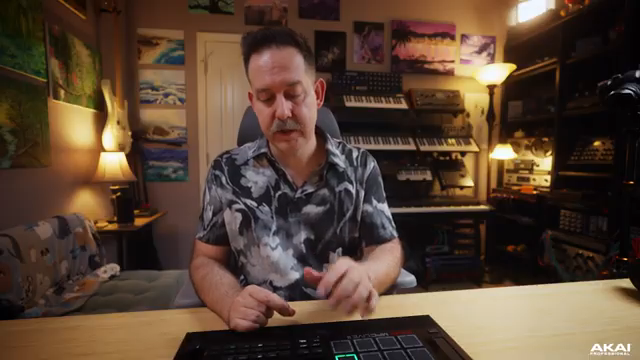
Akai Professional’s MPC Live III lands as a standalone production powerhouse, and in this official MPC Academy walkthrough, we get a granular look at its new MPCe pads and modulation matrix. The video, hosted by Tefty, doesn’t just skim the surface: it demonstrates how the MPC Live III’s digital architecture enables nuanced pad articulations, flexible modulation assignments, and creative sample layering. As always with Akai, the focus is on practical, producer-friendly workflows—this time with a clear nod to expressive performance and deep sound design. If you’re curious about how the MPC Live III translates its tech into hands-on music-making, this is a must-watch.
3. October 2025
LYRA
Akai Professional’s MPC Live III: Deep Dive into Expressive Pads and Modulation Matrix
Standalone Powerhouse: MPC Live III’s Core Identity
The MPC Live III is introduced as a robust, standalone production tool, ready to handle everything from beat creation to advanced sound design without the need for a computer. Akai Professional’s approach here is all about maximizing creative control and flexibility, providing a workflow that’s both familiar to seasoned MPC users and inviting for newcomers. The video kicks off with a brand new project and a trap kit loaded, setting the stage for hands-on exploration.
From the outset, it’s clear that the MPC Live III’s interface is designed for fast, tactile editing—whether you’re building drum tracks or tweaking samples. The edit button gives immediate access to drum program parameters, and the workflow encourages experimentation. Akai’s signature focus on producer-centric features is evident, with the device positioned as a central hub for both DAWless and integrated studio setups.
MPCe Pads: Articulation and Expressive Performance
The new MPCe pads are the headline act in this walkthrough, and for good reason. Each pad is divided into four quadrants, allowing for distinct articulations or effects depending on where you strike. This isn’t just about velocity or aftertouch—each quadrant can trigger a different articulation, such as note repeats, pitch rolls, or standard rudiments, dramatically expanding the expressive potential of a single pad.
In the demonstration, a hi-hat sample is mapped across quadrants: the first remains a basic hit, while others are assigned to note repeats at various speeds and pitch rolls with chromatic descents. The stereo field, dynamics, and repeat speed are all adjustable, giving performers granular control over how each articulation behaves. The ability to scale speed even further—up to 800% with time scaling—shows just how deep the pad articulation system goes.
What stands out is how these features are accessed: through a dedicated effects and articulations page, making it easy to experiment without menu-diving. The result is a pad system that encourages live performance tricks, nuanced finger drumming, and on-the-fly sound variation—all within a single drum program.

"Already from one sample, way more interesting performance potential from a single pad. This is the power of the NVCE technology."
© Screenshot/Quote: Akai Pro (YouTube)
Modulation Matrix: Precision Sound Shaping
"So the power of the mod matrix, we just add a little bit of character into this high hat, which is one sound with multiple articulations and the filter being used to create some variations."
© Screenshot/Quote: Akai Pro (YouTube)
The modulation matrix is where the MPC Live III’s digital architecture truly flexes. Accessible from the last page of the pad edit section, the matrix allows users to assign a variety of modulation sources—like LFOs or pad position—to nearly any parameter, including filter cutoff, amplitude, or effects. In the video, an LFO is routed to modulate the filter cutoff of a hi-hat, with the speed and shape of the LFO easily adjusted for subtle or dramatic movement.
The workflow is straightforward: select a source, pick a target, and dial in the amount and direction. The matrix supports nuanced control, such as using sample and hold LFOs for randomized effects or carefully scaling modulation depth. The demonstration highlights how modulation can be introduced gradually, allowing for evolving textures and performance dynamics.
This system isn’t just for synth heads—it’s presented as a practical tool for beatmakers and performers who want to inject life into static samples. The matrix’s flexibility means that even simple drum hits can be transformed into evolving, expressive elements within a track.
Layered Sounds and Dynamic Compositions: Creative Workflows Unleashed
The video moves beyond single-sample tricks to showcase how the MPC Live III supports complex, layered sound design. By bouncing plugin chords and synth sounds to samples, the presenter builds a multi-sample pad where each quadrant can trigger a different timbre or chord. The crossfade options for the MPCe pads allow for both smooth blending and discrete switching between samples, depending on the chosen mode and shaper settings.
The process involves assigning different samples to each layer, configuring playback modes, and using the modulation matrix to map pad X and Y positions to crossfade parameters. This results in a pad that can morph between four samples based on finger position—ideal for live performance or evolving textures. The workflow is efficient: sample selection, layering, and modulation assignment all happen within a few screens, with minimal menu navigation.
Effects are layered in next, with Air Delay Pro and Air Reverb Pro providing lush, spatial processing directly on the pad or globally on the drum track. The presenter is careful to note the routing implications—adding effects per pad versus globally affects the entire kit, so targeted processing is often preferable for nuanced mixes.
Finally, the walkthrough demonstrates how to set up pads for either smooth blending or strict quadrant-based triggering using the shaper’s quantize mode. The modulation matrix is pushed further, with examples of poly aftertouch, modulation wheel assignments, and LFO rate modulation. The result is a showcase of the MPC Live III as a flexible sound design workstation, capable of everything from intricate finger drumming to deep, evolving sonic landscapes.

"So just like that with pretty minimal effort, I have four samples that are blending with each other on one pad."
© Screenshot/Quote: Akai Pro (YouTube)
This article is also available in German. Read it here: https://synthmagazin.at/akai-professional-mpc-live-iii-expressive-pads-und-modulationsmatrix-im-workflow-check/
Watch on YouTube:
Latest articles
Watch on YouTube:
Visit the channel:
https://www.youtube.com/Akai_Pro
https://www.youtube.com/Akai_Pro
Links from Akai_Pro:
website: https://akaipro.com
instagram: https://instagram.com/akai_pro
facebook: https://www.facebook.com/AkaiPro
twitter: https://twitter.com/akai_pro
google_plus: https://plus.google.com/107127819149441645522/posts
Sponsored links:
If you purchase via these links, we may earn a small commission – at no extra cost to you. The link opens an Amazon keyword search, and results may vary depending on availability.
MPC Live III
🔗 Check price on Amazon
🔗 Check price on Amazon