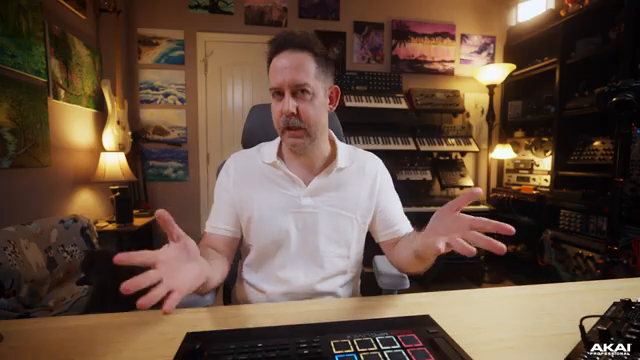
Akai Professional’s MPC Live III steps boldly into the standalone groovebox arena, and this official deep dive from the Akai Pro channel puts its new clip launching workflow front and center. The video walks through the architectural logic of the clip matrix, demonstrating how the MPC Live III is engineered for hands-on music creation, flexible arrangement, and hybrid MIDI/audio integration. With a focus on workflow, performance tools, and real-world connectivity, Akai’s presentation is both practical and revealing—showing not just what’s possible, but how it actually feels to build and manipulate musical ideas on the MPC Live III. For anyone curious about the device’s new creative paradigm, this is a must-watch breakdown.
3. October 2025
LYRA
Akai Professional’s MPC Live III: Clip Launching Workflow Unpacked
A New Standalone Paradigm: MPC Live III’s Clip Launching Vision
Akai Professional positions the MPC Live III as a versatile, standalone powerhouse, and this video wastes no time in spotlighting its new clip launching workflow. Right from the start, the focus is on how the device is designed for music creation without the need for a computer, emphasizing immediacy and hands-on control. The presenter demonstrates three distinct ways to access the clip matrix, underscoring Akai’s commitment to workflow flexibility and user preference.
This approach is clearly about reducing friction between inspiration and execution. By allowing users to jump straight into the clip launching environment, Akai sets the stage for a creative process that feels more like performance and less like programming. The video’s tone is practical and accessible, inviting both newcomers and seasoned MPC users to rethink how they approach arrangement and live improvisation.
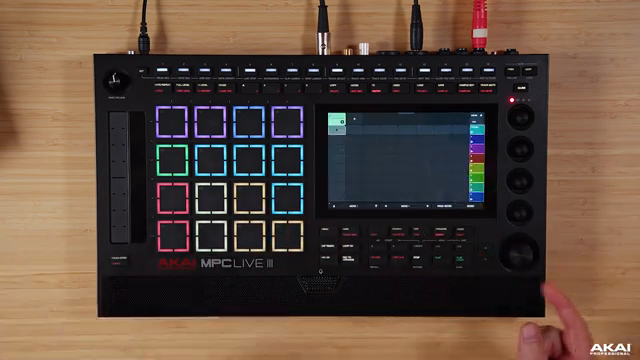
"So three options to get you into the same window right here."
© Screenshot/Quote: Akai Pro (YouTube)
Clip Matrix: The Heart of Creative Arrangement
The clip matrix is the architectural centerpiece of the MPC Live III’s new workflow. Users can create clips by tapping and holding on empty spaces within tracks, with options to record MIDI, overdub, duplicate, and freely arrange clips across the matrix. The interface supports both fixed-length and freeform recording, catering to structured beatmakers and improvisational performers alike.
Duplication and editing are streamlined: clips can be copied, pasted, and overdubbed with minimal menu-diving. The video shows how users can roll through tracks and clips using the encoder, making it easy to build up complex arrangements. This design philosophy leans into the MPC’s legacy of tactile music-making, but with a modern, grid-based twist that’s clearly aimed at live performance and spontaneous composition.
Hybrid Workflows: Integrating External Synths and Audio Clips
"What if we wanna take it a step further?"
© Screenshot/Quote: Akai Pro (YouTube)
One of the standout demonstrations in the video is the seamless integration of external synthesizers—specifically, a Moog Labyrinth—into the MPC Live III’s clip workflow. The presenter details the MIDI and audio routing, showing how to connect external gear via MIDI out and audio inputs, and how to set up corresponding MIDI and audio tracks within the MPC. This hybrid approach allows users to trigger external synths, record their output as audio clips, and manipulate those clips alongside internal sounds.
The workflow supports both fixed-length and freeform audio recording, with editing tools for trimming, looping, and layering. The video also walks through adding internal plugin instruments and effects, demonstrating how MIDI, audio, and plugin tracks can coexist in a single project. This flexibility is a clear nod to modern producers who want to blur the lines between hardware and software, MIDI and audio, composition and performance.
Performance Tools: Scenes, Quantization, and On-the-Fly Arrangement
The MPC Live III’s clip launching system is packed with performance-oriented features. Scene capturing allows users to snapshot the current state of the matrix and recall it instantly, making it easy to build song sections like intros, breakdowns, and full mixes. Scenes can be named, colored, and even assigned unique tempos, enabling dynamic tempo changes during a performance. The video highlights how these tools facilitate both structured song-building and live improvisation.
Launch quantization is another key feature, with granular control over when clips and scenes trigger—ranging from full bars down to 64th notes. Launch modes include trigger, toggle, and legato, the latter allowing seamless transitions between clips without restarting playback. The presenter also demonstrates follow actions and pad-based launching, rounding out a toolkit that’s clearly designed for both studio arrangement and DAWless live sets.
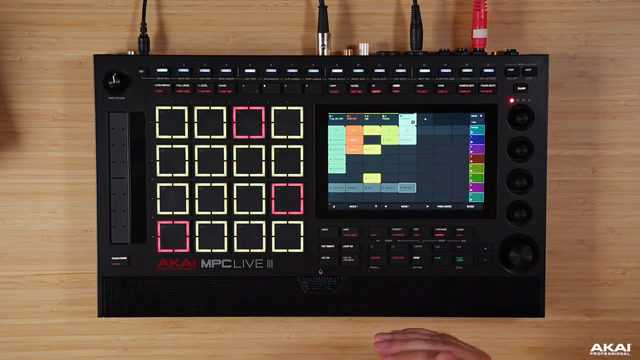
"So with the clip launching matrix, you have the ability to launch rows of clips."
© Screenshot/Quote: Akai Pro (YouTube)
Learning by Doing: Accessible Mastery for All Levels
Throughout the video, Akai Professional emphasizes an accessible, step-by-step approach to mastering the MPC Live III. The presenter’s walkthrough is methodical yet encouraging, highlighting not just the features but the logic behind them. Settings menus are explored in detail, but always with an eye toward practical application—whether that’s launching clips from the pads, using the step sequencer for visual feedback, or customizing the interface to suit individual workflows.
This educational focus is reinforced by the MPC Academy branding, positioning the video as both a tutorial and an invitation to experiment. By demystifying the architecture and showing real-world use cases, Akai lowers the barrier to entry for newcomers while still offering depth for power users. The result is a presentation that feels both comprehensive and empowering, encouraging users to dive in and make the MPC Live III their own.
This article is also available in German. Read it here: https://synthmagazin.at/akai-professional-mpc-live-iii-clip-launching-workflow-im-detail/
Watch on YouTube:
Latest articles
Watch on YouTube:
Visit the channel:
https://www.youtube.com/Akai_Pro
https://www.youtube.com/Akai_Pro
Links from Akai_Pro:
website: https://akaipro.com
instagram: https://instagram.com/akai_pro
facebook: https://www.facebook.com/AkaiPro
twitter: https://twitter.com/akai_pro
google_plus: https://plus.google.com/107127819149441645522/posts
Sponsored links:
If you purchase via these links, we may earn a small commission – at no extra cost to you. The link opens an Amazon keyword search, and results may vary depending on availability.
Moog Labyrinth
🔗 Check price on Amazon
🔗 Check price on Amazon
MPC Live III
🔗 Check price on Amazon
🔗 Check price on Amazon