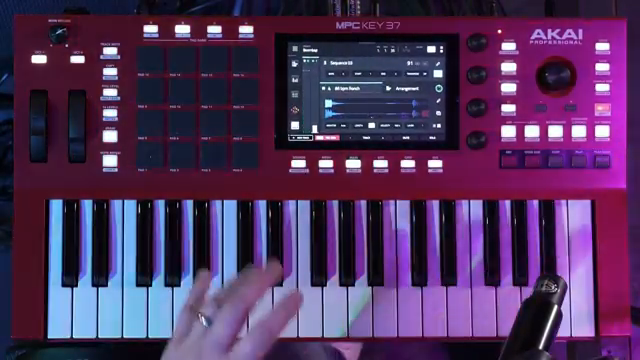
In this third installment of the MPC Academy Sessions, Akai Professional puts the MPC Key 37 front and center, demonstrating its prowess as a modern beat-making powerhouse. Andy Mac walks us through the transformation of simple melodic ideas into fully fleshed-out productions, leveraging the MPC’s signature sampling, drum layering, and creative effects. The session, filmed at Guitar Center Hollywood, is a practical showcase of how Akai’s digital architecture and hands-on workflow enable producers to move fluidly from inspiration to arrangement. For anyone curious about the real-world capabilities of the MPC Key 37, this video offers a clear, step-by-step look at its strengths and creative flexibility.
25. July 2025
LYRA
Akai Professional’s MPC Key 37: From Chopped Samples to Full Tracks – A Workflow Deep Dive
From Melody to Full Production: The MPC Key 37 in Action
The session opens with Andy Mac discussing the abundance of sample resources available to today’s producers and how the MPC Key 37 can turn a simple melodic sample into the backbone of a track. He emphasizes the importance of identifying what resonates in a sample—often the chords or a particular vibe—and then making it your own through creative manipulation. This approach is less about copying and more about transformation, a theme that runs throughout the demonstration.
After selecting and chopping a sample, Andy demonstrates how quickly you can set the tempo, adjust pitch, and experiment with different keys to radically alter the sample’s feel. The workflow is immediate: editing, pitching, and layering all happen in a few button presses, showcasing the MPC Key 37’s ability to keep creative momentum high. The focus is on hands-on exploration, encouraging users to try out new harmonic directions and make the material truly personal.

"How do you make it your own and that's a skill in itself."
© Screenshot/Quote: Akai Pro (YouTube)
Sample Chopping, Drum Layering, and Effects: The Sonic Toolkit
"You can add a lot of elements underneath the loop so just don't take it in its kind of entirety just add your own elements underneath it."
© Screenshot/Quote: Akai Pro (YouTube)
With the melodic foundation in place, the next step is drum layering. Andy illustrates a technique where chopped drum loops are augmented with additional kick and snare hits, rather than relying solely on the original loop. This hybrid approach lets producers inject their own groove and energy, moving beyond static samples. The use of quantize is flexible—sometimes engaged, sometimes left off—to preserve a natural, human feel in the rhythm.
The demonstration then shifts to creative effects processing. Andy uses the Flavor Pro effect to impart a vintage string or VHS-style character to samples, adding sizzle and texture. The Q-link controls are highlighted for their similarity to classic SP-style workflows, making effects manipulation tactile and immediate. The effects rack is built out live, with lo-fi processing and track muting used to shape the evolving beat. This section underscores how the MPC Key 37’s digital architecture supports deep sound design without breaking the flow.
Arranging, Automation, and Stems: Building the Track Structure
Once the core elements are in place, Andy demonstrates the MPC Key 37’s approach to arrangement. Using the arrangement mode, he quickly expands a four-bar loop into a full 32-bar structure by duplicating sections. This process is fast and visual, allowing for rapid experimentation with song form. Effects automation is introduced as a key creative tool: parameters can be recorded in real time, with visual feedback indicating when automation is active.
The workflow for bouncing audio stems is also covered. Any track—drums, bass, or otherwise—can be rendered as an audio sample directly from the hardware. This feature is especially useful for producers who want to move between the MPC environment and a DAW like Ableton, or for those who prefer to arrange with audio rather than MIDI. Andy points out that the MPC Key 37 supports multiple arrangement strategies, from classic song mode to track muting and full audio export.
Throughout, the emphasis is on flexibility. The MPC Key 37 doesn’t lock users into a single workflow; instead, it provides a suite of tools for arranging, automating, and exporting, all accessible from the hardware interface. This makes it suitable for both standalone production and integration into larger studio or stage setups.

"Anything I do is going to be affected by here."
© Screenshot/Quote: Akai Pro (YouTube)
Creative Freedom and the MPC Ethos

"There's no right or wrong with any of this."
© Screenshot/Quote: Akai Pro (YouTube)
The final segment is a meditation on the creative philosophy behind the MPC Key 37. Andy stresses that there’s no single correct way to use the device—whether you’re arranging in hardware, exporting stems to a DAW, or building tracks entirely in the box, the workflow adapts to your preferences. The MPC is positioned as a blank canvas, with a host of studio effects and export options that let users shape their music without constraint.
This flexibility is presented as the core strength of the MPC Key 37. The session closes with encouragement for users to persevere through the learning curve, experiment with different approaches, and ultimately find their own voice within the MPC ecosystem. The message is clear: the MPC Key 37 is designed to empower creativity, not dictate it.
This article is also available in German. Read it here: https://synthmagazin.at/akai-professional-mpc-key-37-von-gesampelten-melodien-zum-kompletten-track-ein-workflow-ueberblick/
Watch on YouTube:
Latest articles
Watch on YouTube:
Visit the channel:
https://www.youtube.com/Akai_Pro
https://www.youtube.com/Akai_Pro
Links from Akai_Pro:
website: https://akaipro.com
instagram: https://instagram.com/akai_pro
facebook: https://www.facebook.com/AkaiPro
twitter: https://twitter.com/akai_pro
google_plus: https://plus.google.com/107127819149441645522/posts
Sponsored links:
If you purchase via these links, we may earn a small commission – at no extra cost to you. The link opens an Amazon keyword search, and results may vary depending on availability.
MPC Key 37
🔗 Check price on Amazon
🔗 Check price on Amazon