Akai Professional steps up the low-end game with AIR Sub Factory, a plugin instrument purpose-built for the MPC platform. This official walkthrough showcases how Sub Factory combines dual wavetable oscillators, a sample layer, and a suite of modulation and effects tools to deliver industrial-strength bass. The video is all about workflow: from browsing presets to hands-on sound design, Akai’s producer-focused approach is on full display. For those seeking to anchor their tracks with punchy, customizable bass, Sub Factory promises a streamlined yet deep experience—at least, that’s what the demo aims to prove.
9. August 2024
LYRA
Akai Professional’s AIR Sub Factory: Deep-Dive into MPC Bass Power
Meet Sub Factory: MPC’s Low-End Architect
Akai Professional introduces AIR Sub Factory as a dedicated bass plugin for the MPC ecosystem, targeting both standalone and desktop workflows. The video wastes no time positioning Sub Factory as the go-to solution for earth-shattering bass and 808s, promising a wide palette from classic sub sounds to more experimental synth basses and drones.
Browsing and loading Sub Factory within the MPC interface is straightforward, with preset categories clearly organized for quick auditioning. The walkthrough highlights how users can immediately access a range of 808 classics and creative patches, reinforcing the plugin’s focus on delivering powerful, production-ready bass with minimal menu-diving.
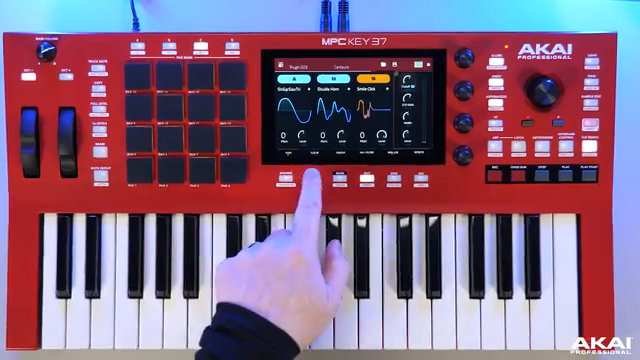
"With cutting edge presets, two wavetable oscillators and one sample layer, more filters and onboard effects, Subfactory is the perfect plugin for your beats and productions."
© Screenshot/Quote: Akai Pro (YouTube)
Oscillator Architecture: Wavetables and Sample Layer in Action
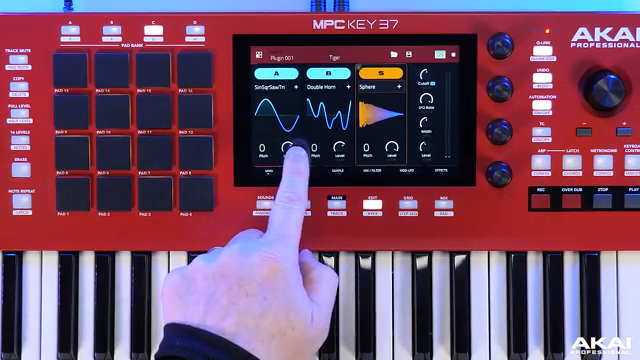
"Here we can see our two wave tables A and B and our sample layer along with pitch control and volume for easy access and sound design."
© Screenshot/Quote: Akai Pro (YouTube)
At the heart of Sub Factory’s sound engine are two wavetable oscillators (A and B) and a third sample layer, all accessible from the main interface. This tri-layer setup allows for intricate bass textures, with each oscillator offering independent pitch and volume controls. Users can select oscillator types, adjust pitch, and add glide directly from the main screen, streamlining the patch creation process.
The video demonstrates how the sample layer isn’t just an afterthought—it can be loaded with everything from kicks and loops to noise and clicks, blending seamlessly with the wavetables. The cue link controls make it easy to tweak layer volumes and pitches on the fly, and the interface provides dedicated envelopes for amplitude, pitch, and filter shaping. This architecture supports both classic sub layering and more experimental, hybrid bass sounds.
A notable workflow feature is the ability to save custom patches after tweaking oscillator settings and modulation. The presenter shows how quickly users can move from preset browsing to deep editing, making Sub Factory equally suitable for preset surfers and hands-on sound designers.
Modulation and Sculpting: Control Meets Creativity
Sub Factory’s modulation page is designed for fast, intuitive routing. Users can assign LFOs and filter modulation, set up pitch bend, and engage unison for stereo width—all from a single tab. The glide and legato controls are given special attention, as they’re crucial for expressive 808 and bassline programming.
The plugin offers seven LFO shapes, syncable to tempo or free-running, with curve and fade options for nuanced modulation. The target LFO page allows users to direct modulation to oscillator parameters, filter cutoff, or morph amounts, supporting both subtle movement and extreme sound mangling. The workflow here is clearly optimized for quick experimentation, with cue link integration and one-shot/retrigger options for performance flexibility.
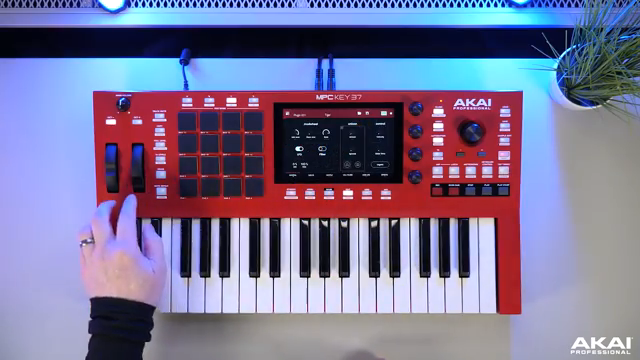
"Here we can set up our modulation and pitch band so we can decide if we want our LFO and our filter to be controlled by the modulation."
© Screenshot/Quote: Akai Pro (YouTube)
Filters and Effects: Shaping the Final Bass Character
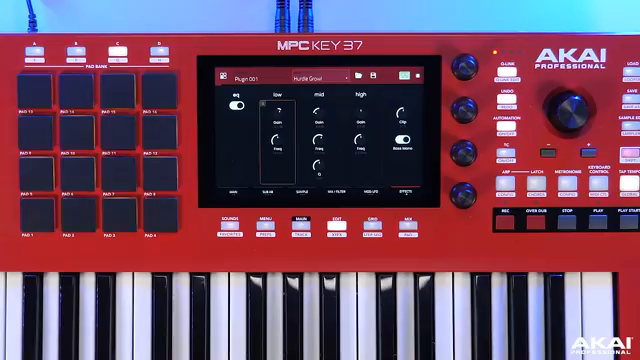
"SubFactory really does give you so much control over sculpturing your own low end types of bass sounds for your productions."
© Screenshot/Quote: Akai Pro (YouTube)
Sub Factory’s filter section provides two morphable filters with twelve preset types, allowing users to blend filter characteristics in real time. The morph control, accessible via cue links, lets producers dial in evolving filter responses for dynamic bass textures. Each oscillator and the sample layer can be filtered independently, with envelope control for further shaping.
On the effects side, the plugin includes ring modulation, chorus, drive, a master EQ (with low, mid, and high bands), a soft clipper, and a bass mono function. These tools are designed to add punch, grit, and clarity to bass patches, whether you’re after subtle enhancement or full-on distortion. The video underscores how these effects can be stacked and tweaked without leaving the plugin’s interface, supporting a streamlined workflow for both studio and live use.
Sub Factory in the Mix: Essential Bass for Modern Production
Akai Professional positions AIR Sub Factory as a must-have for producers seeking high-impact bass in their tracks. The walkthrough demonstrates the plugin’s ability to cut through mixes, whether layering 808s over R&B beats or crafting drones for electronic genres. With its combination of deep sound design tools and accessible interface, Sub Factory aims to be a central player in any MPC-based production setup.
This article is also available in German. Read it here: https://synthmagazin.at/akai-professional-air-sub-factory-tiefenanalyse-des-mpc-bass-plugins/
Watch on YouTube:
Latest articles
Watch on YouTube:
Visit the channel:
https://www.youtube.com/Akai_Pro
https://www.youtube.com/Akai_Pro
Links from Akai_Pro:
website: https://akaipro.com
instagram: https://instagram.com/akai_pro
facebook: https://www.facebook.com/AkaiPro
twitter: https://twitter.com/akai_pro
google_plus: https://plus.google.com/107127819149441645522/posts
Sponsored links:
If you purchase via these links, we may earn a small commission – at no extra cost to you. The link opens an Amazon keyword search, and results may vary depending on availability.
AIR Sub Factory
🔗 Check price on Amazon
🔗 Check price on Amazon