Akai Professional has teamed up with Native Instruments to bring NKS (Native Kontrol Standard) integration to the MPK series, transforming these popular MIDI controllers into deeply connected plugin command centers. In this official overview, Akai demonstrates how the MPK Mini MK3 and its siblings now offer instant, hands-on control over Native Instruments plugins—no manual mapping required. With curated Komplete 15 Select bundles and a focus on real-time workflow, this update promises to streamline studio and stage performance alike. We dig into the architecture, the new browsing and macro paradigms, and what this means for producers seeking a mouse-free, tactile experience.

27. February 2025
LYRA
Akai Professional Brings NKS Integration to MPK Series: A Workflow Game Changer
Akai MPK 249, Akai MPK 261, Akai MPK Mini MK3, Akai MPK Mini Play, Akai MPK Mini Plus
NKS Integration: The MPK Series Evolves
Akai Professional’s MPK series just received a significant upgrade: full NKS (Native Kontrol Standard) integration, developed in collaboration with Native Instruments. This move positions the MPK controllers as more than just MIDI input devices—they now serve as direct, hands-on interfaces for Native Instruments’ plugin ecosystem. The video opens with a clear focus on how this integration transforms the MPK’s role in a modern production setup.
With NKS enabled, users gain immediate, deep control over plugin parameters, bypassing the usual manual mapping headaches. Akai’s demonstration highlights that this isn’t just a surface-level update; it’s a rethinking of how hardware and software interact. The result is a workflow that feels unified and purpose-built for producers who demand efficiency and tactile control.
Instant Parameter Mapping: No More Manual Setup
One of the standout features of NKS integration is the elimination of manual parameter mapping. As soon as the MPK controller is connected, it automatically syncs with Native Instruments plugins, providing instant access to key controls. This means no more digging through menus or assigning CCs by hand—everything is ready to go from the moment you launch your DAW or the standalone Komplete Kontrol application.
The video demonstrates this streamlined process, showing how quickly users can get up and running. The focus here is on enhancing workflow efficiency: with NKS, the controller becomes an extension of the software, allowing for a more intuitive and productive creative process.

"You get instant parameter control for instruments and a streamlined workflow to browse and tweak sounds without having to touch the mouse."
© Screenshot/Quote: Akai Pro (YouTube)
Browsing and Macro Control: Hands-On Sound Shaping
"We are synced up with the plugin."
© Screenshot/Quote: Akai Pro (YouTube)
A major highlight of the integration is the ability to browse and tweak sounds directly from the MPK controller. Users can select presets, scroll through sound banks, and make real-time adjustments—all without reaching for the mouse. The video walks through a practical example: loading a Native Instruments Play Series instrument, browsing presets using the MPK’s pads, and adjusting macro parameters with the controller’s knobs.
The macro knobs on the MPK are tightly synchronized with the plugin’s on-screen parameters, adapting dynamically as users navigate between different macro pages. This allows for nuanced sound sculpting, from adjusting volume and filter cutoff to manipulating more complex effects like bit crushing and EQ. The workflow is clearly designed for creative exploration, with the controller’s hardware layout mapped intelligently to the software’s architecture.
Navigation isn’t limited to a single instrument—users can move between multiple plugins and effects within a chain, using dedicated pads to switch focus. This layered approach means that even complex plugin setups remain accessible and manageable from the MPK, reinforcing the controller’s role as a central hub for performance and sound design.
Komplete 15 Select: Curated Bundles for Every Workflow
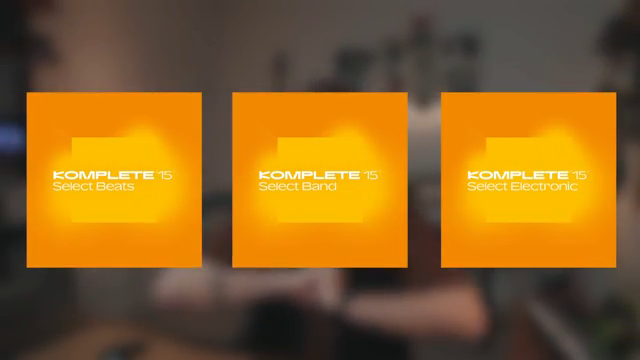
To sweeten the deal, Akai and Native Instruments are offering three curated versions of the Komplete 15 Select bundle, tailored for different genres and production styles. Whether your focus is beats, band arrangements, or electronic textures, there’s a bundle designed to fit your workflow.
This approach empowers users to dive straight into music creation with a toolkit that matches their stylistic needs. The integration ensures that all included instruments and effects are pre-mapped and ready for hands-on control, further lowering the barrier to entry for both new and experienced producers.
A Mouse-Free Workflow: The New Standard for MPK Users
The NKS update represents a substantial workflow upgrade for MPK users, allowing for comprehensive plugin management directly from the controller. The ability to browse, load, and tweak sounds without ever touching the mouse is a clear nod to the demands of modern producers who value speed and immersion.
While the video focuses on the immediate benefits—instant mapping, macro control, and curated sound bundles—it also hints at a broader shift: the MPK series is now positioned as a true command center for hybrid hardware–software setups. For those seeking a streamlined, tactile production environment, this integration is a compelling step forward.
"It's a huge workflow upgrade for MPK users."
© Screenshot/Quote: Akai Pro (YouTube)
This article is also available in German. Read it here: https://synthmagazin.at/akai-professional-bringt-nks-integration-in-die-mpk-serie-ein-workflow-upgrade/
Watch on YouTube:
Latest articles
Watch on YouTube:
Visit the channel:
https://www.youtube.com/Akai_Pro
https://www.youtube.com/Akai_Pro
Links from Akai_Pro:
website: https://akaipro.com
instagram: https://instagram.com/akai_pro
facebook: https://www.facebook.com/AkaiPro
twitter: https://twitter.com/akai_pro
google_plus: https://plus.google.com/107127819149441645522/posts
Sponsored links:
If you purchase via these links, we may earn a small commission – at no extra cost to you. The link opens an Amazon keyword search, and results may vary depending on availability.
Akai MPK 249
🔗 Check price on Amazon
🔗 Check price on Amazon
Akai MPK 261
🔗 Check price on Amazon
🔗 Check price on Amazon
Akai MPK Mini MK3
🔗 Check price on Amazon
🔗 Check price on Amazon
Akai MPK Mini Play
🔗 Check price on Amazon
🔗 Check price on Amazon
Akai MPK Mini Plus
🔗 Check price on Amazon
🔗 Check price on Amazon