Akai Professional’s AIR Iona brings the unmistakable character of an iconic 80s monophonic synth to the digital age, meticulously modeled and seamlessly integrated into the MPC ecosystem and DAW environments. In this official walkthrough, Akai demonstrates how Iona’s architecture—complete with a 128-step sequencer, graphical editor, and hands-on performance controls—caters to both deep sound design and immediate musical creation. The video moves from lush preset browsing to granular sound crafting, highlighting how Iona’s blend of classic synthesis and modern workflow tools can fit into contemporary production setups. For producers and synth enthusiasts alike, this is a revealing look at how vintage inspiration meets digital convenience.
24. October 2025
LYRA
Akai Professional AIR Iona: Classic Analog Spirit, Modern MPC Workflow
Vintage DNA, Digital Habitat
Akai Professional introduces AIR Iona as a virtual instrument that channels the essence of a legendary 80s monophonic synth, now tailored for MPC standalone, desktop, and DAW workflows. The video sets the stage by emphasizing Iona’s meticulous modeling, aiming to capture the classic sound palette that defined techno and acid house, but with a modern twist. This isn’t just a nostalgia play—the focus is on how Iona’s architecture and interface are designed to serve today’s producers, whether they’re working in hardware-centric setups or hybrid environments.
From the outset, Akai’s presentation style is practical and workflow-driven, inviting users to explore both the preset library and the instrument’s deep editing capabilities. The initial demo of factory sounds underscores Iona’s versatility, showing that it’s equally at home delivering iconic basses, leads, and sequences as it is supporting more experimental sound design. The message is clear: Iona is built to slot into contemporary production pipelines without sacrificing the character that made its inspiration a classic.
Sequencing and Editing: The Modern Backbone
One of Iona’s standout features is its integrated 128-step pattern sequencer, which is presented as both powerful and approachable. The video demonstrates how this sequencer, paired with a graphical editor, allows users to construct complex melodic patterns and grooves directly within the MPC environment. This approach streamlines the process of moving from sound design to musical arrangement, a workflow that’s especially valuable for DAWless and live performance contexts.
The graphical editor is highlighted as a central hub for performance controls, making it easy to tweak parameters in real time and visualize changes. This design philosophy reduces menu-diving and supports a more tactile, immediate interaction with the synth engine. Akai’s focus here is on making advanced sequencing accessible, ensuring that even intricate patterns can be programmed and manipulated without breaking creative flow.
Sound Generators and Performance Controls: Sculpting from Scratch
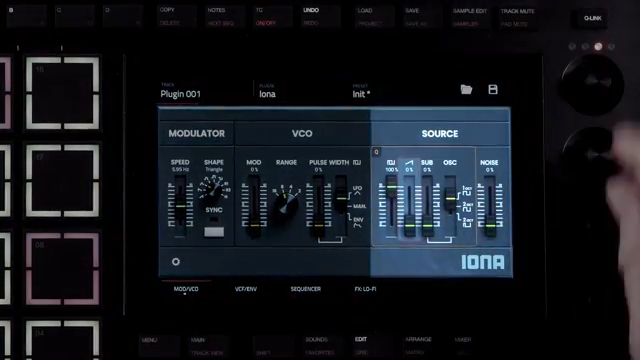
Diving into Iona’s architecture, the walkthrough details the main sound sources: pulse, sawtooth, sub, and noise. Users can blend these generators or isolate them, providing a flexible starting point for everything from classic analog timbres to more modern textures. The VCO section introduces range controls and pulse width modulation, with modulation sources available via LFO or envelope, giving users nuanced control over harmonic content.
Performance modulation is a core part of Iona’s workflow. The modulator section offers pitch modulation with adjustable speed (in Hz or tempo-synced) and multiple LFO shapes, all accessible from the main page. The video also notes the ability to customize preset color themes—a small but thoughtful touch for organizing sounds by type. The interface is designed to keep essential parameters within reach, supporting both quick tweaks and deeper sound-shaping sessions.
"These are the sound generators for Iona, a pulse, sawtooth, sub, and noise."
© Screenshot/Quote: Akai Pro (YouTube)
Effects: Shaping Space and Character

"Here we have access to four different effects, lo-fi, delay, reverb, and EQ."
© Screenshot/Quote: Akai Pro (YouTube)
Iona’s effects section is presented as a creative finishing suite, offering lo-fi, delay, reverb, and EQ. Each effect can be toggled and edited individually, allowing users to sculpt their sounds with both subtle enhancements and dramatic transformations. The workflow is streamlined: effects are activated with a single click, and parameter adjustments are direct and visual. This integration means that users can finalize their patches entirely within Iona, minimizing the need for external processing and keeping the creative process contained within the MPC or DAW environment.
Sequencing, Automation, and Workflow Integration
The video shifts focus to Iona’s sequencing and automation capabilities, demonstrating both the arpeggiator and the step sequencer. The arp section enables chord cycling, note hold, and style/gate adjustments, making it easy to generate rhythmic patterns and melodic runs. The gate function is particularly useful for cleaning up sequences at higher tempos, ensuring clarity in dense arrangements.
The step sequencer stands out for its straightforward design and depth: users can input notes by clicking and dragging, activate/deactivate steps, and introduce rests, ties, and legato. With up to 128 steps, sequences can be long and evolving, and features like sequence transposition and start-point shifting add further flexibility. The classic C3 trigger workflow is preserved, and the ability to transpose sequences via pad selection is a nod to hands-on performance. Akai’s demonstration makes it clear that Iona is engineered for seamless integration into modern production setups, supporting everything from sketching ideas to building full tracks.

"The step sequencer is very straightforward in design."
© Screenshot/Quote: Akai Pro (YouTube)
This article is also available in German. Read it here: https://synthmagazin.at/akai-professional-air-iona-klassischer-analoggeist-moderner-mpc-workflow/
Watch on YouTube:
Latest articles
Watch on YouTube:
Visit the channel:
https://www.youtube.com/Akai_Pro
https://www.youtube.com/Akai_Pro
Links from Akai_Pro:
website: https://akaipro.com
instagram: https://instagram.com/akai_pro
facebook: https://www.facebook.com/AkaiPro
twitter: https://twitter.com/akai_pro
google_plus: https://plus.google.com/107127819149441645522/posts
Sponsored links:
If you purchase via these links, we may earn a small commission – at no extra cost to you. The link opens an Amazon keyword search, and results may vary depending on availability.
AIR Iona
🔗 Check price on Amazon
🔗 Check price on Amazon