Forget the horror stories—Woody Piano Shack grabs the Behringer TD-3 and shows us that programming a 303-style bassline is less cryptic ritual, more cheeky rave hack. With his trademark blend of dry humour and hands-on clarity, Woody slices through the myth that the 303 is a programming nightmare. If you’re tired of gatekeeping and want to see acid lines built in real time, this is your jam. The video’s got happy accidents, groove tweaks, and enough slides to make your toaster jealous. Don’t let the plastic fool you—this thing’s a street weapon in the right hands.
26. February 2026
SPARKY
Woody Piano Shack vs. The 303: TD-3 Programming Without Tears
TD-3: The Friendly Face of Acid
Woody Piano Shack kicks things off by challenging the reputation of the Roland TB-303 as a programming nightmare. Instead, he brings out the Behringer TD-3, a clone that promises the same squelchy goodness without the hair-pulling. The TD-3 is presented as a more approachable, user-friendly gateway to classic acid basslines.
While Woody admits the interface isn’t exactly child’s play, he’s quick to point out that once you get the hang of it, the process is surprisingly quick and even fun. The TD-3’s workflow is laid out with just enough logic to keep you from rage-quitting, and Woody’s no-nonsense approach makes it all feel less like deciphering ancient runes and more like prepping for a warehouse party.
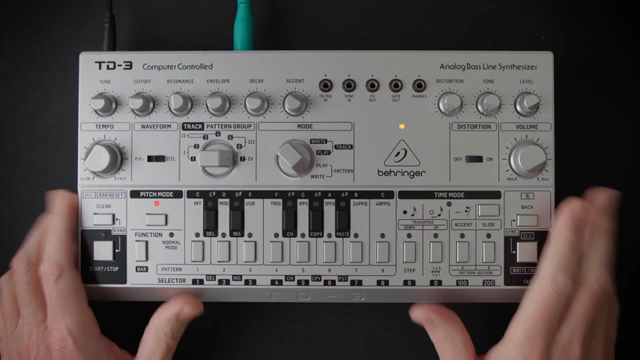
"Contrary to popular belief, the 303 is not actually that hard to program."
© Screenshot/Quote: Woodypianoshack (YouTube)
Busting the 303 Myth: It’s Not That Hard
Woody wastes no time debunking the idea that 303 programming is some kind of dark art. He shows that, despite its reputation, the TD-3 (and by extension, the original 303) is actually pretty straightforward once you know where to poke.
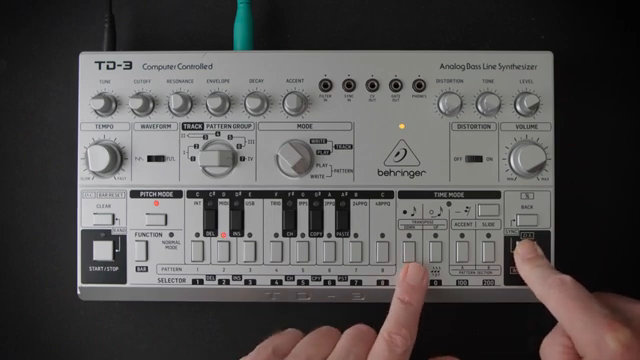
With a few button presses, he demonstrates how to clear patterns, enter write mode, and get a blank slate. The real trick, Woody reveals, is understanding the sequence of steps—once you’ve got that, the rest is just muscle memory. The process isn’t intuitive at first, but it’s hardly rocket science once you’ve seen it in action.
Modes Unleashed: Pitch, Time, and Function
The heart of the TD-3’s programming lies in its three main modes: pitch, time, and function. Woody walks through each, showing how pitch mode lets you step through and audition notes, while time mode is where you lay down steps, ties, and rests to shape your groove.
Function mode ties it all together, letting you play back your creation and tweak as needed. Woody’s demonstration is brisk but clear, making it obvious that these modes are less intimidating than they look. If you can count to sixteen and press a few buttons, you’re already halfway to acid glory.
Accents, Slides, and Groove: The Secret Sauce
"This thing is all about the happy accidents."
© Screenshot/Quote: Woodypianoshack (YouTube)
Here’s where the magic happens. Woody dives into the TD-3’s creative potential, showing how to add accents, slides, and octave shifts to inject life into your patterns. He’s not precious about it—randomness and happy accidents are part of the game, and sometimes the best lines come from just messing about.
He demonstrates how to tweak individual steps, layering in slides and accents for that unmistakable acid squelch. Woody also shows how to use real-time input and metronome tapping to build grooves with more swing and personality. The process is playful, and he encourages experimentation over perfection.
By the end, Woody’s patterns are dripping with character, and he makes it clear that the TD-3 rewards those who embrace chaos. If you want clinical, look elsewhere—this is about vibe, not spreadsheets.
Watch the Video: Acid in Action
There’s only so much you can get from words—Woody’s video is packed with real-time programming, knob-twiddling, and those little mistakes that make acid lines sing. If you want to see the TD-3’s quirks and charms in full effect, you’ll need to watch the original. Trust me, some things just don’t translate to text—especially when the groove hits.
This article is also available in German. Read it here: https://synthmagazin.at/woody-piano-shack-vs-die-303-td-3-programmierung-ohne-traenen/
Watch on YouTube:
Latest articles
Watch on YouTube:
Visit the channel:
https://www.youtube.com/WoodyPianoShack
https://www.youtube.com/WoodyPianoShack
Links from WoodyPianoShack:
Website: https://woodypianoshack.com
Patreon: https://patreon.com/woodypianoshack
Twitter: https://twitter.com/woodypianoshack
Instagram: https://instagram.com/woodypianoshack
Facebook: https://facebook.com/woodypianoshack
Sponsored links:
If you purchase via these links, we may earn a small commission – at no extra cost to you. The link opens an Amazon keyword search, and results may vary depending on availability.
Behringer TD-3
🔗 Check price on Amazon
🔗 Check price on Amazon