If you think Novation Launchpads are just for triggering clips and looking cool on Instagram, TAETRO is here to flip your script. In his signature hands-on, no-nonsense style, he breaks down how these little boxes can hustle in your studio, from finger-drumming to full-on song arrangement. Whether you’re rocking the Mini, X, or Pro, this video is packed with workflow hacks, customization tips, and some brutally honest Push comparisons. If you’re about that beatmaker life and want to squeeze every drop of juice from your gear, this one’s for you.
1. December 2025
RILEY
TAETRO’s Launchpad Deep-Dive: More Than Just Blinky Lights
Ableton Move, Ableton Push, Novation Launchpad Mini, Novation Launchpad Pro, Novation Launchpad X, Polyend Synth
Launchpads: The Swiss Army Knife You Didn’t Know You Needed
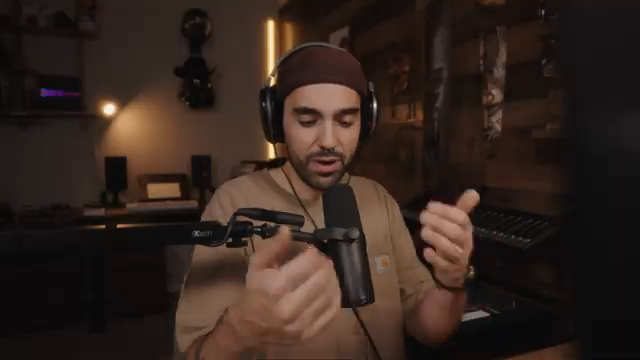
TAETRO kicks things off by reminiscing about his long-running relationship with Launchpads, showing off his original Mini like it’s a battle-scarred mixtape from back in the day. He sets the vibe for anyone who’s ever stared at a grid of pads and wondered if it’s just a flashy toy or a legit studio weapon. Spoiler: it’s both, and then some.
He’s quick to point out that Launchpads aren’t just for Ableton nerds or folks with deep pockets. If you’re hunting for a controller that won’t break the bank but still brings serious heat, these boxes are worth a look. TAETRO promises to show how Launchpads can flex in ways you probably never considered, and trust me, he delivers.
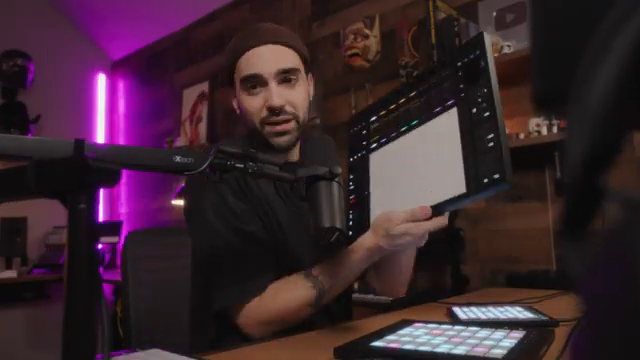
"If you're like me all those years ago, and you have no idea how these things work, or you're looking for a capable good controller without dropping big dollars on an Ableton Push, I want to show you why launchpads have been a part of my setups for years."
© Screenshot/Quote: Taetro (YouTube)
Mini, X, or Pro? Picking Your Poison
"The mini, great for clip launching in a small footprint. The X, added capabilities, velocity and after touch pads. The Pro, more dedicated buttons, more features, sequencer, MIDI in and out."
© Screenshot/Quote: Taetro (YouTube)
TAETRO lines up the Launchpad Mini, X, and Pro like street food options—each with its own flavor. The Mini is the pocket-sized clip launcher, perfect for cramped desks or backpack warriors. It’s got drum and note modes, but don’t expect any fancy velocity action. It’s basic, but it gets the job done.
Step up to the X and you get more real estate, velocity-sensitive pads, and some extra sauce like custom scale modes and mixer tricks. The Pro? That’s the full meal: dedicated buttons, a built-in sequencer, MIDI ins and outs, and enough workflow shortcuts to keep your hands off the mouse. TAETRO doesn’t just list specs—he shows how each model fits a different hustle, whether you’re finger-drumming at home or running a live set at your cousin’s basement party.
From Loops to Full Tracks: Launchpad X in Action
TAETRO jumps into the Launchpad X workflow, breaking down how you can flip a handful of loops into a legit song arrangement without ever touching your QWERTY keyboard. He walks through capturing ideas, layering drums, and juggling clips in session view like a street magician. The capture button is a lifesaver for those moments when inspiration hits but you forgot to hit record—been there, done that.
He keeps it real about not playing everything perfectly, but that’s the beauty of this workflow: you can jam, mess up, and still end up with a track that slaps. TAETRO’s approach is all about staying in the groove, building energy, and arranging on the fly. If you want to see the magic happen, you gotta peep the video—words just don’t do those transitions justice.
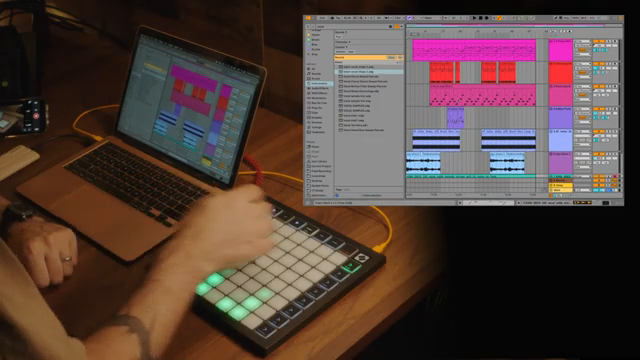
"That's how we go from just a collection of loops to some actual song structure."
© Screenshot/Quote: Taetro (YouTube)
Launchpad Pro vs. Push: The Budget Brawl

"Launchpad Pro, on the other hand, a fraction of that cost and the size, as you can hopefully see, at about like $320 to $390, depending on the sale."
© Screenshot/Quote: Taetro (YouTube)
Here’s where TAETRO gets spicy. He throws the Launchpad Pro in the ring with Ableton Push, pointing out that Push costs as much as a used car, while the Pro is more like a solid pair of sneakers—affordable, reliable, and still fresh. He shows how the Pro covers most of the Push’s workflow, from fixed-length recording to quantize, duplicate, and even a built-in step sequencer.
TAETRO doesn’t sugarcoat the differences: browsing sounds is still easier with a mouse, and Push has a few tricks the Pro can’t match. But for the price, the Launchpad Pro punches way above its weight. He even demos sequencing external synths and Ableton’s Move, flexing those MIDI outs and probability features. If you’re on a budget but want pro-level control, this section is pure gold.
Custom Modes: Make It Yours with Components
TAETRO drops the real secret sauce—Novation’s Components software. He shows how you can turn even the humble Mini into a custom performance beast, mapping faders, drum racks, and shortcuts to fit your exact needs. The drag-and-drop interface is so easy, you could probably do it one-handed while eating a burrito.
He highlights how you can set up custom keystrokes, color-code pads, and build layouts that work for your unique setup, whether you’re running a DAW or just want to control your lights and coffee maker (okay, maybe not the coffee, but you get the idea). TAETRO keeps it honest: Launchpads might not be the newest gear on the block, but with this level of customization, they’re still a killer addition to any beatmaker’s rig.
This article is also available in German. Read it here: https://synthmagazin.de/taetros-launchpad-deep-dive-mehr-als-nur-blinkende-lichter/
Watch on YouTube:
Latest articles
Watch on YouTube:
Visit the channel:
https://www.youtube.com/Taetro
https://www.youtube.com/Taetro
Links from Taetro:
Instagram: https://instagram.com/taetro
Facebook: https://facebook.com/taetromusic
Bandcamp: https://taetro.bandcamp.com
Sponsored links:
If you purchase via these links, we may earn a small commission – at no extra cost to you. The link opens an Amazon keyword search, and results may vary depending on availability.
Ableton Move
🔗 Check price on Amazon
🔗 Check price on Amazon
Ableton Push
🔗 Check price on Amazon
🔗 Check price on Amazon
Novation Launchpad Mini
🔗 Check price on Amazon
🔗 Check price on Amazon
Novation Launchpad Pro
🔗 Check price on Amazon
🔗 Check price on Amazon
Novation Launchpad X
🔗 Check price on Amazon
🔗 Check price on Amazon
Polyend Synth
🔗 Check price on Amazon
🔗 Check price on Amazon