Diving deep with Taetro, we explore the Novation Play and how this free software, paired with the Launchkey Mini, opens new doors for sound design. Whether you’re a novice or a season pro, there’s something to learn from this engaging guide.

27. October 2025
RILEY
Taetro Unveils the Novation Play: Crafting Sound in Style
What's on the Menu?
When Taetro sits down to break down sound design with Novation Play, it’s like a chef unveiling his secret recipe. Novation’s Play comes free with Launchkeys and pairs up like peanut butter and jelly with Ableton Live Lite, which is also part of the package. On this menu? We’re serving a crash course in the fundamentals of sound design, served with a side of practical tips on using this robust plug-in. It’s a tasty treat for anyone looking to dive into the creative world of music-making without a hefty price tag. In his video, Taetro invites both new and returning viewers to explore the series focusing on Launchkey Mini’s capabilities. So, whether you’re a newbie or not, this episode promises to be a savory session of learning.
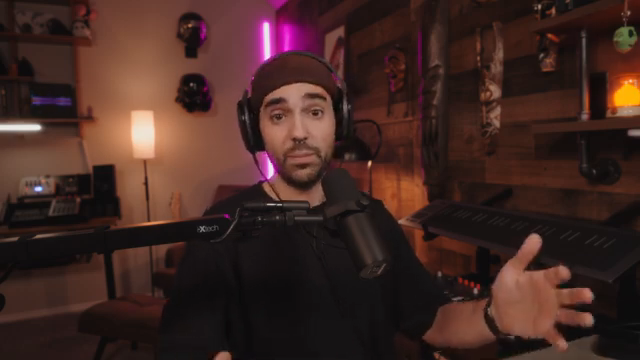
"I want to break down for you how you can use Play with your Launchkey."
© Screenshot/Quote: Taetro (YouTube)
Inside Novation Play: A Tasty Sound Buffet
"We get this sort of like looped tail. Really, really cool."
© Screenshot/Quote: Taetro (YouTube)
Novation Play isn’t just any free plugin – it’s a whole smorgasbord of sonic possibilities. Taetro gives us the lowdown on how Play works as a virtual instrument within Ableton Live Lite. This puppy is stacked with high-quality sounds that are sure to make you drool, from multi-sampled instruments to global effects like reverb and delay. We’re talking about macros, which according to Taetro, mirror those on your screen and come stacked with tasty additions like chorus and cassette effects. Fancy a dance with some lo-fi? He’s got you covered with a spinner that bounces sounds between your ears faster than a ping-pong match. There’s even a freeze function that can loop a note and turn it into an ambient pad that’s (you guessed it) chill.
Crafting Ambient Drones with Style
With Taetro at the helm, creating ambient drones is like crafting a complex cocktail with just a few ingredients. He demonstrates using the freeze function in Novation Play to craft a sound that hovers like a smoky vapor in a beat-driven club. By manipulating Play’s presets, you can conjure up sounds that echo through the night, making it easy to create those lush, dreamy backgrounds perfect for any chill-out session. The process involves capturing the ambient tail of a note onto a separate audio track, ensuring it never fades away prematurely, just like ensuring your cocktail’s ice cube doesn’t melt too fast. It’s a trick that gives any budding beat-maker a gold star in the sonic playground.
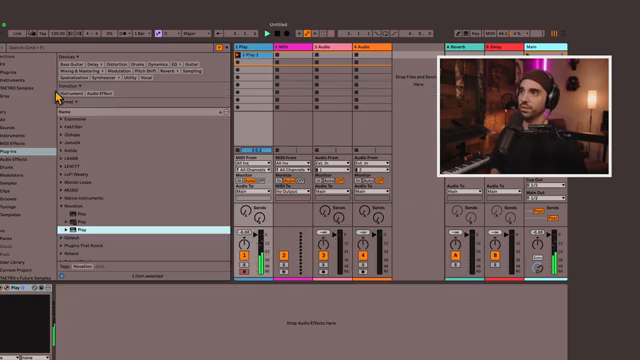
"Let me show you how you can create your own sort of ambient drone using Play."
© Screenshot/Quote: Taetro (YouTube)
Decoding the Sound Envelope: Letter by Letter
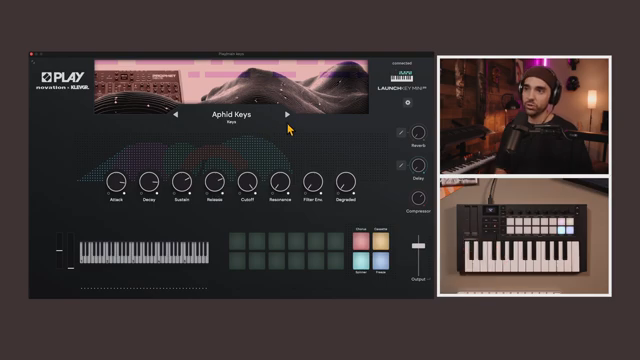
"Understanding what they do is fundamental to understanding how to get the kind of sound that you want."
© Screenshot/Quote: Taetro (YouTube)
Understanding the amp envelope in sound design is like cracking an old-school letter from a secret admirer. Although the attack, decay, sustain, and release settings might sound like rocket science to some, Taetro breaks it down into bite-sized chunks. He takes us on a journey through these terms, showing how they shape the audio profile of any sound in Play. By adjusting these four variables, creators can create notes that soar like a songbird or ground them to punchy beats that stop on a dime. For those just looking to vibe rather than dive into a textbook, Taetro’s explanation is clear and punchy – proving you don’t need a PhD to make your music groove. This is the meat and potatoes of sound design, served with a side of practical sound wisdom.
Bringing it All Together: The Final Jam
With all the pieces in play, Taetro demonstrates how all these concepts culminate in producing a cohesive track. It’s like assembling a puzzle made of beats, melded perfectly using the Play sounds within Ableton Live Lite’s confines. Taetro encourages aspiring producers to download the plugin – after all, it’s free if you have a Launchkey. He suggests exploring his one-hour detailed process as a channel member to witness the full, unadulterated jam session. It’s a masterclass in creativity, spontaneity, and execution that wraps up the episode like a smooth closing set. The beauty of working with Play and the Launchkey, Taetro assures us, is in the freedom to experiment and improve. It’s an open invitation to dive deeper, explore soundscapes, and find your musical voice.
This article is also available in German. Read it here: https://synthmagazin.at/taetro-enthuellt-den-novation-play-klanggestaltung-mit-stil/
Watch on YouTube:
Latest articles
Watch on YouTube:
Visit the channel:
https://www.youtube.com/Taetro
https://www.youtube.com/Taetro
Links from Taetro:
Instagram: https://instagram.com/taetro
Facebook: https://facebook.com/taetromusic
Bandcamp: https://taetro.bandcamp.com
Sponsored links:
If you purchase via these links, we may earn a small commission – at no extra cost to you. The link opens an Amazon keyword search, and results may vary depending on availability.
Launchkey Mini
🔗 Check price on Amazon
🔗 Check price on Amazon
Novation Play
🔗 Check price on Amazon
🔗 Check price on Amazon