Taetro dives into the Synido TempoKey W25, a powerhouse for mobile music-makers. This Bluetooth MIDI controller is packed with features like scale and arpeggiator modes, making it perfect for budding producers. If you’re into creating music on the go with style, this might just be your new best friend!
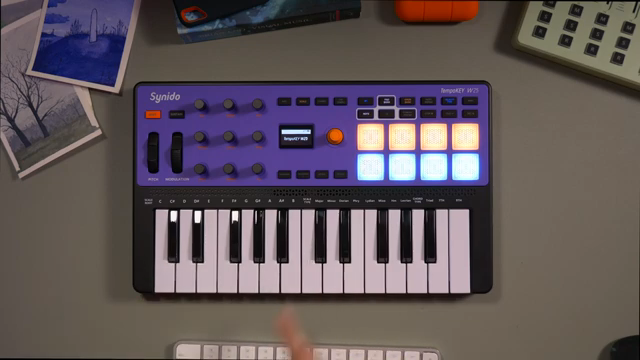
Meet Your Mobile Music Buddy
Alright, let’s crank up the volume and cue up some beats because Taetro’s got the goods with the new Synido TempoKey W25. With Bluetooth connectivity, this compact MIDI keyboard claims to be the ultimate tool for mobile music-making. Taetro breaks down why it’s a massive upgrade from its predecessor, the original Tempo Key. It’s hard to resist the charm of those sensitive pads, especially if you’re a sucker for finger-drumming. With MIDI in, out, and through, this is more than just a pretty face on your gig setup. Compared to other gear, it seems to be a treasure trove for all kinds of beats, from laid-back lo-fi to head-bobbing hip-hop. Get ready to make some noise on the go!
This beast isn’t just for show. Taetro pairs it with an iPad and tames it with Ableton Move, cooking up grooves that resonate with any mobile producer’s dream. In typical Taetro fashion, he gives shoutouts to Synido for sponsoring the video, keeping it real and showing some love to the ones who made this review possible. Now let’s dive into the feature-packed goodness that’s the W25!
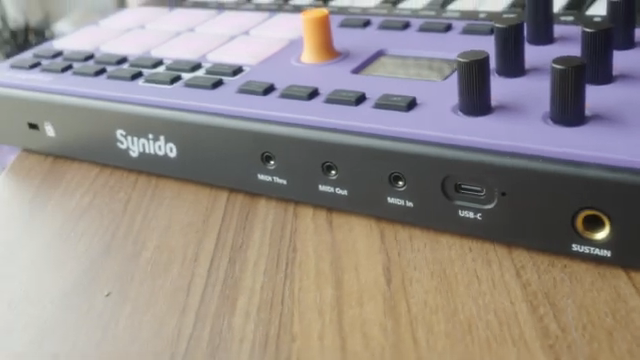
"It is a feature-packed mini MIDI keyboard, which y'all know I love."
© Screenshot/Quote: Taetro (YouTube)
Sustain, Scale & Chord Modes Unveiled
"We have a D major in the key of D major, but then if I go to B, we have B minor as we would expect in the key of D major."
© Screenshot/Quote: Taetro (YouTube)
Hold onto your seats because Taetro drops a deep dive on the sustain, scale, and chord modes. The W25 rocks a sustain button right at the front, giving you pedal-like capabilities without dragging hardware along. Need to keep a note lingering longer? Easy-peasy, just toggle it on via the central encoder and adjust your style. And just when you thought it couldn’t get better, scale mode swoops in to save the day. Tailor your music effortlessly by setting up a root note and selecting the scale type right from the keys. Whether you’re stuck on D major or cruising through B minor, this mode’s got you covered. Chord mode adds a dash of harmony magic, allowing you to play triads, sevenths, and ninths without breaking a sweat.
Taetro shows how all this cool stuff is effortlessly displayed on-screen, putting essential info right at your fingertips. Need to play in different keys without a fuss? The transpose buttons are your best friends, jazzing up your creativity with a touch of flair. What’s more, the W25 keeps all chords and scales in tune, magically aligning everything with your chosen key. Even those who struggle with traditional keyboards will find solace in this perfectly curated assistant. Who needs piano lessons when you’ve got a friend like this? Dive into this section with Taetro as he serves up the goods on enhancing your musical skills without much hassle.
Ride the Arpeggiator Wave
Let’s talk arpeggiators, baby! Taetro invites you to ride the sonic waves of the W25’s arpeggiator, a feature every rhythm chaser swears by. With its nifty screen feedback, adjusting octaves, tweaking swing, and juggling note repeats has never been this smooth. Taetro hooks us with an exploration of all the classic arpeggiation functionalities, juxtaposing melody and rhythm with a flick of a switch. He’s got the lowdown on syncing up using USB or MIDI, although the Bluetooth MIDI has its quirks when it comes to sync duties. But hey, for those connected to your DAW, the arp can still lock in with your clock and show off its intricate patterns.
The video showcases how the swing of rhythms can add flair to your jams, making them groove harder than cheap vinyl at a late-night party. You can instantly feel the magic on those drums with note repeat, adding crisp dynamic layers with minimal latency fuss. The tempo syncs up smoothly, proving that even in the Bluetooth age, this controller can hold its ground with wired efficiency. While some might sneer at Bluetooth MIDI, Taetro reassures us that this ride is smooth sailing with no major hiccups. Whether you’re a newbie or a seasoned pro, these arpeggiator features will leave you buzzing with creative energy.
Pads, Sensitivity, and Bluetooth Magic
Grab your headphones and let’s dissect the pads on this bad boy. With two banks of pads that respond to your touch like a devoted street-dancer to beats, there’s no room for unresponsive gear here. Taetro shines a light on how these pads, now with aftertouch, spice up your playing with sensitivity adjustments and crazy flex with velocity types. Whether you’re tapping away gently or going in hard like a drum machine possessed, the W25 accommodates all play styles flawlessly. And for those who like to keep it on the down-low or wild out in full volume, this gadget lets you lock in fixed velocity for consistent output.
Customizing each pad’s note, channel, and color is also just a press away, making it an indispensable gear in live setups. Mobile producers rejoice, because Taetro explains the joys of Bluetooth MIDI with a revelatory touch. He shows how effortlessly the W25 hooks up with his MacBook Pro, proving that any latency ghosts are more folklore than fact. Streaming metronomes and real-time jamming have never felt this liberating, allowing you to focus on what matters the most—those sweet, sweet grooves. Tear down those cable-cluttered walls and step into the future with Bluetooth MIDI as Taetro proves it’s the real deal.
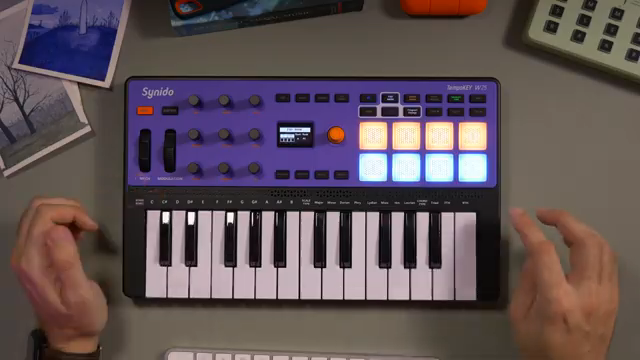
"And before I talk too much about latency, I'll also add that you guessed it."
© Screenshot/Quote: Taetro (YouTube)
Unleashing MMC Control and Mobile App Mastery

"It makes it so you can really customize the controller to whatever use case you're using."
© Screenshot/Quote: Taetro (YouTube)
Turn the page to MMC control and app galore with Taetro’s tour de force through the W25’s additional features. Bringing the spirit of MIDI to life, the MMC button illuminates the transport controls like a backstage pass to a gig, although here, it’s the gear doing the heavy lifting. In typical Taetro style, he remarks on how not every software supports these automatic mappings, much to our chagrin. Fear not, custom mappings still offer a touch of DIY magic, letting you create your own workflow across your favorite DAWs.
The real showstopper is how the W25 pairs with mobile apps, especially Ableton Note. Taetro dives into the depths of mapping and macro integrations, showing how the controller transforms into a mini command center. He highlights how these mappings stay intact even when you switch off, putting convenience on the front stage. Taetro masterfully juggles between apps and hardware, revealing the unsung hero of simplicity that the W25 becomes in a mobile setup. It’s not just about playing notes; it’s about crafting an experience that’s uniquely yours. With the mobile app features in full swing, the W25 elevates itself as a must-have for the traveling musician.
A Controller for the Ages with Endless Mojo
Finally, Taetro wraps up the rollercoaster ride by heralding the Synido TempoKey W25 as a controller that’s got true staying power. In the world of MIDI controllers, it’s like finding a rare street food cart that never disappoints. With all those customizable options and the ability to remember your settings, it’s as if the W25 knows you better than your bandmates. The Bluetooth connection remains smooth and the pads hit all the right notes, proving that in the world of portable music-making, this device is a trusty companion.
Taetro’s enthusiasm is contagious, as he lays out how easily it fits into a mobile setup. Whether you’re a bedroom producer or taking your tunes on the road, he shows how this controller’s endless customization turns it into a powerhouse. For the price-to-fun ratio lovers out there, this box might just slap harder than any wooden spoon ever could. The Synido TempoKey W25 is a testament to how far mobile music-making gear has come, fulfilling dreams, and creating new avenues for creativity. And with Taetro’s parting words, there’s no doubt that this gadget will keep grooving into the future.
This article is also available in German. Read it here: https://synthmagazin.at/taetro-groovt-mit-dem-tempokey-w25/
Watch on YouTube:
Latest articles
Watch on YouTube:
Visit the channel:
https://www.youtube.com/Taetro
https://www.youtube.com/Taetro
Links from Taetro:
Instagram: https://instagram.com/taetro
Facebook: https://facebook.com/taetromusic
Bandcamp: https://taetro.bandcamp.com
Sponsored links:
If you purchase via these links, we may earn a small commission – at no extra cost to you. The link opens an Amazon keyword search, and results may vary depending on availability.
Synido TempoKey W25
🔗 Check price on Amazon
🔗 Check price on Amazon