Starsky Carr dives headfirst into the Beetlecrab Tempera’s V2.2 update, and let’s just say this isn’t your nan’s granular synth. With new tricks like Euclidean sequencing, master dirtification, and poly aftertouch, Tempera is now a full-on rave bunker in a box. Starsky’s trademark deep-dive style slices through the interface weirdness, showing off everything from crunchy new effects to workflow tweaks that actually make sense. If you want to hear Anthony Hopkins rage against the dying of the light through a haze of digital chaos, this is the walkthrough you need. Strap in—this one’s for the hardware heads who like their textures complex and their updates actually useful.

21. November 2025
SPARKY
Starsky Carr Unleashes the Beetlecrab Tempera V2.2: Granular Mayhem Gets a Dirty Upgrade
Tempera Gets a V2.2 Injection: More Than Just a Facelift
The Beetlecrab Tempera just got a serious shot in the arm with its V2.2 update, and Starsky Carr wastes no time showing off the new muscle. Forget minor bug fixes—this update brings a Euclidean generator, improved reverb, master dirtification effects, and poly aftertouch, all crammed into a box that already looked like it was plotting to overthrow your DAW. The interface might remind you of an MPC at first, but don’t be fooled: those pads are portals into granular chaos, not just sample triggers.
Starsky’s approach is classic—no hand-holding, just a straight-up breakdown of how the Tempera’s four granular engines chew through up to eight stereo samples, each sliced into eight parts. The result? A workflow that’s more genius than gimmick, letting you build complex textures without getting lost in menu hell. If you’ve ever stared at a granular synth and wondered what the hell was going on, this walkthrough finally connects the dots—without dumbing it down.
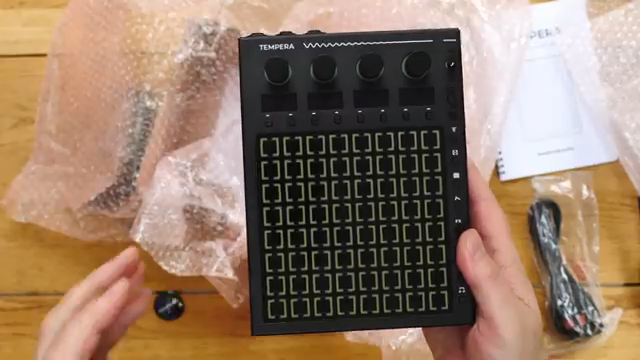
"It's just been given a really nice update with a new Euclidean generator, improved reverb, master dirtification effects and poly aftertouch amongst other things."
© Screenshot/Quote: Starskycarr (YouTube)
Modulation Mayhem and Grain Control: The New Features That Matter
"They sort of dirtify the sound, that's the effects."
© Screenshot/Quote: Starskycarr (YouTube)
V2.2 isn’t just about shiny new buttons—Starsky digs into the real upgrades. Modulation gets a turbo boost, with poly aftertouch now on tap and a modulation matrix that lets you target pretty much any parameter you’d actually want to mess with. Want to twist grain density, spray, or filter cutoff with a flick? Sorted. The new modulation options aren’t just for show; they make the Tempera feel like a proper performance weapon, not a static sound lab.
Grain controls have levelled up too. You can now fine-tune grain length, density, trigger points, and even spray them across X and Y axes for that extra layer of unpredictability. The expanded performance capabilities mean you’re not just stuck in ambient pad land—this thing can get percussive, glitchy, or downright filthy when you want it. Starsky’s no-nonsense demo proves these aren’t just incremental tweaks—they’re the kind of upgrades that make you want to actually use the box live.
Demo Time: Sonic Upgrades You Can Actually Hear
Starsky doesn’t just talk the talk—he throws the Tempera into the deep end with a hands-on demo that’s as chaotic as it is musical. The Anthony Hopkins sample gets diced and stretched, showing off how the new BPM and pitch modes keep things locked or let them run wild. Chopping, syncing, and retuning samples on the fly, Starsky builds a canvas that’s anything but vanilla.
The real kicker? The sound. With the new effects and grain controls, the Tempera spits out textures that range from dreamy pads to mangled, rhythmic madness. If you want to hear what this update actually does to your audio, you’ll have to watch the video—no written review can do justice to the way this thing chews up and spits out samples. It’s a rave bunker in a box, and Starsky’s demo proves it.
Hidden Tricks and Workflow Hacks: Starsky’s Survival Guide
Starsky isn’t just here to show off presets—he drops a load of practical tips for getting the most out of the Tempera. From chopping samples in your DAW for maximum control to using macros for quick performance tweaks, it’s all about making the box work for you, not the other way around. The canvas system gets a shout, letting you save and load entire setups without breaking a sweat.
There’s plenty of workflow wisdom here, like setting up percussion to hit bang on the beat or using randomness to keep things fresh. Starsky even admits he prefers prepping samples in Logic before bringing them into the Tempera—proof that sometimes the best hacks are outside the box. If you’re after hidden tricks and real-world advice, this section is pure gold.
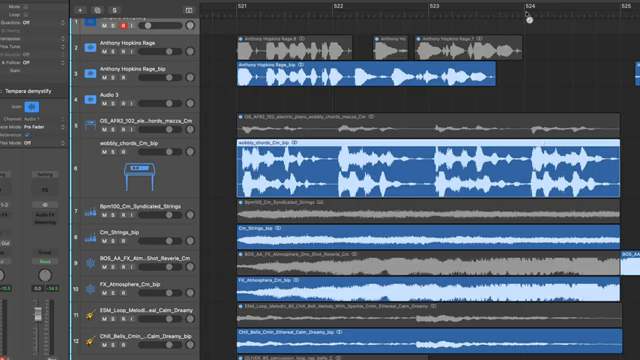
"If you want to get it really exact, you can use the relative offset for the sample start in the emitters."
© Screenshot/Quote: Starskycarr (YouTube)
Sound Design Showdown: Why Tempera Stands Out
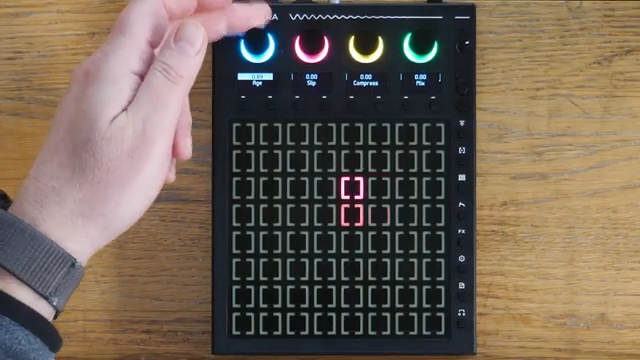
"So it gets really crunchy."
© Screenshot/Quote: Starskycarr (YouTube)
The final act is a masterclass in sound design. Starsky walks through effects like the new ‘age’ and ‘slit’ for instant dirtification, plus compressor and mix tweaks that take the Tempera from clean to crusty in seconds. The global effects system works like a mini mixing desk, with each emitter sending audio through your chosen flavour of chaos.
Visual demos of grain syncing, Euclidean sequencing, and poly aftertouch modulation show why the Tempera isn’t just another granular box. It’s flexible, expressive, and—thanks to V2.2—capable of sounds you won’t get anywhere else. If you want to see how deep the rabbit hole goes, you’ll need to watch the video. Trust me, no amount of text can capture the filth and finesse this thing delivers in the hands of someone who knows how to push it.
This article is also available in German. Read it here: https://synthmagazin.at/starsky-carr-entfesselt-das-beetlecrab-tempera-v2-2-granularer-wahnsinn-mit-drecks-garantie/
Watch on YouTube:
Latest articles
Watch on YouTube:
Visit the channel:
https://www.youtube.com/StarskyCarr
https://www.youtube.com/StarskyCarr
Links from StarskyCarr:
Patreon: https://patreon.com/starskycarr
Instagram: https://instagram.com/starskycarr
Facebook: https://facebook.com/StarskyCarrOfficial
Sponsored links:
If you purchase via these links, we may earn a small commission – at no extra cost to you. The link opens an Amazon keyword search, and results may vary depending on availability.
Beetlecrab Tempera Granular Synth
🔗 Check price on Amazon
🔗 Check price on Amazon