Peel back the layers of Elektron Digitakt’s elusive middle tier with soulbrixofficial. Get ready for an exploration of firmware updates, sonic tricks, and mysterious secrets, all delivered with the flair only a passionate noise maker from Portugal can serve. Delve in and discover why this sampler and sequencer is the gear of dreams and legends.
6. October 2025
JET
soulbrixofficial Dives Into the Digitakt Iceberg – Brace Yourselves!
Cracking the Firmware Code
First up in soulbrixofficial’s expose on the Elektron Digitakt iceberg’s second tier is the firmware realm. If you’re thinking, “Firmware updates, really?”, think again. These aren’t just mundane tweaks – they’re the lifeblood that can elevate your Digitakt to legendary status. To get things rolling, the Elektron Transfer software comes into play. After connecting the Digitakt to your computer, it’s a quick drag and drop from the Elektron support page to initiate the OS update. And while at the time of recording the video, firmware version 1.52a was the latest, it’s crucial to stay updated. After all, no one wants to miss out on the next big leap that could make their sampler the stuff of legends.

"Firmware updates have introduced new features that help the Digitakt achieve its iconic status."
© Screenshot/Quote: Soulbrixofficial (YouTube)
Sonic Sculpting with Data Entry Knobs
"Sounds and sound pool are concepts used by the Digitakt."
© Screenshot/Quote: Soulbrixofficial (YouTube)
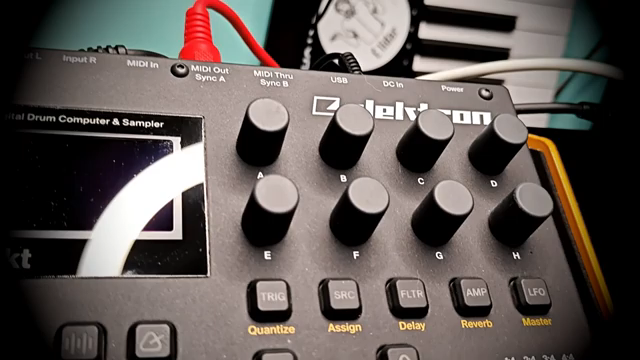
The dance continues with the often-overlooked yet essential data entry knobs. These eight encoders, bewilderingly labelled A through H, aren’t just for decoration. They’re the secret behind precise parameter manipulation across the Digitakt’s myriad pages. Whether you’re tweaking filters or adjusting LFO settings, these knobs serve as your musical compass. Each knob maps out a realm of possibility, opening doors to what soulbrixofficial would describe as an odyssey through sound. It’s here that the Digitakt’s identity shines – where mundane samples transmogrify into dynamic soundscapes. The sound pool, acting as your tonal reservoir, stores your crafted sounds, ensuring no masterpiece is ever lost to the void. It’s a hefty 128-sound allowance, inviting more experimentation than a rave at a council estate. As soulbrixofficial tours through the sound library, it’s a reminder that each twist of a knob might be the key to unlocking your next great auditory exploit.
Navigating Audio and MIDI Track Pages
Soulbrixofficial unveils the intricacies of the Digitakt’s audio and MIDI track pages like a guide through Elysium. With five glorious pages per audio track and additional pages for MIDI, there’s a universe of sonic exploration at your fingertips. Each page is festooned with specific roles, from trig parameters to LFO destinations. In its essence, it’s an archetype of flexibility, turning each audio track into a multifaceted powerhouse. MIDI track pages present their own unique configuration settings, enabling note chords and intricate modulation. The layering of complexity achieved here—akin to a dance between sound architect and their realm—reveals why the Digitakt is not just an instrument but a cornerstone of gear collections worldwide. Soulbrixofficial makes it evident that with the right page settings, one can weave an entire orchestra within this humble box.
Unlocking Secondary Functions and Mixing Mastery
Standing out amidst the plethora of options is the Function key, a little orange gateway to Digitakt’s hidden tricks. By holding it, users can access secondary functions mapped to almost every button. This key isn’t just your average modifier; it’s akin to finding a secret door in your favourite arcade game. With a tilt of quirkiness, soulbrixofficial demonstrates how this key can expedite navigation and enhance workflow tenfold.
Moving on to mixing, we delve into the internal and external mixer territory. The internal mixer is straightforward, balancing volumes across audio tracks, while the external mixer controls audio inputs. The nuances involved—such as dual mono settings for splitting channels—highlight the Digitakt’s potential as a live performance beast. Whether you’re prepping your set for a smokey basement gig or just fiddling around at home, the mixing options add depth and control. Such features underscore why the Digitakt resonates with producers who demand power and flexibility in their rigs. With soulbrixofficial’s exploration, no stone is left unturned, showcasing why navigating these tools is as exhilarating as a late-night jam session.
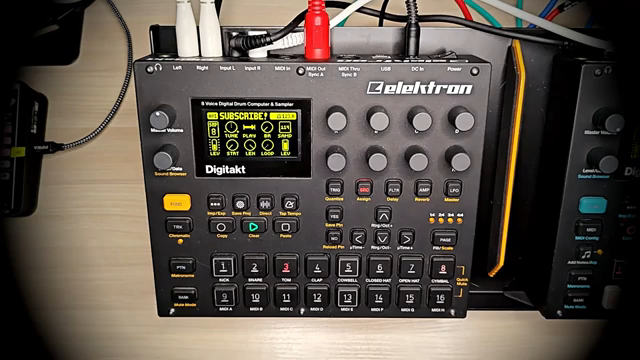
"The function key is the only coloured button in the Digitakt in orange."
© Screenshot/Quote: Soulbrixofficial (YouTube)
Sampling Novelties and Effectual Surprises
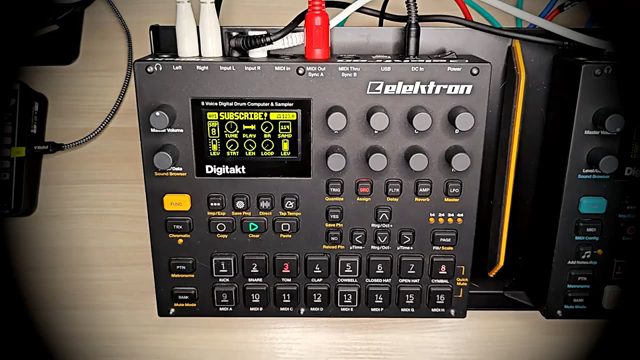
"Sampling the Digitakt has great sampling capabilities."
© Screenshot/Quote: Soulbrixofficial (YouTube)
In a nod to those who relish sampling, soulbrixofficial presents the Digitakt’s sampling capabilities as a carnival of choices. From internal audio to external sources via USB, this beast is a sampling aficionado’s playground. Selecting sources and defining lengths becomes a breeze, inviting experimentation and creativity. Whether capturing spontaneous sounds or methodically planning samples, the Digitakt’s ease shines.
Effects, an integral aspect of sound design, offer further indulgence. The sampler boasts delay, reverb, compressor, overdrive, and bit reduction effects. With such a comprehensive toolkit, the Digitakt transcends from mere sampler to an audio alchemist’s cauldron. Navigating through these effects, soulbrixofficial showcases how each can flavour your tracks, from hinting at subtle textures to utterly deconstructing soundscapes. This segment affirms that the Digitakt’s prowess is not just in its sampling ability but in its transformative nature, morphing any sequence into something uniquely expressive.
Ending On a Rhythmic Note
Rounding off the adventure, soulbrixofficial steers us towards mastering volume levels, tempo, and the art of metronome precision. Adjusting volume across various segments is almost a philosophical debate on balance versus presence, yet essential for live settings or crafting pristine recordings. Within this realm, the Tempo and Swing options unveil creative timing and rhythm lifelines. The meticulous control bestowed upon users allows the Digitakt to adjust to any musical whim.
As if that wasn’t enough, you’re introduced to modes, mutes, stops, and plays, giving your music the dynamic traits of a well-rehearsed band. The power to pause, mute, or alter tempo on the fly transforms performances into immersive experiences. Soulbrixofficial’s exploration culminates in understanding these tools as an artist’s means to breathe life into digital compositions. It’s the secret weapon for those who look beyond the handbook and take the Digitakt into the realms of legendary gear.
This article is also available in German. Read it here: https://synthmagazin.at/soulbrixofficial-taucht-in-den-digitakt-iceberg-ein-festhalten/
Watch on YouTube:
Latest articles
Watch on YouTube:
Visit the channel:
https://www.youtube.com/soulbrixofficial
https://www.youtube.com/soulbrixofficial
Links from soulbrixofficial:
Sponsored links:
If you purchase via these links, we may earn a small commission – at no extra cost to you. The link opens an Amazon keyword search, and results may vary depending on availability.
Elektron Digitakt
🔗 Check price on Amazon
🔗 Check price on Amazon