Ever wanted to tweak your piano sound like changing clothes? Well, sangstersounds’ latest review of Pianoteq 9 is like magic for your music. Tune in as Chris unravels how this plugin lets you mess with mic placements and room dimensions even after recording. Streetwise hacks for virtual pianists? You bet!

Meet the Magic Box
Chris Sangster, or as we know him, sangstersounds, kicks off his latest video by diving into the magical world of the Pianoteq 9 by Modartt. Imagine a virtual piano instrument so revered that it includes samples from legends like Bösendorfer and Steinway grand pianos. Yet, despite its legendary status, Chris admits he never heard of it until recently when the developers reached out to him. That’s the kind of real talk we love from sangstersounds. He immediately embraces this box of wonders, excited to unravel its acoustic capabilities.
The Instrument Packs Conundrum
Chris is tasked with a delightful challenge – choosing from a selection of instrument packs that would make any pianist swoon. From the graceful serenades of the Bösendorfer 280VC to the rock-ready sounds of the Rock YC-5 Yamaha emulation, the selection is no picnic. Each pack is imbued with a unique essence, allowing Chris to explore different musical landscapes. Yet, it’s not just about the famous models here, because Pianoteq also includes some in-house creations, like the U4 upright piano, designed to deliver an impeccable general sound without referencing a specific old legend. Chris has that spark in his eye as he navigates through these choices, clearly reveling in the sheer variety Pianoteq 9 offers.
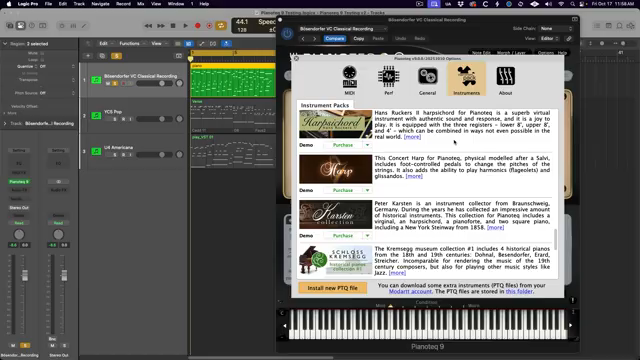
"Honestly, good luck picking."
© Screenshot/Quote: Sangstersounds (YouTube)
Beyond Mere Samples
What sets Pianoteq 9 apart from the crowd isn’t the gigantic library of samples, because this isn’t that kind of party. Instead, it’s got some kind of wizardry called physical modeling that’s less about gobbling up your hard drive space and more about simulating the vibin’ acoustics of famous pianos. In real time! It’s like having a mini-concert at your fingertips without the oversized file download. This ain’t your average plugin from some random shelf. Sangstersounds highlights how this feature retains the authenticity while keeping things real slick and efficient. No need for a massive sound library here, just pure unbridled piano magic.
Mic Placement: The Virtual Frontier
"Unfortunately, I don't have a flux capacitor in my Jeep."
© Screenshot/Quote: Sangstersounds (YouTube)
Now here’s where things get jaw-droppingly cool. Chris steps into the revolutionary mic modeling feature of Pianoteq 9. Picture this: recording your piano and then, like some musical Jedi, moving microphones around the virtual room after the fact. Chris is like a kid in a candy shop, demonstrating how in-depth you can control the virtual micing setup. The top-down and front views really allow you to customize your soundstage. Move the mics closer, change the room dimensions, adjust the angle, even reposition the piano itself! This trickery isn’t just some fun gimmick but a genuine tool for getting that perfect sound your music dreams of. Sangstersounds gives us a show-and-tell that confirms this feature as the rockstar of this patch.
The Mic Emulation Lineup
What’s a piano without some killer microphones to back it up? Pianoteq 9 steps up with an enviable list of mic emulations that would make any engineer drool. We’re talking Neumann U87s, DPA models, and AKG C414 amongst others. These aren’t just for show – each emulation provides a set of vibes distinct to the microphone’s character. Chris breaks down the nuances between these nifty little emulations, even giving us the lowdown on how the Royer SF-24’s bass response will slap you differently than its sibling, the SF-12. With this array of microphone choices, users can craft the perfect mix for any recording scenario with flair and precision.
More Than Meets the Ear
Pianoteq 9 is packed with features beyond the microphone gymnastics. You can control the sound like a wizard tweaking spells: invert phase, modify stereo width, adjust sound speed – things that sound like they belong in Dr. Who’s toolkit more than a music studio. Chris walks through these controls with the flair of a seasoned mixologist, shaking up a concoction of sound settings that push the boundaries of audio engineering. It’s where innovation meets the analog dreams of sound engineers, and Chris makes sure to guide us expertly through these high-tech seas.

"I want to narrow the stereo image and bring in some more punch and definition into the center."
© Screenshot/Quote: Sangstersounds (YouTube)
Aging Gracefully
The final segment of this sonic journey reveals one of Pianoteq’s cheekier features – the virtual aging of pianos. Chris can’t help but smile as he fiddles with sliders that change not just the wear and tear of the piano’s sound, but the visual yellowing of keys too! It’s like time traveling, right from your DAW. Sangstersounds rounds off the adventure by pitting the Pianoteq 9 against a classic Logic Pro piano plugin, further proving how this virtual box of strings not only stands its ground but sets new heights in realism and versatility. Chris leaves us with a lingering promise of innovation as he subtly nudges us to grab this piece of virtual music tech magic.
This article is also available in German. Read it here: https://synthmagazin.at/sangstersounds-entfesselt-die-magie-von-pianoteq-9/
Watch on YouTube:
Latest articles
Watch on YouTube:
Visit the channel:
https://www.youtube.com/sangstersounds
https://www.youtube.com/sangstersounds
Links from sangstersounds:
FREE DOWNLOADS!: https://linktr.ee/sangstersounds
Website: https://sangstersounds.com
Instagram: https://instagram.com/sangstersounds
Sponsored links:
If you purchase via these links, we may earn a small commission – at no extra cost to you. The link opens an Amazon keyword search, and results may vary depending on availability.
Pianoteq 9
🔗 Check price on Amazon
🔗 Check price on Amazon