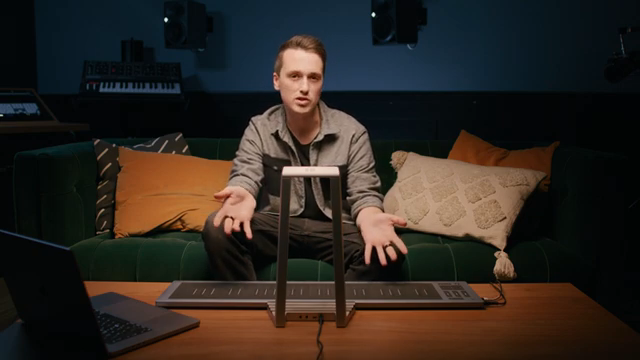
ROLI’s Airwave is not your average MIDI controller. In this official walkthrough, ROLI’s Sound Design & Innovation Manager, Marcus Levy-Chance, demonstrates how Airwave leverages dual infrared cameras and advanced hand tracking to turn gestures into expressive sound control. The video walks through hardware setup, the full suite of Air Gestures, and how Airwave integrates with both ROLI’s own instruments and third-party MIDI gear. For anyone interested in spatial control, MPE workflows, or simply adding a new dimension to their performance rig, this is a deep dive into the architecture and creative potential of Airwave.
7. December 2024
LYRA
ROLI Airwave: Spatial Expression for the Modern Controllerist
Meet Airwave: A New Dimension of Expression
ROLI introduces the Airwave as a controller designed to push expressive sound control into new territory. At its core, Airwave uses dual infrared cameras to track 27 joints in each hand, capturing nuanced gestures in real time. This hardware foundation enables a level of physical interaction that goes far beyond traditional MIDI faders or XY pads.
The video opens with a quick tour of the Airwave’s physical layout, highlighting its USB-C data and power ports, audio out, and sustain pedal input. ROLI’s typical focus on seamless integration is evident: the device is designed to work both as a standalone controller and as a companion to ROLI’s own Seaboard and Piano M keyboards. The sustain port, in particular, allows for full two-handed expression even with keyboards lacking their own sustain input.

"Dual infrared cameras are capable of tracking 27 different joints in each hand."
© Screenshot/Quote: Weareroli (YouTube)
Hand Tracking and MIDI: Under the Hood
Airwave’s advanced hand tracking is the heart of its expressive power. The system captures hand movement at 90 frames per second, ensuring that even subtle gestures are translated into responsive control. This data is mapped to what ROLI calls ‘dimensions,’ each corresponding to a specific MIDI CC value that can be routed to parameters in Airwave Player or any compatible software.
Setting up Airwave with ROLI instruments is straightforward. The video demonstrates connecting both the Seaboard and Piano M, with the latter benefiting from Airwave’s magnetic ports and single-cable data connection. The sustain pedal can be routed through Airwave itself, making it possible to achieve full expressive control regardless of the keyboard’s native connectivity.
Once connected, users can assign hand gestures to different sound-shaping parameters. The system’s flexibility is clear: each gesture can be mapped to any MIDI-controllable parameter, opening up a wide range of creative possibilities for both studio and stage.
Exploring Air Gestures: From Raise to Grasp
"We kind of consider this to be the sort of primary dimension when controlling sound."
© Screenshot/Quote: Weareroli (YouTube)
The video systematically introduces Airwave’s suite of Air Gestures, each designed to control a different aspect of sound. Air Raise, the primary gesture, maps vertical hand movement to dramatic changes like filter cutoff, offering immediate and tactile control. Air Tilt adds another layer, allowing users to introduce vibrato or subtle modulations by tilting their hands outward, with the system tracking values from 0% to 100%.
Air Glide enables side-to-side movement above the keys, which can trigger alternate voicings or modulate effects, while Air Slide translates forward and backward hand motion into parameter shifts—such as dropping a choral layer by an octave. Air Flex, achieved by flexing the hands downward, brings in effects like granular delay or shimmering layers, adding sparkle to the sound. Finally, Air Grasp uses a fist-clenching motion to cut notes or reduce volume, supporting staccato and choppy playing techniques.
What stands out architecturally is Airwave’s per-hand tracking and prioritization logic: the system always takes the highest value for each dimension, allowing independent control with each hand. When mapped in third-party software, each hand’s gestures are sent as separate MIDI CCs, enabling up to ten simultaneous assignments and highly intricate modulation schemes.
Integration: ROLI Ecosystem and Beyond
Airwave is designed for flexibility, working seamlessly with both ROLI’s own instruments and third-party MIDI keyboards. The video demonstrates DAW compatibility, with all Air Dimensions transmitted as standard MIDI CCs that can be recorded and edited post-performance. This makes Airwave suitable for both live improvisation and detailed studio work.
All Airwave sounds are MPE-based, ensuring full compatibility with the Seaboard’s five dimensions of touch and macro assignments. For users with existing MIDI keyboards, Airwave offers an immediate way to inject expressive, spatial control into any setup, broadening the creative palette without forcing a change in core workflow.
Visual Feedback: Bridging Movement and Sound
A key part of Airwave’s workflow is its visual feedback system, shown in the Airwave Player app. Light trail effects attached to each finger provide a clear, real-time visualization of which notes are being played and which dimensions are being controlled. This not only helps users understand the mapping between gesture and sound but also reinforces the sense of physical connection with the instrument.
By linking visual cues to both hand position and sustained notes, Airwave makes it easier for performers to internalize complex mappings and develop muscle memory. The result is a more intuitive and immersive creative experience, especially for those new to spatial or gestural control.

"It just provides this cohesive connection between what you're playing, what you're expressing in the air, and also giving you some nice kind of visual feedback when you're looking at the screen."
© Screenshot/Quote: Weareroli (YouTube)
This article is also available in German. Read it here: https://synthmagazin.at/roli-airwave-raeumliche-expression-fuer-moderne-controller-fans/
Watch on YouTube:
Latest articles
Watch on YouTube:
Visit the channel:
https://www.youtube.com/WeAreROLI
https://www.youtube.com/WeAreROLI
Links from WeAreROLI:
website: https://roli.com
instagram: https://www.instagram.com/we.are.roli
twitter: https://twitter.com/WeAreROLI
facebook: https://www.facebook.com/ROLI
Sponsored links:
If you purchase via these links, we may earn a small commission – at no extra cost to you. The link opens an Amazon keyword search, and results may vary depending on availability.
ROLI Airwave
🔗 Check price on Amazon
🔗 Check price on Amazon
ROLI Piano M
🔗 Check price on Amazon
🔗 Check price on Amazon
ROLI Seaboard
🔗 Check price on Amazon
🔗 Check price on Amazon