RolandChannel’s latest video dives deep into the SP-404MKII Version 5 update, positioning this beloved sampler as a formidable bridge between DJ performance and studio beatmaking. With native integration for Serato DJ Lite/Pro and Serato Studio, the update transforms the SP-404MKII into a hands-on controller and audio interface, unlocking new creative workflows for both DJs and producers. The walkthrough highlights how the device’s tactile controls, signature effects, and expanded software connectivity empower users to manipulate tracks, stems, and samples in real time—without ever reaching for a mouse. If you’re curious about how digital-analog hybrids can streamline your set or studio session, this is a must-watch.

3. April 2025
LYRA
RolandChannel’s SP-404MKII V5 Update: A Hybrid Workflow Powerhouse for DJs and Producers
Roland SP-404MKII, Serato DJ Lite, Serato DJ Pro, Serato Studio
A New Hybrid Identity: SP-404MKII V5’s Dual Focus
Roland’s SP-404MKII has always been a flexible sampler, but the Version 5 update marks a significant leap, positioning it as a central tool for both DJs and beatmakers. The update’s headline feature is its seamless plug-and-play integration with Serato DJ Lite and Pro, as well as Serato Studio, effectively transforming the SP-404MKII into a hybrid controller and performance hub. This dual focus is evident from the outset: the device now offers hands-on control over DJ mixing, sample triggering, and studio beat creation, all from its familiar hardware interface.
The video makes it clear that the V5 update is about workflow unification. Whether you’re mixing tracks live or building beats in the studio, the SP-404MKII’s expanded connectivity and control surface are designed to eliminate the friction between hardware and software. This isn’t just about adding features—it’s about rethinking how the SP-404MKII fits into modern digital setups, allowing users to move fluidly between DJ sets and production sessions without changing gear.
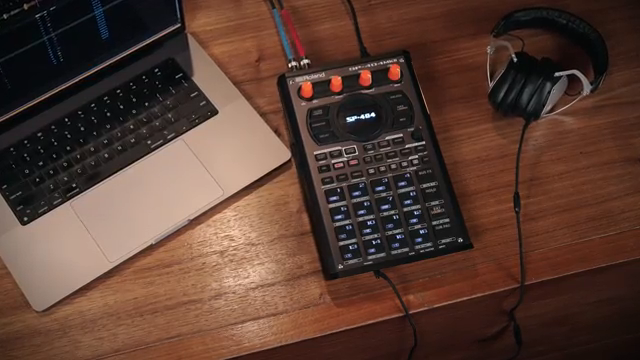
"This firmware expands the SP's functionality adding high-level integration with Serato DJ Lite and DJ Pro turning the SP into a powerful DJ controller."
© Screenshot/Quote: Rolandglobal (YouTube)
Serato DJ Integration: Mixing, Browsing, and Sample Triggering from the SP
"It is best to think of these pads as actually two different halves. The two rows on the left hand side of the SP control the left hand deck and the two rows on the right hand side of the SP control the right deck."
© Screenshot/Quote: Rolandglobal (YouTube)
The V5 update’s integration with Serato DJ Lite and Pro is impressively deep. Once connected via USB-C, the SP-404MKII is instantly recognized by the software, switching its screen to Serato DJ mode and mapping its controls to essential DJ functions. Users can browse their Serato library using the value knob, load tracks to decks with dedicated bank buttons, and even sort their library by BPM or song name—all without touching a computer. The pad matrix is cleverly split: the left half controls deck one, the right half deck two, mirroring the DJ workflow in hardware.
Mixing is tactile and intuitive, with pads for play/pause, cue, sync, and temporary cue points, plus dedicated knobs for channel volumes and crossfader control. Advanced features like key lock and key sync are available for Serato DJ Pro users, while the SP’s performance effects can be assigned to individual decks using the bus selection system. Notably, the integration allows users to trigger samples from the Serato Sampler and access SP sound banks on the fly, making the device a true command center for hybrid DJ sets.
Real-Time Audio Manipulation: Stems, Hot Cues, and Beat Looping
Where the SP-404MKII V5 update really shines is in its facilitation of real-time audio manipulation. The video demonstrates how users can leverage Serato’s Stems feature to isolate and remix elements like drums, bass, melody, and vocals directly from the SP’s pads. This opens up creative possibilities for live mashups, breakdowns, and on-the-fly arrangement changes, all with immediate hardware feedback.
Hot cue and auto loop modes are mapped to the pad grid, allowing DJs to set, trigger, and remove cue points or loops with a single press. For those using Serato DJ Pro, additional performance tools like Beat Roll and Beat Jump are accessible, enabling intricate rhythmic manipulations and quick navigation through tracks. The workflow is designed for speed and spontaneity, letting performers move from idea to execution without menu-diving or mouse clicks.
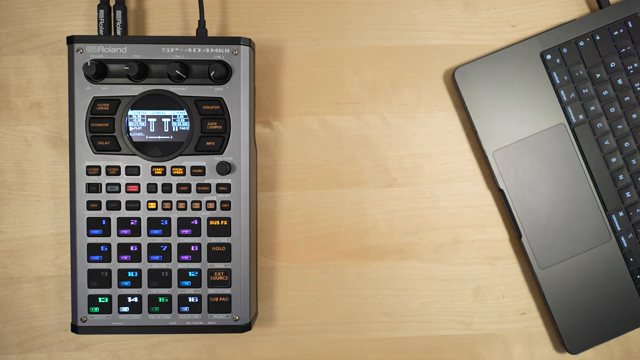
"One of the really cool features of Serato DJ is being able to analyze your track and separate it into stems."
© Screenshot/Quote: Rolandglobal (YouTube)
Producer Mode: MIDI Control and Audio Interface for Serato Studio
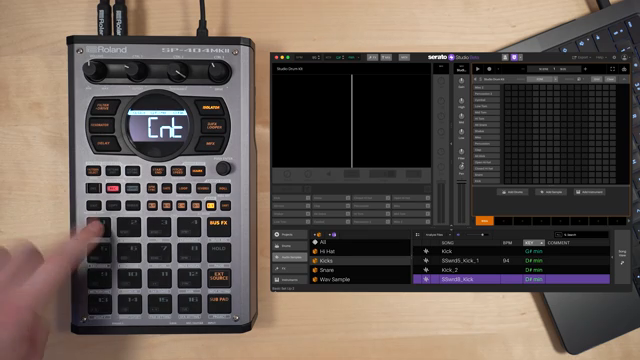
"When you found a sound you like you can load it to a pad by just pressing the pad. You will notice the pad is now mirroring the color of the sample pad in Serato Studio and when we press that pad it will trigger a sound."
© Screenshot/Quote: Rolandglobal (YouTube)
For producers, the SP-404MKII V5 update turns the device into a fully functional MIDI controller and USB audio interface for Serato Studio. The video shows how users can browse samples, load sounds, and trigger pads directly from the SP, with pad colors mirroring those in the software for clear visual feedback. Pattern creation is hands-on: you can record beats, layer samples, and even mute tracks using the hardware pads, all without ever reaching for a mouse or keyboard.
The SP’s control knobs are mapped to key parameters in Serato Studio, such as volume, filtering, panning, and—when combined with the shift button—attack, release, and tempo. This tight integration streamlines the beatmaking process, making it possible to build and manipulate patterns in real time. The SP-404MKII also routes Serato Studio’s audio through its own effects engine, allowing for classic SP processing on DAW-based projects.
Performance Effects and Seamless Creative Manipulation
The SP-404MKII’s signature effects remain central to its creative appeal, and the V5 update ensures these are fully accessible across both DJ and studio contexts. Whether you’re routing Serato DJ decks or Serato Studio tracks through the SP’s effects, the workflow is consistent and immediate. The ability to assign effects to individual decks or tracks, keep effect settings visible for extended sets, and even use features like skip back sampling within Serato Studio mode, demonstrates Roland’s commitment to hands-on, performance-oriented design.
Crucially, the update doesn’t just add features—it refines the instrument’s role as a creative hub. Users can capture Serato Studio projects as audio and assign them to SP pads for further manipulation, blurring the lines between DJing, beatmaking, and live performance. The result is a device that empowers creators to move seamlessly between roles, leveraging digital integration without sacrificing the tactile immediacy that makes the SP-404MKII a modern classic.
This article is also available in German. Read it here: https://synthmagazin.at/rolandchannel-und-das-sp-404mkii-v5-update-workflow-maschine-fuer-djs-und-producer/
Watch on YouTube:
Latest articles
Watch on YouTube:
Visit the channel:
https://www.youtube.com/rolandglobal
https://www.youtube.com/rolandglobal
Links from rolandglobal:
website: https://www.roland.com
roland_cloud: https://www.roland.com/global/promos/about_roland_cloud
instagram: https://instagram.com/rolandglobal
Sponsored links:
If you purchase via these links, we may earn a small commission – at no extra cost to you. The link opens an Amazon keyword search, and results may vary depending on availability.
Roland SP-404MKII
🔗 Check price on Amazon
🔗 Check price on Amazon
Serato DJ Lite
🔗 Check price on Amazon
🔗 Check price on Amazon
Serato DJ Pro
🔗 Check price on Amazon
🔗 Check price on Amazon
Serato Studio
🔗 Check price on Amazon
🔗 Check price on Amazon