RolandChannel lifts the curtain on Melody Flip, a DAW-friendly plug-in designed to shake up your melodic workflow with generative algorithms and flexible editing. This official walkthrough focuses on how Melody Flip’s library of musical palettes, adjustable density, and real-time DAW sync converge to offer instant inspiration for producers of all stripes. From auditioning genre styles to exporting raw MIDI, the video showcases how Melody Flip fits into modern music creation—whether you’re building a beat or sketching out a full track.
5. September 2026
LYRA
RolandChannel’s Melody Flip: Generative Inspiration Inside Your DAW
Meet Melody Flip: Instant Melodic Spark in Your DAW
The video opens with a quick tour of Melody Flip, positioning it as a generative MIDI plug-in that caters to everyone from beginners to pros. Installed directly on a MIDI track, Melody Flip operates either independently or tightly synced within your DAW session. Roland’s demonstration underscores its mission: to serve as a creative partner that bridges inspiration and production, offering fresh melodic material on demand. While the video doesn’t dive into long-term workflow or system integration, it’s clear from the start that Melody Flip is intended as a modular, drop-in tool for rapid ideation.
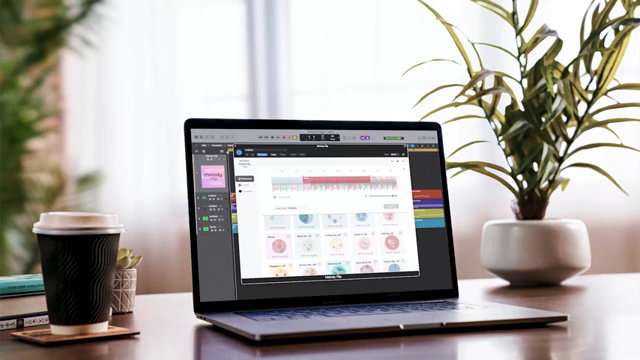
"This is MelodyFlip, a playful and generative musical MIDI tool for everyone, from amateurs to pros."
© Screenshot/Quote: Rolandglobal (YouTube)
Exploring Palettes: Genre Hopping at the Click of a Button
"You can click and immediately audition them one by one."
© Screenshot/Quote: Rolandglobal (YouTube)
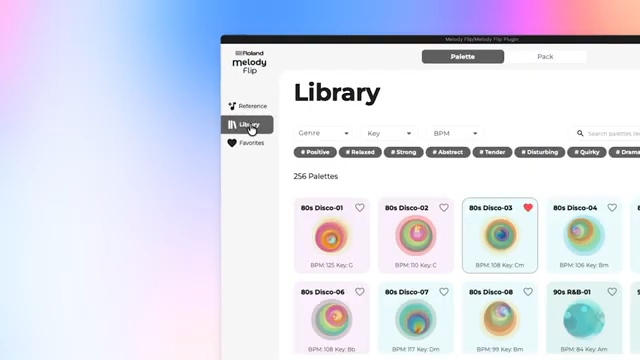
Roland spotlights Melody Flip’s Library tab, where users can browse a wide array of musical palettes—a term used here for style templates spanning 80s disco, 90s R&B, pop, and various dance genres. Each palette comes with its own sounds and chord progressions, ready to be auditioned instantly. This palette-driven approach encourages quick exploration: clicking on a style not only previews its sound but also reshapes the melodic context for further generation.
The video shows how changing palettes is frictionless and playful, which lowers the barrier for users to experiment outside their comfort zones. Adjusting key and tempo is just a couple of clicks away, letting producers adapt palettes to their song’s requirements. While the walkthrough doesn’t address custom palette creation or deep editing, it’s evident that Melody Flip’s core is about fast, genre-specific inspiration.
Generative Engines and Mixer: Sculpting Your Musical DNA
With a palette selected, Melody Flip’s generative engine takes center stage. The plug-in automatically crafts melodies, and users can influence the complexity by adjusting the note density and hitting the “compose” button. A higher note density yields busier, more intricate melodies, while a lower value keeps things sparse—ideal for minimal beats or spacious arrangements.
Roland demonstrates the built-in mixer, allowing for quick tweaks to instrument levels, muting channels, and dialing in reverb on the fly. This hands-on control over each part—melody, chords, bass, drums—encourages iterative sound design. Although the video doesn’t venture into deep modulation or macro assignment, the accessible mixer and density options make for a workflow that’s fast, musical, and beginner-friendly.
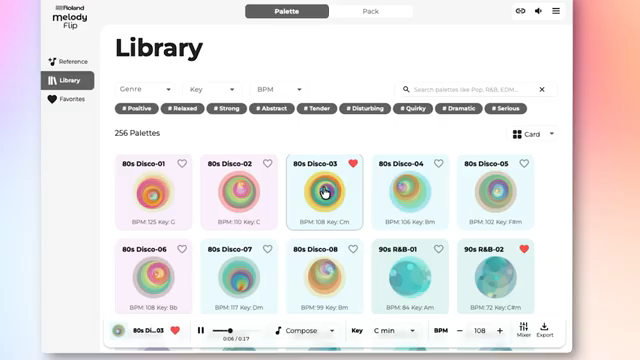
"You can even choose how busy you want it to be by changing the note density value and pressing "compose"."
© Screenshot/Quote: Rolandglobal (YouTube)
DAW Sync and Effects: Tight Integration, Flexible Sound
Melody Flip is designed to behave like any traditional plug-in, meaning it can be routed through standard audio effects in your DAW—filters, vinyl simulators, and more. The video highlights this by running Melody Flip through effects and confirming that its internal clock syncs perfectly with the DAW’s transport.
This synchronization ensures that producers can start, stop, and align Melody Flip’s playback with other instruments (including software drum machines like Roland’s TR-909 plug-in) for seamless workflow. While the walkthrough doesn’t tackle latency or advanced routing, the basic integration shown here is straightforward and well-suited for both live and studio use.
Export Made Simple: Drag-and-Drop MIDI Freedom
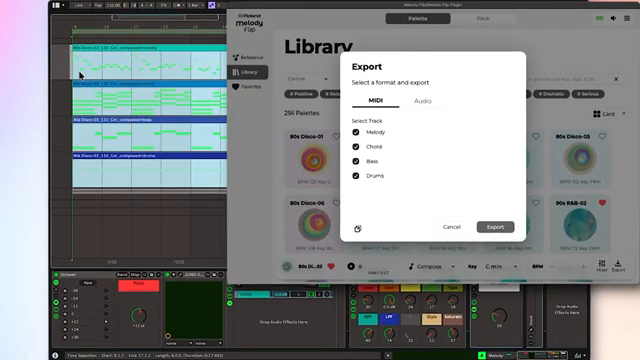
"And there they are, as raw MIDI."
© Screenshot/Quote: Rolandglobal (YouTube)
Once you’ve dialed in a motif you like, exporting is as frictionless as dragging and dropping channels directly into your DAW. The video demonstrates exporting either all or specific parts—melody, bass, chords, or drums—as raw MIDI, which then becomes fully editable within your DAW’s timeline. This enables users to further arrange, tweak, or replace sounds as they would with any other MIDI material, bridging the gap from generative sketch to finished production with minimal hassle.
This article is also available in German. Read it here: https://synthmagazin.at/rolandchannel-melody-flip-generative-inspiration-direkt-in-der-daw/
Watch on YouTube:
Latest articles
Watch on YouTube:
Visit the channel:
https://www.youtube.com/rolandglobal
https://www.youtube.com/rolandglobal
Links from rolandglobal:
website: https://www.roland.com
roland_cloud: https://www.roland.com/global/promos/about_roland_cloud
instagram: https://instagram.com/rolandglobal
Sponsored links:
If you purchase via these links, we may earn a small commission – at no extra cost to you. The link opens an Amazon keyword search, and results may vary depending on availability.
Melody Flip
🔗 Check price on Amazon
🔗 Check price on Amazon
TR-909 Drum Machine plugin
🔗 Check price on Amazon
🔗 Check price on Amazon