OXI Instruments returns with Episode 3 of their OXI One MKII series, diving deep into the art of groove and its transformative effect on electronic sequences. This Spanish manufacturer, renowned for hybrid workflow tools, puts the spotlight on how subtle timing and velocity tweaks can turn rigid patterns into living, breathing music. The video methodically explores the OXI One MKII’s groove engine, from preset templates to granular control over accent, time, and randomization, plus the power of custom groove creation via the OXI app. For anyone obsessed with performance-ready sequencing and nuanced rhythmic control, this is a revealing look at how digital architecture meets hands-on groove sculpting.
15. January 2026
LYRA
OXI Instruments OXI One MKII: Grooves Unleashed – Dynamic Sequencing in Focus
From Static to Groovy: The OXI One MKII’s Rhythmic Philosophy
The OXI One MKII is introduced as a sequencer that goes beyond simple step programming, aiming to inject life into patterns through the concept of groove. The video opens by contrasting a rigid, unprocessed sequence with one enhanced by groove, immediately highlighting the dramatic difference subtle timing and velocity changes can make. Groove, as presented here, is less about dramatic transformation and more about nuanced shifts that elevate a track’s feel from mechanical to musical.
OXI Instruments positions the OXI One MKII as a tool designed to bridge the gap between static patterns and dynamic, performance-ready sequences. The manufacturer emphasizes that groove is not just a feature but a workflow philosophy, enabling users to move from predictable, grid-locked beats to sequences that genuinely move the listener. This sets the stage for a detailed exploration of the groove engine’s capabilities.

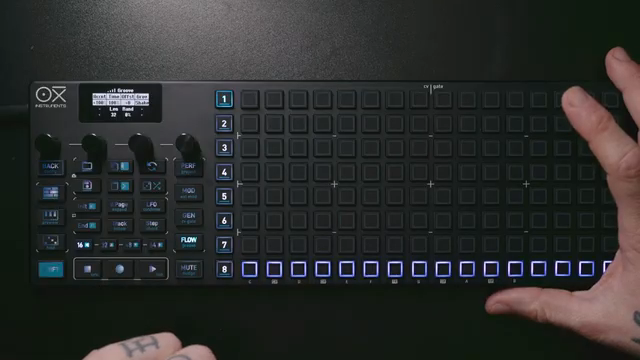
"Groove doesn't have to be dramatic. Sometimes just a touch is enough to add the right flavor."
© Screenshot/Quote: Oxiinstruments (YouTube)
Groove Engine Deep Dive: Accent, Time, Length, Random, Offset

"So now we actually decouple our note pattern and the rhythmical groove pattern, and this is pretty awesome."
© Screenshot/Quote: Oxiinstruments (YouTube)
The core of the OXI One MKII’s groove system is its dedicated groove menu, accessible directly from the hardware interface. Users can select from 14 preset groove templates and load up to eight more, with the option to import additional grooves via SD card. Each template can be customized using several key parameters: accent (for velocity variation), time (for microtiming shifts), groove length (decoupling groove cycle from pattern length), random (to introduce controlled unpredictability), and offset (to shift the groove pattern in time).
Accent allows for both positive and negative velocity changes, giving sequences a dynamic push or pull. Time adjustments introduce subtle or pronounced timing shifts, again with positive or negative values for creative flexibility. Groove length can be set independently from the note pattern, enabling polyrhythmic interplay and evolving rhythmic textures. The random parameter adds a layer of unpredictability, modulating the amount of groove applied while preserving the underlying template’s character.
Offset acts as a phase shifter for the groove pattern, letting users nudge the groove left or right in time. The video demonstrates how combining these parameters—especially over steady rhythms like four-on-the-floor kicks—opens up a wide palette of rhythmic possibilities. The hands-on workflow is clearly prioritized, with all adjustments made in real time on the device.
Multitrack Groove: Independent Templates for Each Track
A standout feature of the OXI One MKII is its ability to assign independent groove templates to each of its eight tracks in multitrack mode. The video illustrates how this per-track groove architecture allows for intricate layering, with each instrument or sequence part carrying its own rhythmic identity. Switching between tracks is straightforward, and each track maintains its own groove page, complete with unique accent, time, and offset settings.
This multitrack groove system is not just about variety—it’s about deep creative control. The presenter shows how different groove templates and parameter settings can be applied to kick, hi-hat, and melodic tracks, resulting in a composite groove that is both complex and cohesive. The workflow is designed to encourage experimentation, as users can quickly audition and tweak grooves across tracks without menu-diving or losing their place.
OXI Instruments’ approach here is unapologetically modular: groove is not a global effect but a per-track tool, supporting hybrid setups and layered arrangements. This flexibility is especially powerful in DAWless rigs or live performance contexts, where rhythmic variation and independence are key to engaging, evolving music.
"When using multi-track mode, each of the eight tracks can have its own groove template."
© Screenshot/Quote: Oxiinstruments (YouTube)
Groove in Action: Rhythmic and Melodic Examples

"So the best way to perceive the accent on groove is to set the basic velocity to 64."
© Screenshot/Quote: Oxiinstruments (YouTube)
The video moves from technical explanation to practical demonstration, showing how groove transforms both rhythmic and melodic patterns. Contrary to the common assumption that groove is only for drums, the OXI One MKII proves its value on melodic sequences and arpeggios as well. The presenter plays back identical patterns with and without groove, making the expressive difference immediately clear.
Offset is highlighted as a particularly useful tool for melodic tracks, allowing users to make patterns “sing” by shifting note placement in subtle ways. The arpeggiator receives its own groove menu, enabling the same level of velocity and timing manipulation as the main sequencer. This integration ensures that even fast-moving arpeggios can benefit from nuanced groove shaping.
Attention is also given to velocity management: setting the default velocity to 64 is recommended to maximize the dynamic range of groove accenting. This practical tip ensures that users can fully exploit both positive and negative velocity shifts, resulting in grooves that are both punchy and expressive.
Custom Grooves with the OXI App: Tailoring Your Rhythms
The OXI app is introduced as a companion tool for creating, editing, and importing custom groove templates. Users can design grooves from scratch, import them from MIDI files (including those exported from Ableton Live), and fine-tune parameters such as length, velocity, timing, and offset. The app interface allows for step-by-step editing, with visual feedback and the ability to name and organize templates.
Once a custom groove is created, transferring it to the OXI One MKII is a simple drag-and-drop process. The video demonstrates loading a user-made groove onto the device and applying it to both rhythmic and melodic patterns, showcasing the seamless integration between hardware and software. This workflow empowers users to craft grooves that fit their unique musical style, extending the OXI One MKII’s groove engine well beyond its factory presets.
This article is also available in German. Read it here: https://synthmagazin.at/oxi-instruments-oxi-one-mkii-grooves-entfesselt-dynamisches-sequencing-im-fokus/
Watch on YouTube:
Latest articles
Watch on YouTube:
Visit the channel:
https://www.youtube.com/oxiinstruments
https://www.youtube.com/oxiinstruments
Links from oxiinstruments:
website: https://oxiinstruments.com
instagram: https://www.instagram.com/oxiinstruments
facebook: https://www.facebook.com/oxiinstruments/
support: https://oxiinstruments.com/support
Sponsored links:
If you purchase via these links, we may earn a small commission – at no extra cost to you. The link opens an Amazon keyword search, and results may vary depending on availability.
OXI ONE MKII
🔗 Check price on Amazon
🔗 Check price on Amazon