Novation’s Launchpad has long been a staple for grid-based music making, but in this deep-dive, Novation’s official channel demonstrates how Custom Mode templates—built with their free Components app—transform the Launchpad into a truly versatile performance controller. From glitchy beats to expressive bass lines, the video walks through hands-on examples that showcase not just the hardware’s flexibility, but also the architectural thinking behind template design. If you’re curious about how digital controllers can be sculpted into bespoke performance rigs, this is a clear, workflow-focused look at what’s possible—no coding required, just drag, drop, and jam.

21. December 2024
LYRA
Novation Launchpad: Unlocking Performance Mode with Components
Novation Launchpad Mini, Novation Launchpad Pro, Novation Launchpad X
Custom Modes: The Launchpad’s Secret Weapon
The video opens by positioning Custom Mode as the key to taking the Launchpad far beyond its default clip-launching persona. Novation’s presenter sets the stage for a session focused on building performance-ready templates, specifically designed for glitchy beats and deep bass manipulation. Importantly, these Custom Modes aren’t limited to the flagship Launchpad Pro—they’re available across the Launchpad range, making this approach accessible to a broad user base.
All templates and the accompanying Ableton Live project are available for download, reinforcing Novation’s practical, community-driven ethos. The video’s structure is clear: viewers will not only see what’s possible but are encouraged to try it themselves, with the promise that no advanced programming is required—just creative mapping and a bit of drag-and-drop magic.
Components: The Free App That Powers Customization
Central to the workflow is Novation’s free Components application, which acts as the bridge between user imagination and Launchpad hardware. Accessible via web browser or as a standalone desktop app, Components is positioned as an intuitive, visual editor for building and managing Custom Modes. Once the Launchpad is connected, users can immediately start crafting layouts by dragging widgets—pads, faders, buttons—onto a virtual grid.
The process is refreshingly direct: after arranging and tweaking widgets, users can send their template to one of eight hardware slots for instant recall. Accessing these modes on the Launchpad is as simple as pressing the Custom Mode button and selecting the desired slot. The video highlights how this setup encourages experimentation, with rapid iteration and immediate feedback—an approach that fits Novation’s “Play. Create. Perform.” philosophy.
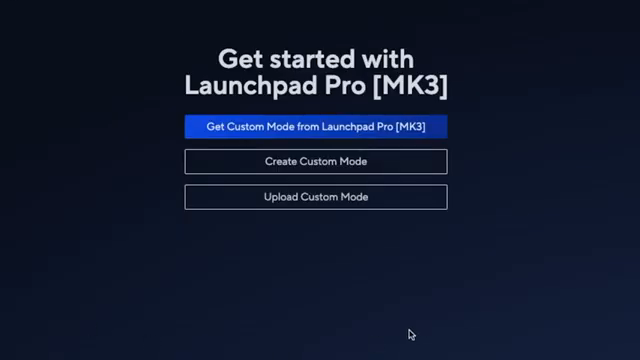
"Components, your gateway to going deeper with Novation products that can be accessed through your internet browser or as a standalone app on your computer."
© Screenshot/Quote: Novationtv (YouTube)
Template Deep-Dive: Beats Glitcher and Bass Performer
"We can first use the drum grid widget in components, which I'll have on the right side so I can play with my right hand and maybe change the color."
© Screenshot/Quote: Novationtv (YouTube)
The first template, Beats Glitcher, demonstrates how Launchpad can become a hands-on drum manipulator. The presenter loads a drum rack with samples and leverages Ableton’s new drum sampler for its built-in effects, particularly the stretch (grain delay) function. Macros for delay amount and grain size are mapped to vertical faders on the Launchpad, allowing nuanced control—especially since the fader response varies with touch pressure, enabling both smooth slides and abrupt jumps. The drum grid widget is placed for right-hand playability, while faders sit alongside for left-hand tweaks, showing a thoughtful approach to ergonomic layout.
To add glitch and color, the template incorporates additional effects like fractal distortion and comb filtering. These are controlled via a set of CC button widgets, arranged so that each button steps through increasing values, while a dedicated toggle button switches the effect on and off. The visual feedback—button colors changing to indicate state—adds to the performance feel. The mapping process is shown in detail, from assigning MIDI CCs to customizing value ranges for tight, glitchy control.
The second template, Bass Performer, shifts focus to melodic playability and expressive sound shaping. Using Ableton’s Drift instrument, the presenter builds a bass patch with macro-assigned effects and snapshots for instant sound variation. Components is used to lay out a scale-constrained keyboard for easy riffing, with CC buttons mapped to snapshot changes. Additional controls include a shifter for pitch slides (up to a semitone), a high-pass filter, and a reverb—each mapped to dedicated faders or buttons. The result is a template that supports both subtle modulation and dramatic performance gestures, all from the Launchpad surface.
Workflow Highlights: Creative Integration and Performance Control
Throughout the video, Novation emphasizes how Custom Modes can be tailored for real-time creativity. The combination of pads, faders, and buttons—each with assignable CCs and customizable color feedback—enables users to build interfaces that match their unique performance needs. The presenter demonstrates how mapping widgets to macros, effects, and snapshots in Ableton Live creates a tightly integrated workflow, where every control on the Launchpad has a meaningful musical function.
This approach isn’t just about adding more buttons; it’s about designing a performance environment that feels intuitive and inspiring. The ability to reset parameters, solo parts, or trigger dramatic sound changes with a single tap exemplifies how digital architecture can empower expressive, hands-on music making. Novation’s video makes a strong case for thinking of the Launchpad not just as a controller, but as a customizable instrument in its own right.
Download, Explore, and Share Your Own Templates
In closing, viewers are encouraged to download the provided templates and Ableton Live set, then use the Components app to experiment and develop their own Custom Modes. Novation invites users to share their creations with the wider community, reinforcing the idea that the Launchpad ecosystem thrives on collective innovation. The takeaway is clear: with Components, the Launchpad becomes a blank canvas for performance design, limited only by the user’s imagination.
This article is also available in German. Read it here: https://synthmagazin.at/novation-launchpad-performance-mode-meistern-mit-components/
Watch on YouTube:
Latest articles
Watch on YouTube:
Visit the channel:
https://www.youtube.com/NovationTV
https://www.youtube.com/NovationTV
Links from NovationTV:
website: https://novationmusic.com
instagram: https://instagram.com/wearenovation
twitter: https://twitter.com/WeAreNovation
facebook: https://facebook.com/NovationMusic
Sponsored links:
If you purchase via these links, we may earn a small commission – at no extra cost to you. The link opens an Amazon keyword search, and results may vary depending on availability.
Novation Launchpad Mini
🔗 Check price on Amazon
🔗 Check price on Amazon
Novation Launchpad Pro
🔗 Check price on Amazon
🔗 Check price on Amazon
Novation Launchpad X
🔗 Check price on Amazon
🔗 Check price on Amazon