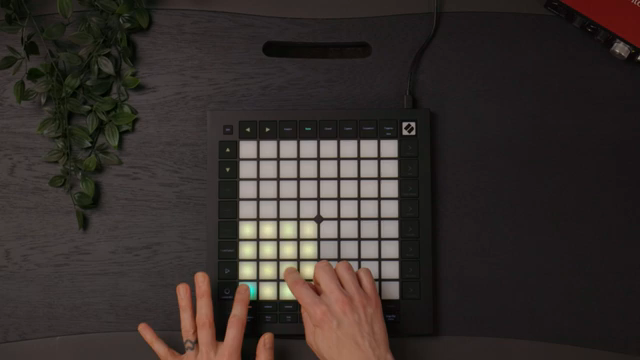
Novation’s Launchpad Pro stands as a prime example of how modern MIDI controllers can blur the line between instrument and compositional brain. In this official walkthrough, Novation demonstrates how the Launchpad Pro integrates tightly with Ableton Live to turn blank sessions into layered tracks, using only factory instruments and effects. The focus here is on workflow: from chord creation and beat sequencing to advanced arpeggiation and custom modes, every feature is leveraged to spark new musical ideas. If you’re curious about how digital pads, play modes, and performance macros can accelerate your studio or DAWless process, this video is a deep dive into the Launchpad Pro’s creative architecture.
6. June 2025
LYRA
Novation Launchpad Pro: Architectural Hacks for Idea Generation in Ableton Live
From Blank Slate to Sonic Canvas: Launchpad Pro’s Ableton Integration
The video opens with a clear mission: generating track ideas from scratch using the Novation Launchpad Pro in tandem with Ableton Live. Novation’s approach is to showcase how the controller’s built-in and custom modes can drive the entire creative process, starting with an empty project and only using Live’s factory instruments and effects. This positions the Launchpad Pro not just as a MIDI controller, but as an idea engine that leverages Ableton’s flexibility.
Integration is at the heart of the workflow. The Launchpad Pro’s modes are mapped to core Ableton functions, allowing users to play, sequence, and manipulate sounds directly from the grid. The video emphasizes that all techniques are accessible in any version of Live, making the workflow broadly applicable. This tight coupling between hardware and software is a recurring theme, setting the stage for the detailed feature demonstrations that follow.
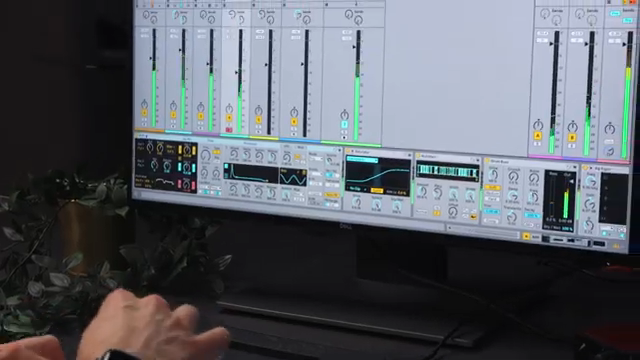
"I'm only using Live's factory instruments and effects throughout, and ones that are available in all versions of the software."
© Screenshot/Quote: Novationtv (YouTube)
Chords, Beats, and Arps: Exploring Core Features and Play Modes
"But I'm actually going to use Launchpad Sequencer for this one, as I can draw and play in notes."
© Screenshot/Quote: Novationtv (YouTube)
The walkthrough dives into the Launchpad Pro’s chord mode, where users can instantly access diatonic chords in a chosen key and build custom voicings by layering notes. The video demonstrates how copying, editing, and enriching chords is straightforward, with options to add bass notes or extended harmonies for richer progressions. Recording is streamlined with quantization and metronome support, ensuring tight timing when laying down harmonic foundations.
Beat creation is tackled next, leveraging the Launchpad’s sequencer and velocity modes. Users can draw in drum patterns, adjust velocities for groove, and even bypass quantization for more humanized timing. The ability to switch between notes mode and sequencer mode on the fly highlights the controller’s flexibility. The arpeggiator is introduced as a tool for melodic and rhythmic complexity, with multiple finger modes enabling everything from simple runs to colorful, extended arps.
Layering and Capturing: Studio Workflows in Action
The video showcases how the Launchpad Pro supports a layered approach to composition. Basslines are crafted in notes mode, with options to toggle between chromatic and scale layouts. The presenter details how different finger modes—two, three, or four—affect the playable intervals, making it easy to construct riffs, triads, and arpeggios. This flexibility is key for quickly iterating on melodic ideas and adapting to shifting harmonic contexts.
Recording workflows are front and center: root notes can be laid down first, with upper notes overdubbed for complexity. The option to record without quantization is highlighted as a way to introduce natural timing and groove. This segment underscores the Launchpad Pro’s suitability for both precise sequencing and expressive, performance-based input, all within the Ableton environment.
Custom Modes and Arpeggiator: Creative Techniques for Rhythms and Melodies
This section is a playground for advanced creative techniques. The video demonstrates how custom modes, configured via Novation Components, can map pads to specific functions—such as toggling the arpeggiator or controlling effects—enabling hands-on manipulation without menu diving. The arpeggiator itself is shown as a powerful tool for generating complex rhythmic and melodic patterns, especially when combined with polyphonic aftertouch and velocity randomization.
Percussion workflows benefit from these features as well. Sliced loops can be triggered in notes mode, while the arpeggiator’s random setting introduces unpredictability and variety. The presenter highlights how holding multiple pads yields evolving drum patterns, and how effects can be tweaked in real time for added movement. These techniques illustrate how the Launchpad Pro’s digital architecture supports both structured sequencing and spontaneous experimentation.
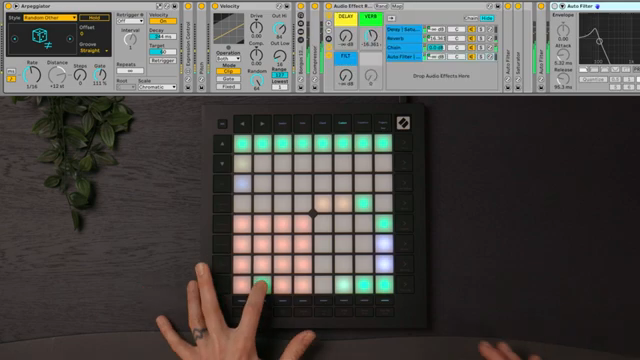
"I've got a filter controlled by the pad grid's polyphonic aftertouch."
© Screenshot/Quote: Novationtv (YouTube)
Session Mode: Arranging and Scene Crafting on the Fly
The final segment focuses on session mode, where the Launchpad Pro’s grid becomes a powerful arranger’s tool. Clips recorded in earlier steps are duplicated and combined into scenes, allowing for rapid exploration of different track structures. The workflow is tactile and immediate—scenes can be built, rearranged, and triggered without leaving the hardware.
Dummy clips and FX sweeps from the user’s library are incorporated to add transitions and polish. The video closes by emphasizing how session mode enables quick sketching and manipulation of ideas, making the Launchpad Pro a central hub for both composition and live performance within Ableton Live. The overall message: with the right digital architecture, hardware can become an extension of your musical imagination.
This article is also available in German. Read it here: https://synthmagazin.de/novation-launchpad-pro-architektonische-hacks-fuer-ideenfindung-in-ableton-live/
Watch on YouTube:
Latest articles
Watch on YouTube:
Visit the channel:
https://www.youtube.com/NovationTV
https://www.youtube.com/NovationTV
Links from NovationTV:
website: https://novationmusic.com
instagram: https://instagram.com/wearenovation
twitter: https://twitter.com/WeAreNovation
facebook: https://facebook.com/NovationMusic
Sponsored links:
If you purchase via these links, we may earn a small commission – at no extra cost to you. The link opens an Amazon keyword search, and results may vary depending on availability.
Ableton Live
🔗 Check price on Amazon
🔗 Check price on Amazon
Novation Launchpad Pro
🔗 Check price on Amazon
🔗 Check price on Amazon