Novation’s latest video dives into how the FLkey MIDI controller unlocks new workflow possibilities with FL Studio 26. From the updated Gopher Assistant to deep plugin integration and highly customizable navigation modes, Novation demonstrates how FLkey adapts to both new and existing FL Studio features. We explore the hybrid hardware-software experience, focusing on hands-on control, creative layering, and performance macros—all with Novation’s signature focus on seamless music-making.
24. July 2026
LYRA
Novation FLkey Meets FL Studio 26: Workflow Unlocked
FL Studio 26, Flex plugin, FLkey, FPC plugin, Luxverb, Transmitter plugin
FLkey and FL Studio 26: A Fresh Integration
Novation’s FLkey MIDI keyboard controller is presented as purpose-built for FL Studio, and with the arrival of FL Studio 26, the integration story gets a notable update. The video opens with the FLkey Mini, but it’s clear that the demonstrated workflows apply across the entire FLkey range, from compact to full-sized models.
The FLkey is positioned as more than a generic MIDI controller—its core strength lies in its tailored support for FL Studio’s interface and features. With a blank project loaded, the controller’s pads and encoders are immediately ready to mirror and manipulate elements within the DAW. This tight coupling is designed to minimize friction, letting users jump between hardware and software with minimal setup.
Feature Highlights: Gopher, FPC Layering, and Transient Control
One of the first updates explored is the Gopher Assistant, a new utility in FL Studio 26 for project organization. While Gopher doesn’t directly integrate with FLkey, it automates tasks like channel coloring and mixer routing—changes that are reflected instantly on the FLkey’s RGB pads. This visual feedback bridges digital and hardware, reinforcing the controller’s role as a workflow centerpiece.
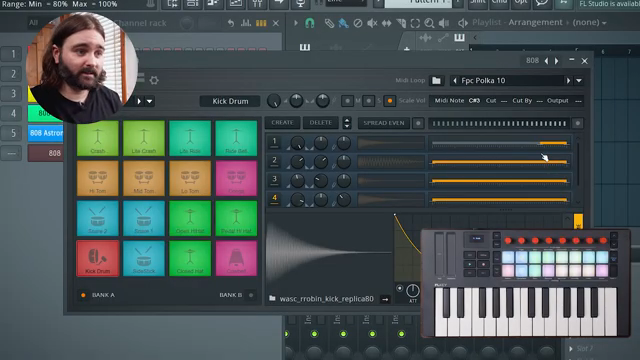
The FPC drum plugin is next up, now supporting drag-and-drop sample layering on individual pads. Using FLkey’s drum pad mode, users can match pad colors to FPC’s internal mapping for an intuitive beatmaking experience. The video demonstrates how multiple samples on a single pad can be blended, volume- and pitch-shifted, and mapped to velocity ranges, enabling nuanced percussive textures and authentic drum kit emulation.
For mixing, the new Transmitter plugin is showcased. FLkey’s plugin encoder mode hands over control of parameters like sensitivity, hold, release, and transient/sustain balance. This hands-on approach streamlines the process of sculpting drum sounds, eliminating the need for complex sample layering and providing direct manipulation of a sound’s impact and decay. The overall takeaway is that FLkey’s hardware integration now extends deeper into FL Studio’s evolving set of plugins.
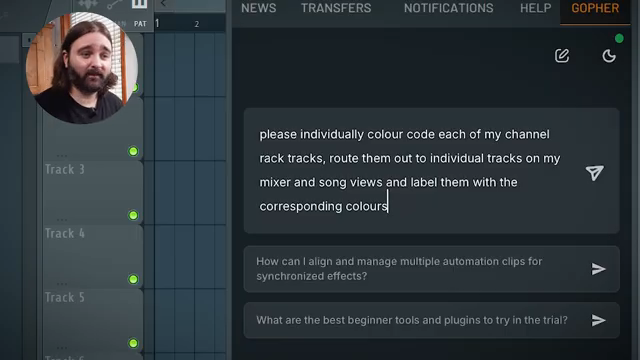
"And as you can see in real time, these tracks are starting to appear with these colors, and you can actually see the colors appearing on my FL Key at the same time, which is really cool."
© Screenshot/Quote: Novationtv (YouTube)
Customizing FLkey for the Redesigned Flex Plugin
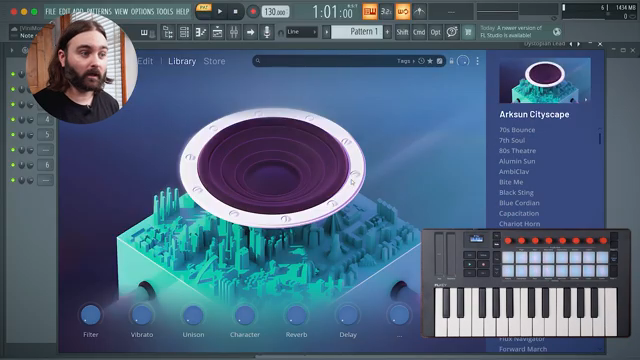
"We now have just eight parameters on show by default."
© Screenshot/Quote: Novationtv (YouTube)
The Flex plugin in FL Studio 26 has been visually and architecturally overhauled, with a simplified interface and improved CPU efficiency. By default, Flex now displays eight macro parameters, each tailored to the selected patch, making it less intimidating for exploratory users yet still allowing deep parameter access for advanced editing.
The video details how FLkey’s custom mode can be configured to navigate Flex’s new structure. By assigning keyboard shortcuts to FLkey’s pads, users can browse presets, switch packs, and trigger selections directly from the controller. This brings a hardware-like patch browsing experience to Flex, while also allowing for the triggering of the Gopher Assistant and other DAW commands—all without leaving FLkey’s surface. The result is a more immersive, hands-on workflow for both sound design and preset auditioning.
Streamlined Workflows and Expansive Sound Design
Integration is a recurring theme throughout the presentation. FLkey’s ability to follow and control FL Studio’s evolving interface—across project organization, drum programming, mixing, and synth navigation—positions it as a hybrid hub for both programming and performance. The hardware feedback, custom mode flexibility, and tight plugin mapping are all demonstrated as ways to keep creative flow uninterrupted.
Sound design is also notably enhanced, as users can leverage plugin-specific macros, velocity layering, and real-time parameter tweaks. Whether browsing Flex patches or sculpting drum sounds with Transmitter, FLkey extends the tactile experience, making complex operations feel more immediate and musical.
Bundled Producer Edition: A Smart Entry Point
A final practical incentive: every FLkey now comes bundled with six months of FL Studio Producer Edition. This not only adds value for newcomers—who get immediate access to the latest DAW features—but also makes it an appealing upgrade path for existing users wanting to experience FL Studio 26’s improvements alongside dedicated hardware.
"The FL key does come with six months of FL Studio Producer Edition bundled in."
© Screenshot/Quote: Novationtv (YouTube)
This article is also available in German. Read it here: https://synthmagazin.at/novation-flkey-trifft-fl-studio-26-workflow-neu-definiert/
Watch on YouTube:
Latest articles
Watch on YouTube:
Visit the channel:
https://www.youtube.com/NovationTV
https://www.youtube.com/NovationTV
Links from NovationTV:
website: https://novationmusic.com
instagram: https://instagram.com/wearenovation
twitter: https://twitter.com/WeAreNovation
facebook: https://facebook.com/NovationMusic
Sponsored links:
If you purchase via these links, we may earn a small commission – at no extra cost to you. The link opens an Amazon keyword search, and results may vary depending on availability.
FL Studio 26
🔗 Check price on Amazon
🔗 Check price on Amazon
Flex plugin
🔗 Check price on Amazon
🔗 Check price on Amazon
FLkey
🔗 Check price on Amazon
🔗 Check price on Amazon
FPC plugin
🔗 Check price on Amazon
🔗 Check price on Amazon
Luxverb
🔗 Check price on Amazon
🔗 Check price on Amazon
Transmitter plugin
🔗 Check price on Amazon
🔗 Check price on Amazon