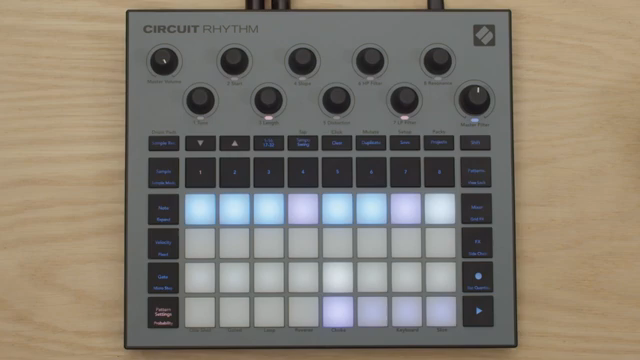
Novation’s Circuit Rhythm steps into the spotlight as a groovebox that’s more than just a sample player—it’s a sequencing powerhouse with a knack for creative arrangement. In this official walkthrough, Dylan demonstrates how the Circuit Rhythm’s pattern chaining, scene management, and project switching can be harnessed to build intricate, evolving tracks. The video leans into glitchy IDM territory, showing off modular drum samples, dub-tinged piano, and a workflow that’s all about fast, hands-on manipulation. As always with Novation’s artist-focused content, the emphasis is on practical techniques that move ideas from sketch to performance-ready track with minimal friction. If you’re curious about how digital sequencing architectures translate into real-world musical flexibility, this is a focused, revealing look.
23. May 2025
LYRA
Novation Circuit Rhythm: Building Complex Sequences with Scene Chaining and Project Hopping
From Simple Loops to Complex Architectures
The video opens with Dylan introducing the Circuit Rhythm as a tool for crafting complex patterns by combining several sequencing techniques. He sets the stage by outlining the plan: leveraging pattern chaining, scene chaining, and project switching to quickly assemble interesting song sections. This approach is positioned as a way to move beyond static loops and into more dynamic, evolving arrangements.
Dylan begins by loading modular drum samples onto the first track and constructing a straightforward two-bar melodic phrase. The initial beat, while sonically intriguing thanks to the glitchy drum samples, is intentionally left repetitive to illustrate how the device’s sequencing tools can inject variation. The focus here is on the foundational workflow—starting with simple elements that will later be transformed through the Circuit Rhythm’s architecture.
"We're going to combine pattern chaining, scene chaining and project switching along with a few other sequence parameters to make really interesting song parts very quickly."
© Screenshot/Quote: Novationtv (YouTube)
Pattern and Scene Chaining: The Building Blocks
"We put the pattern into random mode and we push the pattern settings button again to get to probability."
© Screenshot/Quote: Novationtv (YouTube)
With the basic pattern established, Dylan demonstrates how to save sections as scenes, using the mixer to capture the straight part into the first three scenes—each two bars long to match the melodic phrase. This process is presented as a quick way to organize and recall different song sections, laying the groundwork for more sophisticated arrangement.
He then shifts to creating a fill for the fourth scene by building a new drum pattern and chaining it with the previous one. The fill is made intentionally unpredictable: Dylan sequences additional samples, shortens the pattern to eight beats, and activates random mode. By adjusting probability settings for each step, he ensures that not every hit will trigger, resulting in a fill that’s both glitchy and dynamically varied. This section highlights how the Circuit Rhythm’s pattern and scene tools can be used to break up repetition and add character.
Dynamic Fills and Scene Transitions
The video moves on to chaining the four scenes together, creating a longer phrase that cycles through three straight sections before hitting the fill. This structure introduces a sense of progression and anticipation, with the fill acting as a turnaround. Dylan demonstrates how this approach adds musical variation without requiring complex menu-diving or external sequencing.
The workflow is designed for speed: by saving and chaining scenes, users can quickly assemble arrangements that evolve over time. The fill scene, with its randomized and probabilistic triggers, stands out as a creative tool for injecting surprise and movement into otherwise predictable patterns. This section underscores the Circuit Rhythm’s ability to facilitate dynamic transitions and keep performances engaging.
Project Switching: Jumping Between Ideas in Real Time
Dylan takes the sequencing concept further by introducing project switching. After saving the current arrangement into a new project slot, he demonstrates how users can jump between different versions of a beat in real time. This capability allows for spontaneous performance changes, making it easy to navigate between song sections or entirely different ideas on the fly.
The ability to edit patterns within each project and manipulate them live is emphasized as a key workflow advantage. By mapping out a song as a collection of projects, performers can trigger variations and transitions instantly, supporting both structured arrangements and improvisational play. This section highlights how the Circuit Rhythm’s project architecture supports DAWless and live performance scenarios where flexibility and speed are paramount.
"You can also jump between projects as well."
© Screenshot/Quote: Novationtv (YouTube)
Final Performance: IDM Glitch in Action
The video concludes with a performance that brings together all the techniques demonstrated. The resulting track is a glitchy, IDM-inspired piece that showcases modular drum samples, dub-processed piano, and evolving rhythmic structures. By chaining scenes, deploying fills, and jumping between projects, Dylan illustrates the Circuit Rhythm’s potential for building intricate, expressive tracks with minimal menu navigation. It’s a concise but effective demonstration of how digital sequencing features can translate into real-world musical creativity.
Watch on YouTube:
Latest articles
Watch on YouTube:
https://www.youtube.com/NovationTV
Links from NovationTV:
Sponsored links:
If you purchase via these links, we may earn a small commission – at no extra cost to you. The link opens an Amazon keyword search, and results may vary depending on availability.
🔗 Check price on Amazon