Sick of modular sequencers that feel like programming a toaster with boxing gloves? Monotrail Tech Talk is too. In this punchy walkthrough, our favourite modular deep-diver ditches the usual 8-step suspects and shows how wiring your DAW straight into your rack opens up a world of creative chaos. Expect a nerdy, no-fluff look at MIDI to CV setups, controller chains, and why the BeatStep Pro still slaps for the price. If you want your modular to behave like a studio weapon instead of a stubborn mule, this is your blueprint. Just don’t expect hand-holding or basic explanations – this one’s for the patch-heads.

16. January 2026
SPARKY
Monotrail Tech Talk: DAW to Modular – No More Crappy Sequences
Ableton, APC, Beatstep Pro, DROID, HydraSynth, MPK, OXI1, Roland piano
DAW Power: Ditching the Crappy Sequences
Let’s be honest: hands-on 8-step sequencers are fun until you want more than a glorified doorbell melody. Monotrail Tech Talk wastes no time showing why connecting a DAW to your modular rig is the move if you’re after real studio flexibility. With a DAW, you’re not boxed in by step limits or fiddly menus – you get sprawling, complex sequences and modulation lanes that would make your average hardware sequencer weep.
The big win? Everything’s visible, tweakable, and savable. No more squinting at tiny screens or losing your best riff to a power cut. MIDI turns your modular into a proper studio instrument, letting you route, layer, and control with a few clicks. If you’re still clinging to hardware-only sequencing, you might be missing out on a creative rave bunker of possibilities.
"But connecting a DAW to the modular offers a lot of advantages as well."
© Screenshot/Quote: Monotrailtechtalk (YouTube)
The MIDI to CV Web: Monotrail’s Studio Chain

"My laptop running a DAW is connected via USB to an audio interface that has a classic five pin MIDI in and out."
© Screenshot/Quote: Monotrailtechtalk (YouTube)
Monotrail’s setup is a spiderweb of MIDI and CV, all designed for maximum flexibility. The DAW runs on a laptop, hooked up via USB to an audio interface with classic five-pin MIDI. From there, MIDI out hits a DROID MIDI to CV converter, which then passes the signal through to an OXI1. That’s a serious amount of CV outputs, ready to wrangle your modular voices.
But it doesn’t stop there: master keyboards, mini controllers, and even an APC for DAW control are all in the mix, chained via USB and MIDI splitters. The result? You can play, sequence, and record multiple voices at once, with every controller targeting a different part of your sonic arsenal. It’s a modular command centre – no more unplugging cables just to change a sequence.
MIDI to CV Converters: The Real Street Weapons
DROID and OXI1 aren’t just fancy boxes with blinking lights – they’re the backbone of Monotrail’s setup. DROID stands out for its deep customisation: you can map, scale, invert, and even convert CV back to MIDI if you’re feeling wild. Want to turn a MIDI CC into a macro for your whole patch? Easy. OXI1 brings polyphonic sequencing and enough outputs to make your patch cables sweat.
But Monotrail doesn’t just flex the expensive gear – he points out that you don’t need to drop a fortune. Classic modules can handle single voices, but if you want to sequence whole tracks or get into complex routings, customisability is key. Always check output ranges and channel options before you buy. The right MIDI to CV box can turn your modular into a true sonic street weapon.
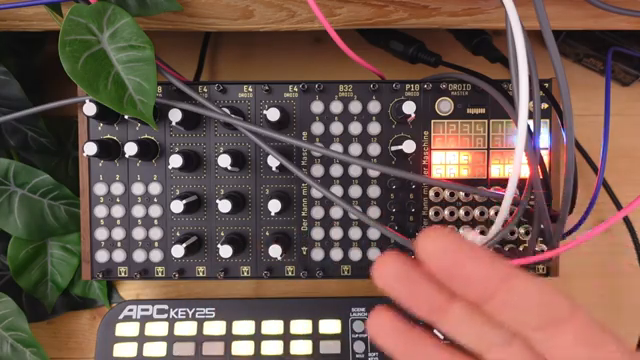
"It's easy to set up and determine exactly what MIDI information is used and to which output it's sent."
© Screenshot/Quote: Monotrailtechtalk (YouTube)
Custom Setups: Writing Tracks, Not Loops
Here’s where it gets real: a custom MIDI to CV setup lets you stop thinking in boring loops and start building tracks. With everything wired up, your modular becomes a proper sound module – ready for long sequences, evolving modulation, and layered jams. You can keep patches alive for days, tweak melodies on the fly, and actually finish tracks instead of getting stuck in the eternal 16-step loop.
Monotrail’s approach is all about workflow. By setting up templates in Ableton and mapping MIDI channels to specific voices, he makes it dead simple to target any part of the modular from the DAW or a controller. If you want to write real music instead of endless sketches, this is the way.
BeatStep Pro: The Compact Chaos Machine
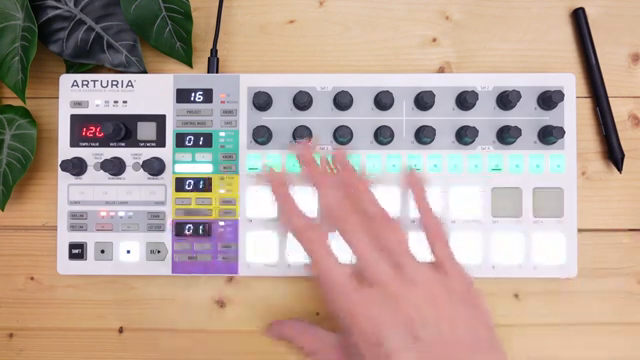
"Possibly the best option if you're starting out is using something like the BeatStep Pro."
© Screenshot/Quote: Monotrailtechtalk (YouTube)
Not ready to drop cash on a DROID or OXI1? Enter the BeatStep Pro – still one of the best bang-for-buck MIDI to CV solutions out there. Monotrail gives it props for being hands-on, affordable, and packed with features: dual melodic sequencers, eight CV/gate outs, and the ability to listen to unique MIDI channels. It’s a compact chaos machine that can handle both sequencing and MIDI to CV duties without breaking a sweat.
If you want to see how this all comes together in a real-world workflow, you’ll need to watch the video. Trust me, the patching gymnastics and controller juggling are best experienced with your own eyes – words can only take you so far in the rave bunker.
This article is also available in German. Read it here: https://synthmagazin.at/monotrail-tech-talk-daw-trifft-modular-schluss-mit-miesen-sequenzen/
Watch on YouTube:
Latest articles
Watch on YouTube:
Visit the channel:
https://www.youtube.com/MonotrailTechTalk
https://www.youtube.com/MonotrailTechTalk
Links from MonotrailTechTalk:
Patreon: https://patreon.com/monotrail
Instagram: https://instagram.com/monotrail/
Sponsored links:
If you purchase via these links, we may earn a small commission – at no extra cost to you. The link opens an Amazon keyword search, and results may vary depending on availability.
Ableton
🔗 Check price on Amazon
🔗 Check price on Amazon
Beatstep Pro
🔗 Check price on Amazon
🔗 Check price on Amazon
DROID
🔗 Check price on Amazon
🔗 Check price on Amazon
HydraSynth
🔗 Check price on Amazon
🔗 Check price on Amazon
OXI1
🔗 Check price on Amazon
🔗 Check price on Amazon
Roland piano
🔗 Check price on Amazon
🔗 Check price on Amazon