Molten Music Technology’s Robin Vincent doesn’t mess about, and neither does the AtoV Faderpunk Controller. Straight out the box, this 16-channel modular weapon is ready to slap your rack into shape—no manual marathon required. In this first-impressions rave, Robin dives into the Faderpunk’s plug-and-play attitude, its multi-headed CV hydra, and the kind of live performance quirks that only show up when the strobes are on. If you want a controller that’s as immediate as a caffeine shot and as flexible as a rave bunker yoga class, read on. But trust us, you’ll want to see this thing in action to get the full hit.

10. January 2026
SPARKY
Molten Music Technology Gets Hands-On: Faderpunk Controller Unleashed
Plug, Play, Rave: Faderpunk’s Out-of-the-Box Mayhem
Robin Vincent wastes no time getting the AtoV Faderpunk Controller into the thick of it. This isn’t your average controller that demands a week of menu-diving before you can even get a pulse out of it. Robin’s verdict? You plug it in, have a quick fiddle, and you’re basically gig-ready. That’s not just marketing fluff—he literally took it to a live set the same day he unboxed it. The Faderpunk’s design is so streamlined, you’re making music before you’ve even had time to question your life choices.
The interface is all about confidence and immediacy. Sixteen channels, each ready to be whatever you want—CV, LFO, sequencer, you name it. The hardware feels solid, the colours pop, and the layout’s got that “just try and mess this up” vibe. Robin’s approach is classic Molten Music Technology: honest, hands-on, and refreshingly unpretentious. If you’re after a controller that lets you skip the manual and get straight to the fun, this is your new best mate.

"Configure it, have a little practice and then BAM you're out there making music with it."
© Screenshot/Quote: Moltenmusictech (YouTube)
Swiss Army Fader: CV, Sequencers, LFOs and More
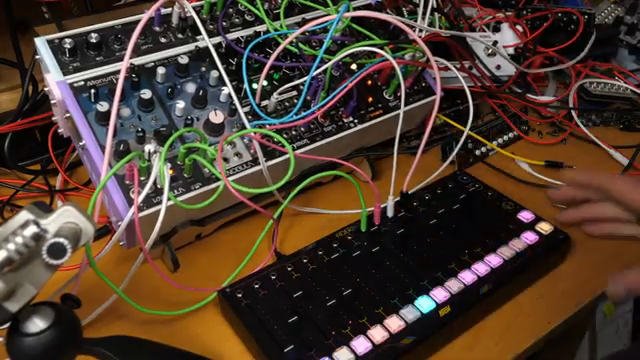
"That ran my show."
© Screenshot/Quote: Moltenmusictech (YouTube)
The Faderpunk isn’t just a one-trick pony—it’s a whole circus. Robin runs through its multi-functionality with the kind of glee usually reserved for finding a tenner in your old jeans. You can set up channels as CV controls, LFOs, Euclidean rhythm generators, random triggers, or classic step sequencers. Need to tweak a filter on the fly? Assign a fader. Want to throw in some random drum triggers? Sorted. The flexibility is wild, and you’re only limited by your imagination—or how many patch cables you can untangle.
What’s refreshing is how easy it is to swap functions and experiment. Robin’s patching up sequences, modulating envelopes, and generally causing modular mischief without hitting a single wall. The Faderpunk’s versatility means you can go from melodic sequencing to percussive chaos in seconds. If you’re into modular but hate gear that fights back, this thing is basically a peace treaty with your rack.
Live Tested: Strengths, Quirks, and Fader Fights
Taking the Faderpunk into battle on stage, Robin uncovers both its killer moves and a few quirks. The controller’s immediacy shines in performance—sequencing, LFO modulation, and live CV tweaks all feel natural. But it’s not all rainbows: the fader value ‘catch-up’ system means you sometimes have to sweep a fader to pick up the right value, which can get fiddly mid-set. It’s a necessary evil for multi-page controllers, but it’s worth knowing if you’re planning a live toaster-fight with your modular.
There are also moments where button combos don’t quite do what you expect, and a few mysteries with LFO modes that’ll have you scratching your head. Still, Robin’s approach is to roll with the punches—he’s jamming, experimenting, and showing that the Faderpunk’s quirks are more speed bumps than brick walls. If you want to see the controller’s real-world strengths (and the odd facepalm moment), the video’s live jams are where the action’s at.
Configurator: No-Nonsense Customisation
Robin gives the Faderpunk’s software configurator a proper shakedown. Plug it into your computer, fire up the web app, and you’re rearranging channels, assigning apps, and tweaking global settings in minutes. The interface is clean, logical, and—crucially—it actually works. Robin does hit a snag with his Surface not supplying enough power, but once connected to a proper desktop, it’s smooth sailing. You can’t drag-and-drop multiple apps at once (yet), but for most users, the process is painless. If you’ve ever been burned by beta firmware or crash-happy editors, this is a breath of fresh air.
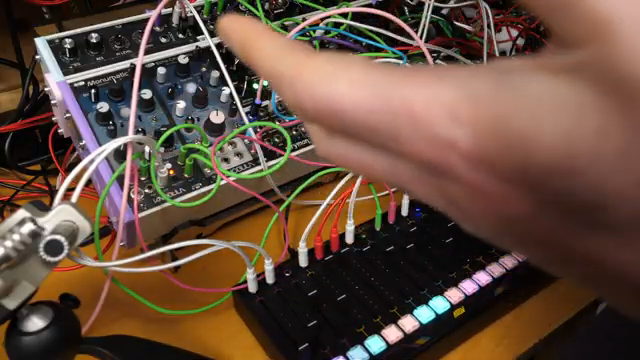
"The idea is that you should be able to plug it straight into your computer and Bish bash Bosch you can configure it."
© Screenshot/Quote: Moltenmusictech (YouTube)
Instant Gratification: Faderpunk for All
The Faderpunk’s biggest flex? Immediate usability. Robin’s clear: this is a controller you can trust, whether you’re a modular rookie or a seasoned patch ninja. The hardware’s robust, the software’s sorted, and the workflow just makes sense. It’s not without its quirks, but nothing here is a dealbreaker. If you want to get hands-on and make music instead of reading PDFs, this is your street weapon. For the full sonic punch, though, you’ll want to watch Robin’s jams—there’s only so much filth we can describe in text.
This article is also available in German. Read it here: https://synthmagazin.at/molten-music-technology-packt-aus-faderpunk-controller-entfesselt/
Watch on YouTube:
Latest articles
Watch on YouTube:
Visit the channel:
https://www.youtube.com/MoltenMusicTech
https://www.youtube.com/MoltenMusicTech
Links from MoltenMusicTech:
website: https://moltenmusictechnology.com
twitter: https://x.com/MoltenMusicTech
Sponsored links:
If you purchase via these links, we may earn a small commission – at no extra cost to you. The link opens an Amazon keyword search, and results may vary depending on availability.
AtoV Faderpunk Controller
🔗 Check price on Amazon
🔗 Check price on Amazon