Make Noise, the Asheville-based modular mavericks, kick off the new year with a deep dive into the MultiWave’s glide control—a feature that promises more than just slippery pitch bends. In this official walkthrough, the Make Noise team demonstrates how the MultiWave stands apart from typical analog VCOs, offering independent glide per voice and real-time modulation for evolving textures. For those who think glide is just a bit of portamento, think again: this module’s approach opens up a world of polyphonic movement and nuanced sequencing. If you’re curious about how a dedicated glide circuit can transform your patches, this video is a must-watch.

MultiWave: A New Year’s Sonic Playground
The video opens with a nod to Make Noise’s prolific year, highlighting the release of several new modules, including the MultiWave. This module is positioned as a versatile addition to any modular setup, designed for creative sound generation and experimental patching. The presentation style is classic Make Noise: exploratory, with an emphasis on musical inspiration rather than just technical parameters.
Rather than simply listing features, the video frames the MultiWave as an instrument that invites hands-on experimentation. The focus is on how the module fits into real-world workflows, encouraging users to think beyond traditional synthesis and embrace open-ended sound design. It’s clear from the outset that the MultiWave is intended for those who want to push the boundaries of modular performance.
Glide Control: Beyond Basic Portamento
A standout feature of the MultiWave is its dedicated onboard glide control. Unlike most analog VCOs, where glide or portamento must be baked into the source CV, the MultiWave provides its own glide circuit. This means you can apply glide after sequencing, opening up new possibilities for pitch manipulation and phrasing.
What sets this approach apart is the ability to apply glide independently to each of the MultiWave’s eight voices. This polyphonic glide capability allows for complex, interwoven melodic lines where each note can slide at its own rate. The video demonstrates how this can lead to intricate textures and evolving harmonies, far beyond the reach of a simple monophonic portamento.
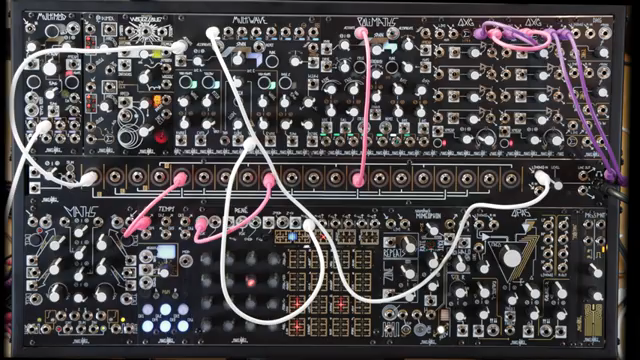
"The MultiWave has a dedicated onboard glide amount that can be used to apply glide after the fact."
© Screenshot/Quote: Maken0Isemusic (YouTube)
Sequencing Accuracy: The Role of Clean CV

"The CV source you're using to sequence pitch on the MultiWave cannot have any glide or portamento on it, if you want it to be read accurately."
© Screenshot/Quote: Maken0Isemusic (YouTube)
The walkthrough underscores a crucial point: for accurate pitch sequencing on the MultiWave, your CV source must be free of glide or portamento. The module samples the incoming voltage upon activation and holds it steady until the next trigger. If the CV is already slewed, the MultiWave can’t track it properly, resulting in pitch inaccuracies.
To illustrate this, the video patches a sequence through a channel with glide before reaching the MultiWave’s volt-per-octave input. The result is immediate—a loss of pitch precision as the slew amount increases. This contrasts with the always-live transpose input, where glide effects can be heard but don’t impact note tracking. The takeaway: keep your pitch CV clean and let the MultiWave handle the glide for best results.
Real-Time Glide Modulation: Performance in Motion
The MultiWave doesn’t just offer static glide settings; its glide rate can be modulated in real time. This opens up a wealth of performance options, allowing for dynamic shifts in phrasing and articulation during a patch. The video showcases how modulating the glide rate leads to evolving, expressive lines that respond to live control or automation.
By enabling real-time manipulation of glide, the MultiWave becomes a powerful tool for those who want to inject movement and unpredictability into their modular performances. Whether you’re after subtle pitch smears or dramatic slides between notes, the module’s glide circuit is designed to keep things fluid and musical, even in the most complex patches.
This article is also available in German. Read it here: https://synthmagazin.at/maken0ise-multiwave-polyphone-glide-magie-fuer-das-neue-jahr/
Watch on YouTube:
Latest articles
Watch on YouTube:
Visit the channel:
https://www.youtube.com/MAKEN0ISEMUSIC
https://www.youtube.com/MAKEN0ISEMUSIC
Links from MAKEN0ISEMUSIC:
website: https://www.makenoisemusic.com
instagram: https://www.instagram.com/makenoisemusic
twitter: https://twitter.com/makenoisemusic
facebook: https://www.facebook.com/makenoiseco
Sponsored links:
If you purchase via these links, we may earn a small commission – at no extra cost to you. The link opens an Amazon keyword search, and results may vary depending on availability.
MultiWAVE
🔗 Check price on Amazon
🔗 Check price on Amazon