Make Noise, the Asheville-based modular mavericks, are back with a deep dive into output mixing on their latest modules: PoliMATHS and MultiWAVE. In this official walkthrough, the team demonstrates how both modules allow for flexible submixing, letting users group channels in unconventional ways for both modulation and voicing. The video walks through the button combinations needed to engage these features, shows off the LED feedback, and provides patch examples that highlight the creative potential of these submixes. If you’re curious about how these modules can slot into your rack for more complex signal routing, this is essential viewing.
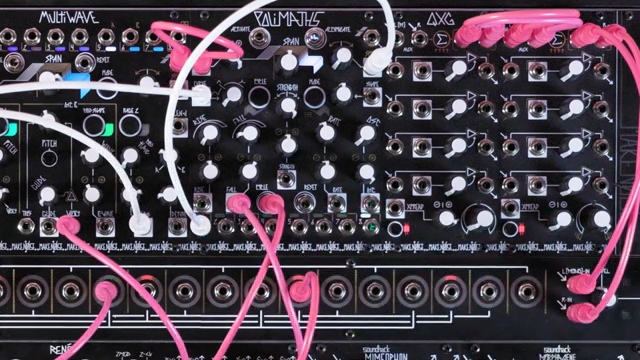
Meet the Submixers: PoliMATHS and MultiWAVE
Make Noise introduces two modules—PoliMATHS and MultiWAVE—that both feature advanced output mixing capabilities. These modules each offer eight channels, and the video sets the stage by showing how, in their default state, each channel is routed directly to its own output. This straightforward setup is ideal for users who want clean, one-to-one patching, but it’s only the beginning of what these modules can do.
The real intrigue lies in their ability to submix outputs, a feature that allows for more creative and efficient patching. By enabling submixing, users can group outputs in various ways, making it possible to create complex modulation sources or combine multiple voices into a single output. This flexibility is particularly useful in larger modular systems or when integrating with other modules that benefit from summed signals.
Submixing: Groupings for Modulation and Voicing
The submixing feature on both modules is designed to allow alternate groupings of channels, which can be a game-changer for modulation and voicing. On PoliMATHS, enabling submixing means that outputs are mixed from left to right, and users can break these into groups by patching cables into specific outputs. Each time a cable is inserted, it removes that output from the mix above it, allowing for dynamic reconfiguration of grouped signals.
MultiWAVE takes a slightly different approach, offering direct outputs for its first four channels, while the remaining outputs provide summed signals for oscillator A, oscillator B, and all odd or even-numbered channels. This opens up a host of possibilities for layering, stereo imaging, or creating complex, evolving textures from a single module. The video makes it clear that these submixing options are not just conveniences—they’re creative tools in their own right.
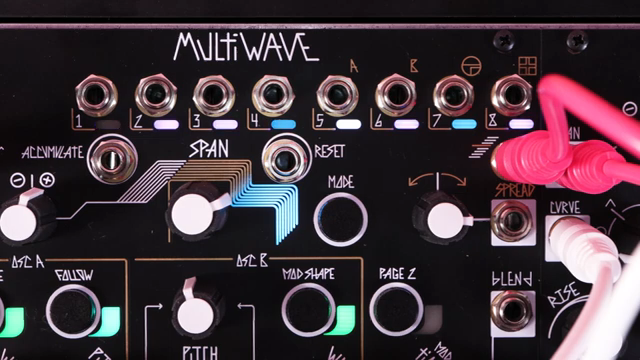
"Outputs 1 through 4 are direct outputs for channels 1 through 4 of multi-wave."
© Screenshot/Quote: Maken0Isemusic (YouTube)
How to Engage Output Mixing: Button Combos and LEDs
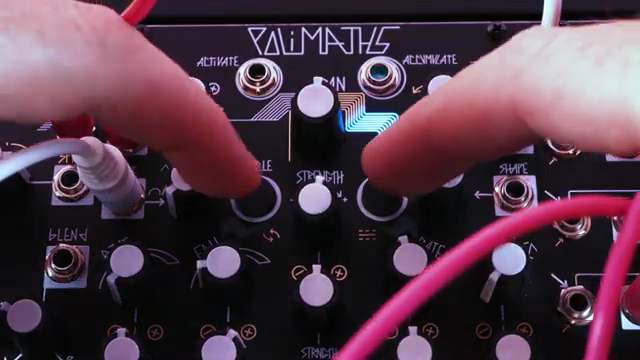
"The lightning bolt LEDs beside them will glow green to indicate that submixing has been engaged, and they will glow red to indicate that submixing has been switched off."
© Screenshot/Quote: Maken0Isemusic (YouTube)
Activating output mixing on PoliMATHS is a simple affair: press and hold the mode and cycle buttons simultaneously. The lightning bolt LEDs beside these buttons provide clear visual feedback—glowing green when submixing is engaged and red when it’s switched off. This immediate indication makes it easy to know the module’s current state, even in a dark rack.
On MultiWAVE, the process involves pressing the page 2 button followed by the mode button. Again, the LEDs glow green for active submixing and red when disabled. These intuitive controls mean users can quickly toggle between direct and mixed outputs without menu diving or guesswork. The panel graphics on MultiWAVE also help, with gold markings above the outputs to indicate the various submixes available.
Patch Examples: Creative Signal Manipulation in Action
The video rounds out with practical patch examples that showcase the power of these submixing features. On PoliMATHS, patching a cable into output 8 mixes all eight channels into a single complex function, ideal for generating rich modulation signals. If output 1 is already in use, the mix will exclude that channel, demonstrating how the system dynamically adapts to patching decisions.
Further, patching into output 4 provides a mix of channels 2, 3, and 4, while the first cable continues to sum the remaining channels. This cascading logic allows for intricate signal splitting and recombination, perfect for evolving modulation or layered audio paths. MultiWAVE’s submixes, meanwhile, let users quickly access summed outputs for all oscillators or just odd/even channels, streamlining the process of building stereo or multi-layered patches.
These examples underline the modules’ roles as flexible signal routers, not just sound sources or modulators. The ability to reconfigure outputs on the fly encourages experimentation and opens up new avenues for creative sound design—just the sort of workflow Make Noise is known for championing.
"With submixing on, patching a single cable to output 8 will provide voltage from all eight channels of polymaths mixed to a single complex function."
© Screenshot/Quote: Maken0Isemusic (YouTube)
This article is also available in German. Read it here: https://synthmagazin.at/make-noise-output-mixing-submixing-auf-polimaths-und-multiwave-im-fokus/
Watch on YouTube:
Latest articles
Watch on YouTube:
Visit the channel:
https://www.youtube.com/MAKEN0ISEMUSIC
https://www.youtube.com/MAKEN0ISEMUSIC
Links from MAKEN0ISEMUSIC:
website: https://www.makenoisemusic.com
instagram: https://www.instagram.com/makenoisemusic
twitter: https://twitter.com/makenoisemusic
facebook: https://www.facebook.com/makenoiseco
Sponsored links:
If you purchase via these links, we may earn a small commission – at no extra cost to you. The link opens an Amazon keyword search, and results may vary depending on availability.
MultiWAVE
🔗 Check price on Amazon
🔗 Check price on Amazon
PoliMATHS
🔗 Check price on Amazon
🔗 Check price on Amazon