Sick of your synths sounding like a mess when you try to record them? Lodewijk Vos (LØ) is here to drag your hardware setup out of the dark ages and into the DAW, one cable at a time. No fluff, no endless theory – just real-world tactics for getting your gear synced, tracked, and actually sounding good. Whether you’re a MIDI newbie or you’ve already got a spaghetti junction of cables under your desk, this video slices through the confusion with LØ’s trademark clarity. If you want your synths to play nice with your computer (and each other), this is the guide you didn’t know you needed.

15. November 2025
SPARKY
Lodewijk Vos (LØ): Hardware Synth Recording – No Excuses, Just Results
Plug In, Don’t Panic
Let’s be honest: recording hardware synths can look like a rave bunker wiring disaster, but LØ wastes no time showing it’s all about having the right setup. He kicks off with a promise—three levels of connection, zero confusion. The video’s not about flexing a wall of modulars; it’s about getting your synths talking to your DAW without tears or tantrums.
LØ’s approach is refreshingly direct. No endless theory, just a step-by-step path from basic audio to full-on MIDI mayhem. If you’ve ever stared at a pile of cables and wondered what plugs where, this is the antidote. The message: don’t let the gear intimidate you—get your interface, get your cables, and get recording.
Audio 101: The Bare Bones
Before you start dreaming of MIDI wizardry, you need to nail the basics. LØ breaks it down: synth output to audio interface input, interface to computer, and don’t forget your headphones or monitors. Open your DAW, set the right input, hit record, and you’re in business.
It’s not rocket science, but it’s the foundation for everything else. If you can’t get sound into your computer, none of the fancy stuff matters. LØ keeps it simple and practical—no faffing about with unnecessary gear or settings.
MIDI: The Secret Sauce
Once you’ve got audio sorted, it’s time to level up. MIDI isn’t just for studio nerds—it’s the secret weapon for anyone who wants flexibility. LØ lays out four reasons to bother: quantising your sloppy playing, reusing note data, freeing up your hands for knob-twiddling, and making synths without keyboards actually play.
He’s not just talking theory—he shows how MIDI lets you record, edit, and re-record without being chained to a single take. If you want to tweak your sound on the fly or fix mistakes after the fact, MIDI is your friend. It’s workflow magic for the modern synth fiend.
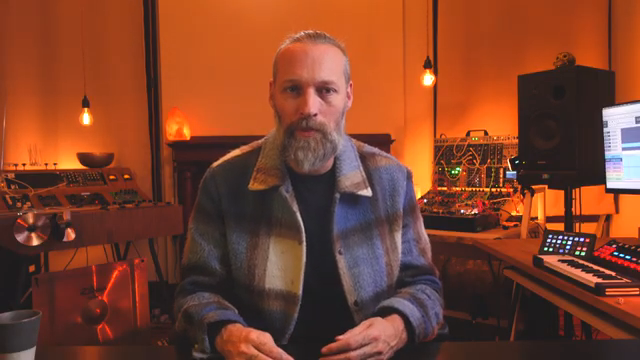
"But of course you want to make use of the advantages of MIDI."
© Screenshot/Quote: Lodewijkvos (YouTube)
USB vs MIDI: The Great Cable Debate
"MIDI over USB often introduces digital noise to your signal."
© Screenshot/Quote: Lodewijkvos (YouTube)
Here’s where things get spicy. LØ dives into the pros and cons of USB and classic MIDI, and he doesn’t sugarcoat the pitfalls. USB is clean, easy, and everywhere—but stack up a few synths and you’ll be drowning in cables and digital noise. LØ’s tried every snake-oil fix for USB whine and found them all useless. Save your cash and your sanity.
MIDI cables, on the other hand, let you daisy-chain gear like a pro and run long distances without a hitch. The catch? You’ll need to wrangle MIDI channels and maybe buy a separate interface. LØ’s advice is clear: don’t get seduced by shiny USB promises if you’re running a proper hardware rig. Sometimes old-school just works.
Multi-Synth Mayhem: Chaining, Mixing, and Winning
Got more than one synth? Welcome to the jungle. LØ walks through chaining synths via MIDI, using a mixer to keep your audio tidy, and making sure each box gets its own MIDI channel. The trick is to plan your flow—one MIDI out, daisy-chained through your gear, and audio routed through a mixer before hitting the interface.
It sounds like a toaster-fight, but LØ keeps it under control. He reminds us: every synth needs a unique MIDI channel, and you’ll need to crack open the manual to set them up. The result? A studio where every box plays nice, and your DAW is the ringleader. If you want to see this chaos tamed in real time, the video’s a must-watch—no text can capture the satisfaction of a perfectly synced hardware crew.
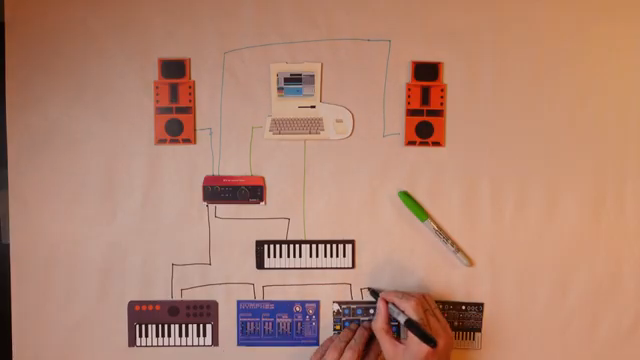
"And this way we can daisy chain all the synths together with only one MIDI cable coming out from the interface."
© Screenshot/Quote: Lodewijkvos (YouTube)
This article is also available in German. Read it here: https://synthmagazin.at/lodewijk-vos-lo-hardware-synths-aufnehmen-keine-ausreden-nur-ergebnisse/
Watch on YouTube:
Latest articles
Watch on YouTube:
Visit the channel:
https://www.youtube.com/lodewijkvos
https://www.youtube.com/lodewijkvos
Links from lodewijkvos:
website: https://lodewijkvos.com
facebook: https://www.facebook.com/lodewijkv
instagram: https://www.instagram.com/lodewijkv/
Sponsored links:
If you purchase via these links, we may earn a small commission – at no extra cost to you. The link opens an Amazon keyword search, and results may vary depending on availability.
Arturia AudioFuse
🔗 Check price on Amazon
🔗 Check price on Amazon
Arturia MicroFreak
🔗 Check price on Amazon
🔗 Check price on Amazon
Dreadbox Nymphes
🔗 Check price on Amazon
🔗 Check price on Amazon