Anyone who thinks the iPad is just for Netflix and cat videos has clearly never seen Kai Chonishvili from Audio Tutorial Experts turn the tablet into a flashing, banging beat-frying pan. In this second Groovebox Expert Circle, the groovebox guru shows how you can flip your workflow upside down with apps, external sequencers, and Logic Pro for iPad. Forget boring basics—here you get creative combos that turn your studio into a Tetris level on speed. Perfect for anyone who wants to feed their grooveboxes with fresh app-fuel and new ideas—and for everyone who knows: if it blinks, it bangs!
14. March 2026
ZAPP
iPad, Apps & Grooveboxes: Audio Tutorial Experts Turn Your Studio into a Gameboy Factory
Akai MPC Live 3, Elektron Tonwerk, Fugue Machine, iPad, Logic Pro for iPad, Patterning, Xone 4D
iPad in the Groovebox Jungle: More Than Just a Touch Toy
Kai Chonishvili makes it clear right away: the iPad is not just a toy, but a real tool for everyday production. While others are still philosophizing about DAWs and hardware, Kai has already found a workflow where the iPad serves as a flexible sketchpad and idea bank. Whether on the subway or in the studio, ideas land straight on the tablet and can later be easily transferred to the groovebox.
This isn’t about banal tips, but about real creative input that’ll make your brain sweat. Kai shows how the iPad can become the heart between classic grooveboxes like Elektron, Akai MPC, or Native Instruments Maschine. If you think the iPad is just a nice gimmick, think again: it’s the secret puppet master in the modern beat-building kit.

"I’m always looking for workflows so that my ideas, no matter where I am, can be preserved and later transferred to a groovebox."
("Ich versuche mittlerweile Workflows zu finden, dass meine Ideen, egal wo ich bin, so konserviert werden, dass ich sie nachher auf eine Groovebox übertragen kann.")© Screenshot/Quote: Audiotutorialexperts (YouTube)
Sequencer Apps: Fresh Groovebox Feed from the App Factory
"I could never program something like this in my life—I wouldn’t even know where to start, and I think it’s just incredibly inspiring."
("Sowas könnte ich nie im Leben einprogrammieren, also da wüsste ich gar nicht, wie ich anfangen sollte und ich finde, das ist einfach wahnsinnig inspirierend.")© Screenshot/Quote: Audiotutorialexperts (YouTube)
Now it gets nerdy: Kai takes us into the world of sequencer apps that serve as idea generators and sources of inspiration. With tools like Fugue Machine and Patterning, the iPad becomes a melody and beat slingshot, feeding your grooveboxes with note fodder. These apps offer wild approaches—from polyrhythmic playheads to touch-optimized drum sequencers in pie-chart format. If you can’t get new ideas here, that’s on you.
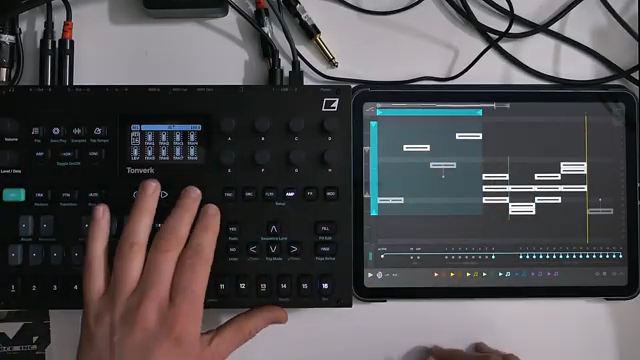
The iPad connects via USB directly to the groovebox, for example to the Elektron Tonwerk, and sends MIDI notes or audio straight to the device. This way, you get sequences you’d never program on a classic step sequencer. The workflow: open the app, tap around wildly, get inspired, record MIDI, unplug the iPad—done! If you want to know how crazy this really sounds, you need to check out the video demos—text alone just doesn’t cut it.
Logic Pro for iPad: The Mobile Sketchbook for Beat Builders
Logic Pro on the iPad is, for Kai, the ultimate notebook for musical ideas. With the Session Players—little AI composition helpers—chord progressions, basslines, and even full song sketches come together in no time. Sometimes it sounds cheesy, sometimes experimental, but always like: “Hey, this could be something!”
The MIDI notes can be sent directly to hardware grooveboxes like the MPC or Elektron. So a quick sketch on the bus quickly becomes a track in the studio. Especially cool: the Session Players adapt when you change the key or chord progression—all with just a few taps. If you think mobile DAWs are just stripped-down toys, let Kai prove you wrong. The power is in the workflow—and on the iPad, it’s surprisingly hefty.
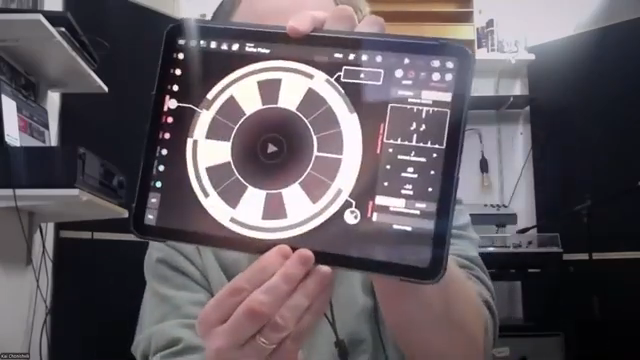
"The big advantage with the iPad is that you can use it as a sketchbook and always have it with you, wherever you are."
("Auf dem iPad hat man den großen Vorteil, dass man, sage ich mal, das iPad als Skizzenblock mitnehmen kann und immer und überall eigentlich da hat.")© Screenshot/Quote: Audiotutorialexperts (YouTube)
Synergy: When Groovebox and iPad Blink Together
"When I record all these melodies from the iPad onto a groovebox, that’s exactly the way for me: I’ve made a sketch somewhere and then throw it into my groovebox."
("Wenn man diese ganzen Melodien vom iPad dann auf eine Groovebox aufnimmt, dann ist das für mich eigentlich genau der Weg, von wegen ich habe eine Skizze, die habe ich irgendwo gemacht und die haue ich dann in meine Groovebox.")© Screenshot/Quote: Audiotutorialexperts (YouTube)
The combination of grooveboxes and iPad is, for Kai, like a synth-building kit on steroids. Synergies emerge when apps, DAWs, and hardware work together seamlessly: the iPad delivers fresh ideas, the groovebox turns them into performance. Reducing to eight tracks, clever MIDI routing, and using touch-optimized apps make the workflow not only faster but also more creative.
Whether you’re working with Logic, Fugue Machine, or Patterning—the interplay with devices like Elektron Tonwerk or Akai MPC brings new possibilities you’d hardly reach with classic hardware alone. The result: less fiddling, more music. And if it blinks and grooves, you know you’re on the right track. If you want to see this interplay in action, don’t miss the live demos in the video.
Jam Fireworks & Tips: Beatmakers Get Their Money’s Worth
To wrap things up, there are some practical jam examples and tips that will make any beatmaker’s heart beat faster. Kai shows how, by reducing to a few tracks and using effects like delay and filter, you can turn simple loops into real tracks. The performances aren’t just for show—they prove the workflow works.
Whether you’re a beginner or advanced: the tips range from creative inspiration sources to concrete tricks for live use. If you want to know how to build a little Gameboy factory out of an iPad and a groovebox, you should watch the video to the end. Because some sounds and moves just can’t be put into words—you have to hear and see them!
Translated from German. Read the original here: https://synthmagazin.at/ipad-apps-grooveboxen-audio-tutorial-experts-bringen-die-gameboy-fabrik-ins-studio/
Watch on YouTube:
Latest articles
Watch on YouTube:
Visit the channel:
https://www.youtube.com/AudioTutorialExperts
https://www.youtube.com/AudioTutorialExperts
Links from AudioTutorialExperts:
Tutorial Experts Shop: https://tutorial-experts.de
Tutorial Experts bei Amazon: https://amazon.de/DVD-Lernkurs-Software/s?k=DVD%20Lernkurs&rh=n%3A301927
Tutorial Experts bei Thomann: https://thomann.de/de/tutorial_experts.html
Impressum: https://tutorial-experts.de/impressum
Sponsored links:
If you purchase via these links, we may earn a small commission – at no extra cost to you. The link opens an Amazon keyword search, and results may vary depending on availability.
Akai MPC Live 3
🔗 Check price on Amazon
🔗 Check price on Amazon
Elektron Tonwerk
🔗 Check price on Amazon
🔗 Check price on Amazon
Fugue Machine
🔗 Check price on Amazon
🔗 Check price on Amazon
iPad
🔗 Check price on Amazon
🔗 Check price on Amazon
Logic Pro for iPad
🔗 Check price on Amazon
🔗 Check price on Amazon
Patterning
🔗 Check price on Amazon
🔗 Check price on Amazon
Xone 4D
🔗 Check price on Amazon
🔗 Check price on Amazon