Intellijel’s Multigrain module has always been a flexible tool for granular synthesis in Eurorack, but the 1.3 firmware update brings a host of workflow improvements that should make any modular sound designer’s life easier. In this official video manual, Intellijel walks through the new features, focusing on smarter sample management, extended grain sizes, and customisable defaults. For those who thrive on patching, tweaking, and wrangling samples, these updates promise a more streamlined and creative experience. Let’s see how Multigrain 1.3 aims to fit into the modern modular workflow, with a typically clear and practical Intellijel presentation.
17. October 2025
MILES
Intellijel Multigrain 1.3: Granular Power, Now with Smarter Sample Handling
Intellijel MultiGrain, Intellijel Palette Case 4U x 62HP, Intellijel Planar 2, Intellijel Quad VCA, Intellijel Stereo I/O 1U, Intellijel Tangrams, Intellijel VCO 1U, Intellijel XY I/O 1U, Intellijel Zeroscope 1U
Granular Synthesis, Refined: Multigrain 1.3 Arrives
Intellijel introduces the Multigrain 1.3 update as a significant step forward for granular synthesis within the Eurorack format. The video wastes no time, diving straight into the new features that distinguish this firmware revision from its predecessors. The focus here is on practical enhancements that directly impact sound design and day-to-day workflow, rather than flashy gimmicks.
From the outset, it’s clear that Multigrain is designed for versatility. The update brings a suite of improvements that address both the creative and organisational sides of granular synthesis. Whether you’re sculpting textures from field recordings or building evolving pads from synth tones, the new features are positioned to make the process smoother and more intuitive.
Collect & Save: Sample Management for the Modular Age
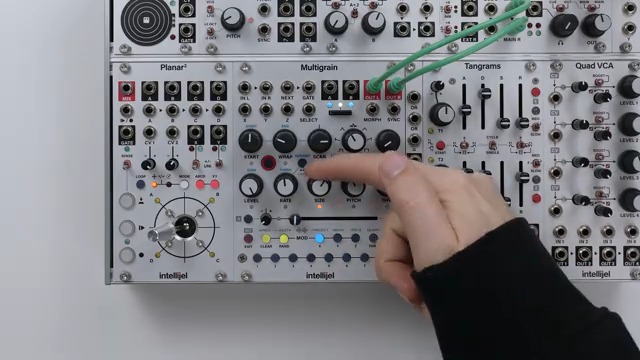
One of the headline features in Multigrain 1.3 is the ‘Collect and Save’ function, which tackles the perennial headache of sample management. Previously, samples could be scattered across global folders, making project backups and transfers a fiddly affair. Now, the module can automatically gather all samples referenced in a project and copy them into the project’s own folder, ensuring nothing goes missing when moving between systems or archiving work.
The video demonstrates three distinct methods for collecting samples: manual collection per project, a global collect-all on boot, and an auto-collect mode that triggers whenever a preset is saved. Each approach is designed to fit different workflows, from meticulous project-by-project organisation to set-and-forget automation. The result is a system that feels much closer to the sample management found in modern DAWs, but tailored for the hands-on modular environment.

"This makes it far easier to transfer or backup projects from the SD card, safe in the knowledge that all samples used in the project are present and correctly referenced."
© Screenshot/Quote: Intellijel (YouTube)
Grain Length Unleashed: From Four Seconds to Two Minutes
"This can lead to super long overlapping grains for dense textures and drains."
© Screenshot/Quote: Intellijel (YouTube)
With the 1.3 update, Multigrain breaks free from its previous four-second grain size limitation. Users can now select from several grain length and scaling options, with the possibility of grains stretching up to two minutes under certain conditions. This opens the door to dense, evolving soundscapes and experimental textures that were previously out of reach.
The video walks through the different grain size modes, showing how the new settings affect both short and long samples. Notably, the ability to set grain size to the full sample length—up to 32 seconds at normal pitch—means overlapping grains can create lush, immersive layers. However, the presenter notes that pushing grain sizes to the extreme will tax the module’s voice allocation, potentially cutting older grains short if the polyphony limit is reached.
System Settings and Custom Defaults: Tailoring Your Workflow
Multigrain 1.3 introduces several new system settings aimed at giving users more control over their workflow. One notable addition is the ability to disable the idle timeout, so the module no longer automatically returns to the home page after 30 seconds of inactivity. This small change can make a big difference for those who like to linger on deeper menus without interruption.
Knob behaviour has also been refined, with the choice between ‘jump’ (immediate value change) and ‘pass-through’ (catch) modes. This allows users to decide whether they want instant parameter jumps or smoother, less abrupt transitions when switching pages—a thoughtful nod to both live performers and studio tweakers.
Perhaps most impactful is the new option to set custom default sound parameters for both sample-based and live sounds. By storing your preferred knob positions, quantizer settings, link states, and modulation assignments, you can ensure that every new sound starts from your ideal baseline. This is especially handy for those who rely on specific CV routings or granular behaviours in their patches.
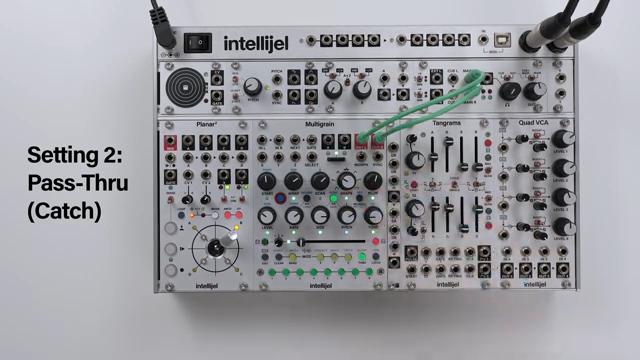
"The benefit of pass-through behaviour is that the parameter changes you make will be less jarring, as they start from the original position from when you opened the page."
© Screenshot/Quote: Intellijel (YouTube)
Creative Workflows: Multigrain 1.3 in the Modular Ecosystem
All these updates come together to make Multigrain 1.3 a more powerful and adaptable module for creative sound design. Features like pitch CV tracking and modulation output scaling are highlighted as tools for integrating granular textures with other voices in a Eurorack system. The video demonstrates how these functions can be calibrated to match different oscillators, ensuring tight pitch tracking and reliable modulation.
Ultimately, Multigrain 1.3 feels like a module designed for the realities of a patch-heavy workflow. By streamlining sample management, expanding sonic possibilities, and allowing for deep customisation, Intellijel continues its tradition of practical, musician-focused design. The update is less about headline-grabbing features and more about making granular synthesis genuinely usable in a busy modular rig.
This article is also available in German. Read it here: https://synthmagazin.at/intellijel-multigrain-1-3-granulare-power-jetzt-mit-cleverem-sample-management/
Watch on YouTube:
Latest articles
Watch on YouTube:
Visit the channel:
https://www.youtube.com/intellijel
https://www.youtube.com/intellijel
Links from intellijel:
website: https://intellijel.com
forum: https://forum.intellijel.com
instagram: https://instagram.com/intellijel
facebook: https://www.facebook.com/intellijel
Sponsored links:
If you purchase via these links, we may earn a small commission – at no extra cost to you. The link opens an Amazon keyword search, and results may vary depending on availability.
Intellijel MultiGrain
🔗 Check price on Amazon
🔗 Check price on Amazon
Intellijel Palette Case 4U x 62HP
🔗 Check price on Amazon
🔗 Check price on Amazon
Intellijel Planar 2
🔗 Check price on Amazon
🔗 Check price on Amazon
Intellijel Quad VCA
🔗 Check price on Amazon
🔗 Check price on Amazon
Intellijel Stereo I/O 1U
🔗 Check price on Amazon
🔗 Check price on Amazon
Intellijel Tangrams
🔗 Check price on Amazon
🔗 Check price on Amazon
Intellijel VCO 1U
🔗 Check price on Amazon
🔗 Check price on Amazon
Intellijel XY I/O 1U
🔗 Check price on Amazon
🔗 Check price on Amazon
Intellijel Zeroscope 1U
🔗 Check price on Amazon
🔗 Check price on Amazon